

Cookie Consent Google Tag Manager: 7 Live Checks Before You Publish in 2026
If you are reviewing cookie consent google tag manager on October 2, 2026, the useful question is not whether the banner appears.
It is whether your defaults, consent updates, tag behavior, refusal path, and later withdrawal path still agree on the live page.
That is still the official pattern. Google’s current developer guidance says you need to set a default consent state before user interaction and then update it when the user makes a choice. The European Commission still frames valid consent around the same core ideas: it must be freely given, specific, informed, and unambiguous, and people must be able to refuse or withdraw it without disadvantage. The ICO’s finalized April 29, 2026 storage-and-access-technologies guidance also makes clear that cookies are only part of the picture; the guidance covers tracking pixels, device fingerprinting, scripts, and similar technologies too.
If you want nearby context first, start with our guides to Google Tag Manager cookie consent, GTM consent mode, and OneTrust cookie consent Google Tag Manager. This article is narrower. It is the live review I would run before publishing or re-publishing a GTM consent setup this week.

1. Set denied defaults before the rest of your container matters
The first failure is usually boring: load order.
Google’s current setup guide still says the default consent state should be set before any commands that send measurement data. In Tag Manager, Google also still points implementers to the Tag Manager-specific consent APIs instead of late fixes after other tags have already evaluated.
For a real launch review, ask:
- do denied defaults exist before analytics or ad tags read state;
- do those defaults match the regional logic you intended;
- does any non-essential script beat consent to the page.
If the third answer is yes, the rest of the setup is mostly cosmetic.
2. Decide whether you are using basic or advanced behavior on purpose
Google still distinguishes basic and advanced consent mode.
In the basic pattern, Google tags are blocked until the user interacts with the banner. In the advanced pattern, tags load with defaults and adjust behavior according to the current consent state. That changes what should happen before choice, what Tag Assistant should show, and how your team explains “working as intended.”
The important thing is not which option sounds better in a slide deck. It is whether the live page behaves the way your team thinks it behaves.
3. Use GTM consent APIs instead of a late custom patch
Google’s current developer documentation is very direct here. If you are maintaining your own Tag Manager template, use setDefaultConsentState and updateConsentState.
That matters because a late custom HTML patch often works like an apology after the event. It may change state eventually, but it is a weak way to control what happened before that change landed.
If you are auditing an older container, this is one of the first things worth checking. A banner can look modern while the underlying logic still depends on brittle custom scripts from an earlier build.
4. Confirm all four consent-mode v2 signals are really wired
For most current Google advertising and analytics stacks, the useful runtime check still includes these four signals:
ad_storageanalytics_storagead_user_dataad_personalization
Google’s current consent documentation and current Tag Assistant debugging guidance both still point to these values as the fields you should verify during setup and testing.
This is where many teams create a false sense of completion. They see one denied or granted value change and assume the whole implementation is healthy. It is common to find analytics behaving one way while ad-related settings remain incomplete or drift out of sync.
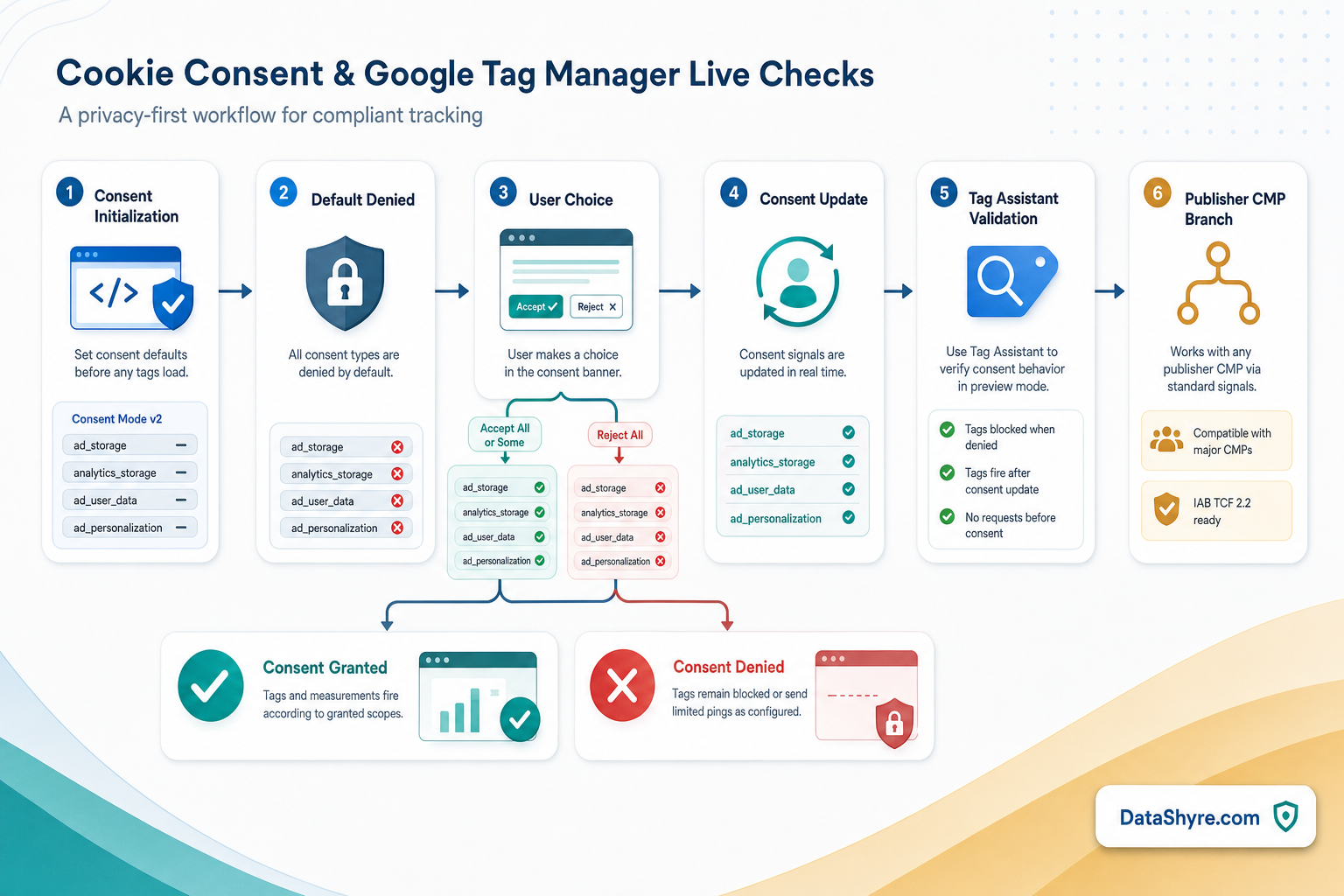
5. Test refusal and withdrawal as seriously as acceptance
This is where legal guidance and runtime behavior meet.
The European Commission still says valid consent must be freely given and that users must be able to refuse or withdraw without disadvantage. CNIL is even more concrete in its December 12, 2024 enforcement notice on misleading banners: “rejecting cookies should be just as easy as accepting them.”
That means your review should not stop at whether the Accept all path works. Test whether:
- the reject option is equally visible on desktop;
- the reject option is equally visible on mobile;
- the consent state updates immediately when someone refuses;
- a later withdrawal actually changes tag behavior, not just banner text.
If refusal is buried, visually downgraded, or delayed in the tag layer, the problem is not only regulatory. It also means your measurement stack is recording a choice path that was harder than it should have been.
6. Test Google tags and non-Google tags as separate branches
Google’s built-in consent checks are not the whole page.
Google tags can respect consent mode while a Meta pixel, LinkedIn Insight tag, Hotjar script, or custom vendor snippet still fires too early. That is why a good cookie consent google tag manager review checks the Google branch and the non-Google branch separately.
My minimum test set is:
- first load with no choice yet;
- explicit reject;
- explicit analytics-only or partial choice if your banner allows it;
- explicit accept all;
- later withdrawal from settings.
Then review GTM Preview or Tag Assistant and also check the network behavior in the browser. The question is still the same: what fired, when, and under which state.
7. Run the publisher-specific branch separately if ads matter
Some teams stop at “consent mode is firing.” That is not always enough.
Google’s current AdSense publisher guidance still says partners using AdSense, Ad Manager, or AdMob must use a Google-certified CMP integrated with the IAB Transparency and Consent Framework when serving personalized ads in the EEA and UK and, separately, in Switzerland under Google’s published dates.
That is related to Tag Manager consent handling, but it is not the same check.
So if ads matter, review these separately:
- GTM defaults and updates;
- banner fairness and withdrawal;
- certified CMP and TCF handling where publisher rules apply;
- downstream ad-tech behavior tied to the same consent choice.
A setup can look healthy inside GTM and still miss a publisher-program requirement outside GTM.
Bottom line
The strongest cookie consent google tag manager setup in 2026 is not the one with the nicest banner screenshot.
It is the one that sets denied defaults early, uses the right GTM consent APIs, verifies all four current signals, makes refusal genuinely easy, tests non-Google tags separately, and handles the publisher branch on purpose when ads are involved.
If your team can still prove those seven checks on the live page today, you are in much better shape than a site that only proves the banner rendered.
Sources
- Google for Developers: Set up consent mode on websites
- Google for Developers: Consent mode overview
- Google for Developers: Troubleshoot consent mode with Tag Assistant
- European Commission: Information for individuals
- European Commission: Legal grounds for processing data
- ICO: Final storage and access technologies guidance published
- ICO: Guidance on the use of storage and access technologies
- CNIL: Dark Patterns in Cookie Banners: CNIL issues formal notice to website publishers
- Google AdSense Help: Google consent management requirements for serving ads in the EEA, the UK, and Switzerland (for publishers)
—
Published: October 2, 2026. Updated using current official regulator, government, platform, and publisher materials available at publication time.