

GTM Consent Mode: 7 Live Checks Before You Publish in 2026
If you are reviewing gtm consent mode on September 25, 2026, the useful question is not whether your banner appears.
It is whether consent defaults, updates, regional rules, Google tags, and non-Google tags still agree at runtime before consent, after acceptance, after refusal, and after a later settings change.
That is still the live official pattern. Google says consent mode “doesn’t provide a consent banner or widget” and expects your site or CMP to collect the choice and communicate it correctly. Google’s current setup guidance still distinguishes basic and advanced consent mode, still requires a default state before user interaction, and still says updates should be tracked on the page where they happen before any page transition. On the regulatory side, the ICO’s final April 29, 2026 storage-and-access-technologies guidance still points teams toward specific, granular consent requests, and the CNIL still says “rejecting cookies should be just as easy as accepting them.”
If you want nearby context first, start with our guides to Google Consent Mode V2, Google Tag Manager cookie consent, and OneTrust cookie consent Google Tag Manager. This article is narrower. It is the live review I would run before publishing or re-publishing a GTM consent mode setup this week.
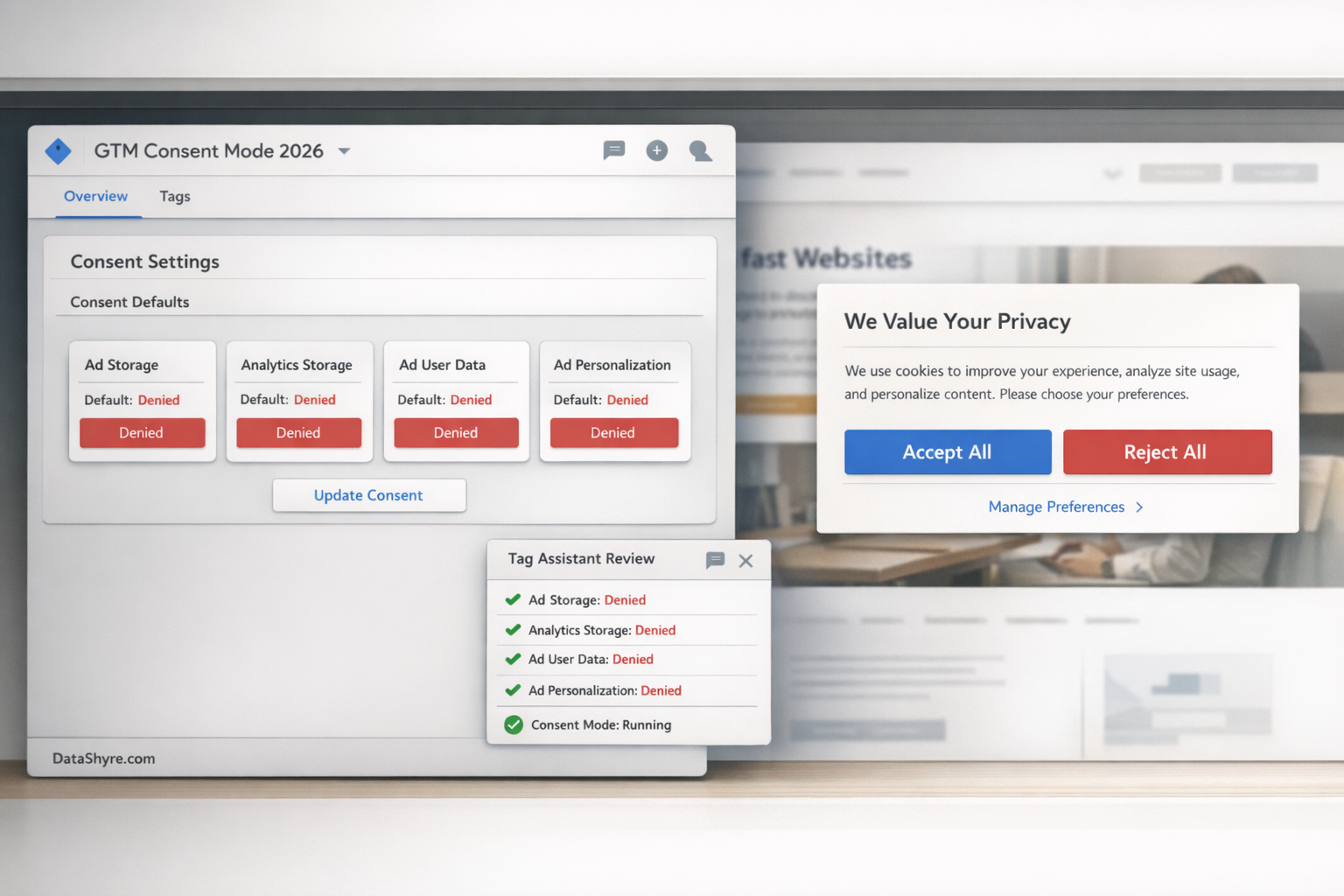
1. Set consent defaults before the rest of your container matters
The first failure is usually load order.
Google’s developer guidance still says you need to set the default consent state before a user grants consent, and Tag Manager still gives you Consent Initialization – All Pages for consent functions that need to happen before other tags evaluate. If your CMP or custom banner arrives late, your container can look correct in the workspace and still behave incorrectly on the page.
For a practical review, I would ask:
- do default consent states exist before analytics or advertising tags read state;
- do those defaults match the regional logic you intended;
- does any non-essential script beat consent to the page.
If the answer to the third question is yes, the rest of the setup is cosmetic.
2. Decide whether you are using basic or advanced consent mode on purpose
Google still treats basic and advanced consent mode as different runtime strategies, not different labels for the same setup.
In basic consent mode, Google tags are blocked from loading until the user interacts with the banner. In advanced consent mode, Google tags load with consent defaults and adjust behavior according to the current state. That changes what appears before choice, what Tag Assistant should show, and how your team explains “working as intended.”
For a GTM review, the important thing is not which option sounds better. It is whether the live behavior matches the strategy your team believes it implemented.
That means checking:
- whether defaults are explicitly set, rather than inherited accidentally;
- whether denied-state behavior before consent is expected or surprising;
- whether your testing notes distinguish blocked tags from denied-state pings.
Too many teams think they are testing a banner when they are really testing an undocumented consent mode strategy.
3. Map consent states clearly and stop fighting Google’s built-in checks
A lot of GTM consent mode trouble comes from duplicate logic.
Google’s current troubleshooting guidance says Google tags already have built-in consent checks and warns that extra consent checks on those Google tags can break behavior. That is an easy mistake to make in mature containers where teams layered old gating rules on top of newer consent mode configuration.
So the review rule is simple:
- verify which consent types your Google tags already respect;
- remove unnecessary extra blocking logic from Google tags that support consent mode;
- separately verify non-Google tags, because those often still need their own trigger logic.
That split matters. Google tags and non-Google tags rarely fail in exactly the same way.
4. Make regional logic explicit instead of pretending one default fits every market
Google’s current setup guide still supports region-specific defaults, and it explicitly recommends scoping default consent settings to the places where banners are required.
That matters because many GTM consent mode problems are not technical in the narrow sense. They are configuration problems disguised as global simplicity.
For a live setup in 2026, I would want to see:
- region-specific defaults documented clearly;
- the affected countries or subdivisions named deliberately, not guessed later;
- a fallback default for traffic outside those regions;
- proof that the regional branch matches what the banner actually does.
If the GTM container says one thing, the CMP says another, and the site behaves a third way, you do not have regional logic. You have drift.
5. Treat refusal and withdrawal as runtime checks, not design extras
Consent mode does not rescue a weak banner.
The ICO’s current guidance says consent requests should be specific to the purpose and generally require granular options. The CNIL is even more direct: “rejecting cookies should be just as easy as accepting them.” Those are not cosmetic observations. They shape what a legally safer and operationally clearer GTM setup should look like.
For this keyword, I would test the refusal path the same way I test the default and update calls:
- compare
Accept AllandReject Allon desktop; - compare them again on mobile;
- count the clicks needed to refuse versus accept;
- confirm refusal leaves the consent state where you expect it;
- confirm a later withdrawal changes runtime behavior, not just banner text.
If refusal is buried, visually downgraded, or harder to complete than acceptance, the problem is not only regulatory. It also distorts the choices your measurement stack records.
6. Use Tag Assistant and preview mode to test the page you actually ship
The safest GTM consent mode review still happens in tools, not slides.
Google’s current help materials still point teams to Tag Assistant and GTM Preview mode for implementation testing. Google also says the Tag Assistant consent tab can be empty when consent mode is not implemented on the page or when the Google tag has been blocked from loading incorrectly.
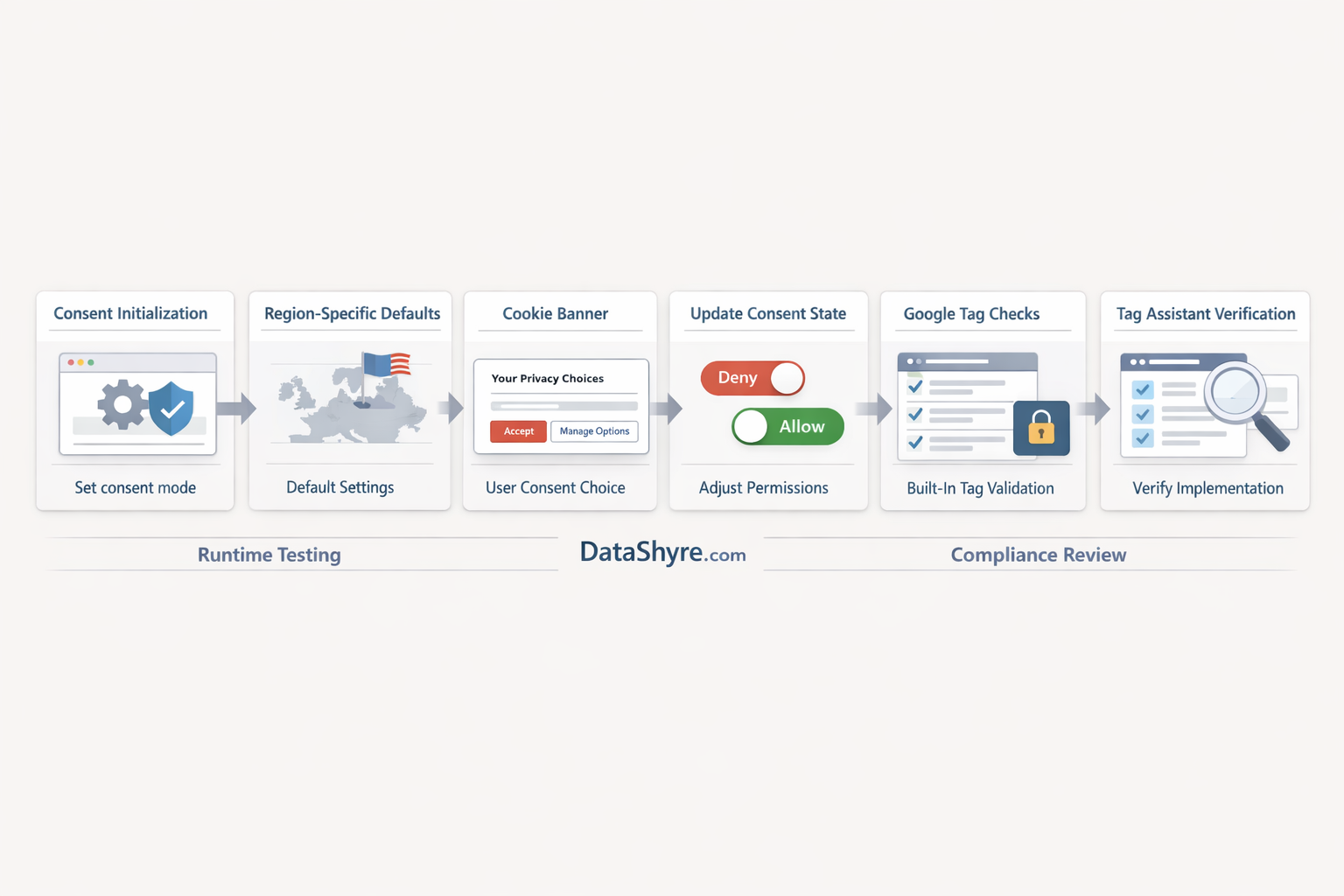
My minimum runtime test this week would be:
- open a clean browser session;
- load the page without interacting;
- inspect cookies and network activity;
- open GTM Preview or Tag Assistant;
- accept one category and confirm the intended state changes;
- reject all and confirm the intended denied or blocked behavior;
- reopen settings later and withdraw a previously granted category.
Look specifically for:
- whether default consent is present before downstream tags evaluate;
- whether update calls happen on the same page where the user made the choice;
- whether Google tags are relying on consent mode as configured;
- whether non-Google tags remain gated correctly;
- whether the debugging view matches the behavior you can see in the network.
7. Run the publisher-specific branch separately if ads matter
Some teams stop at “consent mode is firing.” That is not always enough.
Google’s current publisher policy still requires a Google-certified CMP integrated with the IAB Transparency and Consent Framework when publishers serve personalized ads in the EEA and UK and, separately, in Switzerland under the published rollout dates. That is related to GTM consent mode, but it is not the same check.
So if ads matter, I would review these separately:
- GTM consent defaults and updates;
- banner fairness and withdrawal;
- publisher CMP certification and TCF handling where applicable;
- any additional downstream ad-tech behavior tied to the same choice.
A setup can look healthy inside GTM and still miss a publisher-program requirement outside GTM.
Bottom line
The strongest gtm consent mode setup in 2026 is not the one with the nicest dashboard screenshot.
It is the one that sets defaults early, chooses basic versus advanced behavior on purpose, uses regional branches deliberately, makes refusal genuinely easy, and still behaves correctly when you test the live page in Tag Assistant.
If your team can pass those seven checks today, you are in a much better position than a site that only proves the banner rendered.
Sources
- Google Tag Manager Help: About consent mode
- Google for Developers: Set up consent mode on websites
- Google Tag Manager Help: Unblock Google tags when using consent mode
- Google Tag Manager Help: Best practices for trigger configuration
- Google Tag Manager Help: Troubleshoot consent mode
- Google Tag Manager Help: Preview and debug containers
- ICO: Final storage and access technologies guidance published
- ICO: How do we manage consent in practice?
- CNIL: Dark Patterns in Cookie Banners: CNIL issues formal notice to website publishers
- Google AdSense Help: Google consent management requirements for serving ads in the EEA, the UK, and Switzerland (for publishers)
—
Published: September 25, 2026. Updated using current official regulator, government, platform, and publisher materials available at publication time.