

Cookie Consent Google Tag Manager Google Analytivs: 7 GTM and GA4 Checks for 2026
If you are searching cookie consent google tag manager google analytivs, the phrase itself probably contains a typo, but the underlying problem is familiar.
You are usually trying to make three systems agree on one live page:
- the cookie banner or CMP;
- the Google Tag Manager container; and
- the Google Analytics setup that should stay quiet until the right consent state exists.
That is still worth checking carefully on October 23, 2026. Google’s current consent guidance says you need to set a default consent state and then update it when the user interacts with consent settings. Google’s debugging guidance also expects teams to verify the earliest and most recent Consent events in Tag Assistant, not just assume the banner worked because it rendered correctly. The UK’s ICO also finalized broader storage-and-access-technologies guidance on April 29, 2026, covering not only cookies but also tracking pixels, web storage, and scripts or tags.
If you want nearby context first, start with our guides to Google Tag Manager cookie consent, Google Analytics cookies consent, and cookie consent Google Tag Manager. This page is narrower. It is the seven-check review I would run this week when a banner, GTM, and GA4 need to behave like one system instead of three disconnected layers.
Why this topic still matters in 2026
The current technical guidance is clearer than many broken implementations.
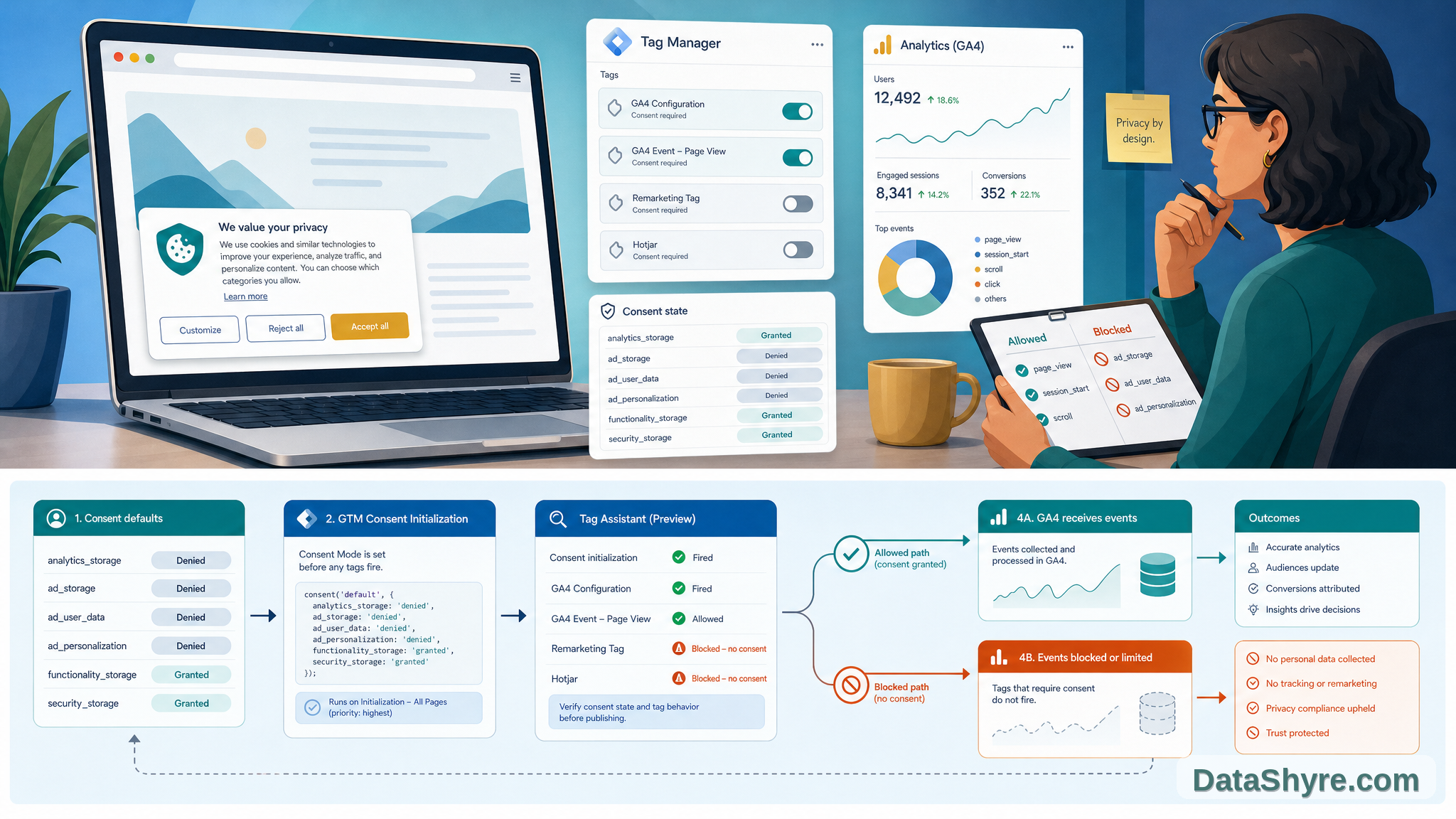
Google’s consent mode materials still separate the job into three steps: get the user’s choice, communicate that choice to Google, and make sure your tags behave according to that choice. Google’s website guide also says consent mode users now need the additional ad_user_data and ad_personalization parameters alongside ad_storage and analytics_storage.
At the regulator level, the direction is also practical. In the ICO announcement for its final 2026 storage-and-access-technologies guidance, William Malcolm said organizations want “clear, practical guidance they can rely on.” That guidance matters here because it explicitly covers scripts or tags in addition to classic cookies. The EDPB’s 2026 work programme also says the coordinated enforcement action for 2026 focuses on transparency and information obligations under GDPR Articles 12, 13, and 14. So even when your immediate issue looks technical, the review pressure still points back to whether the banner and tag behavior match what the user was told.
What this keyword usually means in practice
When teams search cookie consent google tag manager google analytivs, they are rarely asking how to add one more banner button.
They are usually trying to answer one of these questions:
- did GTM set consent defaults before GA4 or Ads tags could run;
- did the banner update all required consent signals, not just one or two;
- did a custom HTML workaround create a race condition;
- did Tag Assistant show the right defaults and updates;
- did a legacy Google Analytics or custom marketing tag bypass the intended consent path.
That is why the most useful review is not visual. It is runtime-focused.
1. Set denied defaults before any measurement code can run
This is the first thing to prove because it affects every later test.
Google’s website consent guide says you need to set the default consent state before tags use consent, and its basic implementation example blocks analytics collection until the user grants consent. If the default is written after the first pageview, the first event may already have been evaluated under the wrong assumptions.
For a practical review, confirm that these defaults exist before measurement starts:
ad_storageanalytics_storagead_user_dataad_personalization
If your team only checks the banner copy and never proves this first step, cookie consent google tag manager google analytivs problems usually stay hidden.
2. Put the consent-writing tag on Consent Initialization
This is where GTM setup quality becomes visible.
Google’s Tag Manager help is very direct: the Consent Initialization trigger is designed to ensure consent settings are honored before any other triggers fire, and it “will always fire before all other tags” including Initialization triggers. Google’s Tag Assistant troubleshooting guide repeats the operational fix: if default consent is set too late, edit the consent-writing template tag so it fires on Consent Initialization – All Pages.
That means a GTM review should ask:
- which tag writes the defaults;
- whether it is a CMP template or a custom template;
- whether it fires on Consent Initialization;
- whether later tags wait until that initialization exists.
If you skip that sequence, the container can look organized while the actual timing is wrong.
3. Do not stop at ad_storage and analytics_storage
A lot of older implementations still behave as if the pre-v2 signal set is enough.
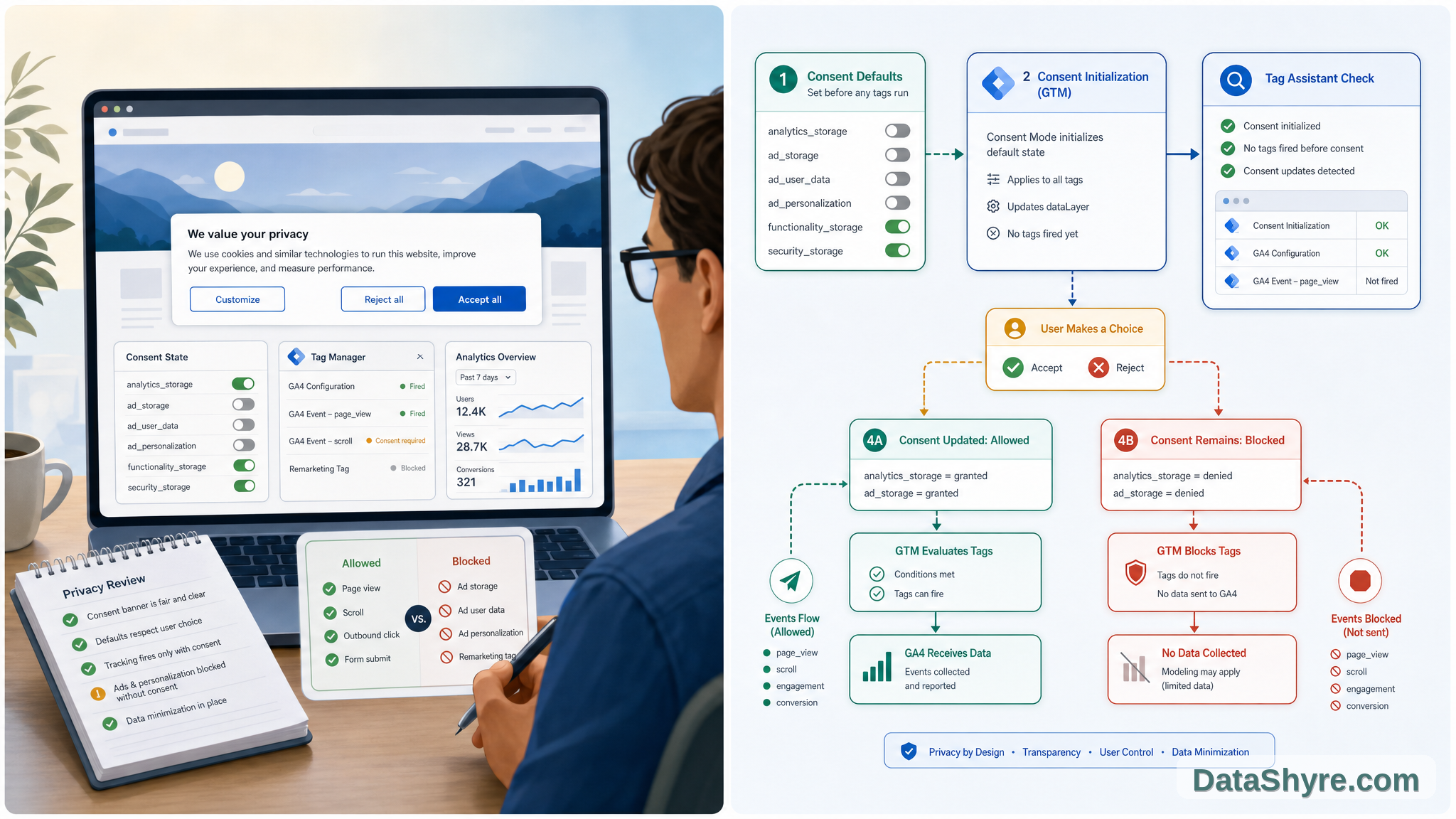
Google’s current website guide says consent mode now includes the additional ad_user_data and ad_personalization parameters. Tag Assistant debugging documentation also tells teams to verify all four parameters in both the earliest Consent event and the updated Consent event after user interaction.
So if your banner currently updates only two values, the fix is not done yet.
A fast check looks like this:
- first visit shows denied defaults for all four parameters;
- accept flow updates the right parameters to granted;
- reject flow keeps denied values where they should stay denied;
- later page loads reflect the stored state consistently.
That is the point where cookie consent google tag manager google analytivs stops being a copy problem and becomes a state-management problem.
4. Debug the earliest and latest Consent events in Tag Assistant
The easiest mistake is testing only the happy path.
Google’s Tag Assistant consent debugging guide says to check the earliest Consent event for on-page defaults and the most recent Consent event for on-page updates. It also tells you to inspect which tags fired or were blocked by the consent state.
That makes the review sequence simple:
- start a fresh Tag Assistant session;
- inspect the earliest Consent event before interaction;
- interact with the banner;
- inspect the most recent Consent event;
- check which tags fired or were blocked.
If your team cannot explain those two events in a few minutes, it is too early to trust the deployment.
5. Remove Custom HTML consent patches where Google says not to use them
This is one of the most common cleanup jobs in old GTM containers.
Google’s Tag Assistant troubleshooting guide says “Don’t use a custom HTML tag” in Tag Manager to call the gtag consent command. Google’s Analytics help says commands executed in callbacks or with gtag() from Custom HTML are not guaranteed to be available before the next trigger fires, and recommends using Tag Manager Consent APIs instead.
In practice, that means the review should identify:
- legacy Custom HTML tags that try to set or update consent;
- callback-driven code that fires after the next trigger has already started;
- custom tags that appear to work in preview but race in production.
This is often the hidden cause behind cookie consent google tag manager google analytivs issues that only appear after a container publish or theme change.
6. Clean up legacy Google Analytics tags before you trust the result
Some consent problems are really tag-upgrade problems.
Google’s website guide still says that if you use legacy tags such as ga.js or analytics.js, you should update to gtag.js or Google Tag Manager. If old analytics code remains on the page outside the intended consent flow, it can undercut the whole banner even when the main container is configured correctly.
So check for:
- legacy Google Analytics libraries left in theme files or plugins;
- duplicate pageview logic inside both GTM and direct page code;
- vendor snippets that write identifiers before the consent-aware path executes.
This matters because a consent-aware GTM container cannot fully protect a page that still ships measurement code somewhere else.
7. Re-test region logic and withdrawal, not just first-visit acceptance
The strongest implementations survive more than one demo scenario.
Google’s Tag Assistant guide says to repeat the debugging steps when you have region-specific defaults or consent banners. The ICO’s 2026 guidance is also a reminder that the tracking review surface is broader than a homepage cookie banner. If the site uses tags, pixels, web storage, or similar technologies, the behavior needs to stay aligned across real flows.
The minimum useful test set is:
- first visit with no prior choice;
- explicit rejection;
- explicit acceptance;
- reopened settings and later withdrawal;
- region-specific behavior if your banner or CMP changes by geography.
That is the difference between a banner that looks finished and a system that is actually under control.
A short fix order for this week
If I were cleaning up this stack today, I would do it in this order:
- inventory every tag or script that can write measurement data;
- move consent defaults to a proper GTM consent template on Consent Initialization if they are not already there;
- verify all four consent parameters, not just two;
- use Tag Assistant to compare the earliest and most recent Consent events;
- remove Custom HTML consent workarounds and legacy analytics code;
- retest reject, accept, and withdrawal flows;
- retest any regional branch your CMP claims to support.
That order is not flashy, but it is the fastest route to a setup you can explain later.
Bottom line
The query is awkward, but the operational problem behind cookie consent google tag manager google analytivs is straightforward.
You need the banner, GTM, and Google Analytics to agree on timing, defaults, updates, and blocking. Google’s current documentation still points to the same essentials: set default consent before tags use it, use the right GTM trigger, verify all four consent parameters, debug with Tag Assistant, and clean out legacy or custom code that races ahead of the consent state. The ICO’s 2026 guidance reinforces the same idea from the regulator side: scripts and tags are part of the compliance surface too.
If your current stack still depends on late defaults, partial updates, or old analytics code outside the main consent path, that is where to start.
Sources
- Google for Developers, consent mode overview: https://developers.google.com/tag-platform/security/concepts/consent-mode
- Google for Developers, set up consent mode on websites: https://developers.google.com/tag-platform/security/guides/consent
- Google for Developers, troubleshoot consent mode with Tag Assistant: https://developers.google.com/tag-platform/security/guides/consent-debugging
- Google Analytics Help, Tag Manager consent mode support: https://support.google.com/analytics/answer/10718549
- ICO, final storage and access technologies guidance published: https://ico.org.uk/about-the-ico/media-centre/news-and-blogs/2026/04/final-storage-and-access-technologies-guidance-published/
- ICO, guidance on the use of storage and access technologies: https://ico.org.uk/for-organisations/direct-marketing-and-privacy-and-electronic-communications/guidance-on-the-use-of-storage-and-access-technologies/
- EDPB work programme 2026-2027: https://www.edpb.europa.eu/system/files/2026-02/edpb_work-programme_2026-2027_en.pdf
—
Published: October 23, 2026. Updated with current official platform and regulator materials available at publication time.