

Google Analytics Cookies Consent in 2026: 7 Checks Before GA4 Starts Tracking
If you are searching for google analytics cookies consent in 2026, the useful question is not whether your banner looks polished.
The useful question is whether GA4 starts storing analytics cookies before a visitor has made the choice your site says it requires, whether that choice updates fast enough in your tag stack, and whether withdrawal changes real behavior later.
If you want the surrounding context first, start with our guides to cookie consent, Google Tag Manager cookie consent, and cookie consent requirements. This page is narrower. It is the seven-check review I would use this week before trusting google analytics cookies consent on a live site.

What this keyword usually means in practice
Most teams asking about google analytics cookies consent are really asking four things at once:
- Does GA4 set cookies in this setup?
- Do we need consent before that happens?
- Does Google Consent Mode actually control the timing well enough?
- How do we prove the reject path works?
Those are better questions than “Do we have a banner?”
Google’s own documentation makes the technical part fairly clear. analytics_storage is the consent type that enables storage related to analytics, including cookies. Google’s current web consent-mode guidance also says you should set the default consent state before the user grants consent, and update that state when the user interacts with the consent controls.
At the same time, the regulatory baseline still points in the same direction. The European Commission says consent requests should use “clear and plain language” and that withdrawal should be “as easy to use as giving consent.” CNIL is still pressing banner design on the same axis, saying refusal should be “just as easy as accepting them.”
So the real issue is not whether Google Analytics exists on the site. It is whether the site turns that legal and technical logic into live behavior.
1. Confirm whether GA4 cookies are part of your current implementation
The first google analytics cookies consent check is simple: know what is actually deployed.
Google says Google Analytics mainly uses first-party cookies to report on visitor interactions. If your site uses a standard GA4 web tag, you should assume analytics cookie behavior is part of the measurement path unless you have deliberately changed the setup.
That means you should map:
- where the GA4 tag loads from;
- whether it loads directly or through GTM;
- which pages or templates include it; and
- whether any older analytics snippets are still present alongside the current tag.
Weak audits often skip this step and then misread the rest of the test.
2. Separate the EU and UK prior-consent question from the Google implementation question
For many sites, google analytics cookies consent becomes urgent because GA4 feels low-risk compared with advertising tags.
That is the wrong shortcut.
The European Commission’s consent guidance still says valid consent depends on a clear affirmative act, clear wording, and a withdrawal path that is as easy as giving consent. The ICO’s finalized storage-and-access-technologies guidance, published on April 29, 2026, also keeps the scope broad by covering cookies, tracking pixels, device fingerprinting, and similar technologies.
That matters because GA4 is not just a dashboard choice. It is part of a storage-and-access workflow on the live site. For EU and UK prior-consent models, the practical review question is whether non-essential analytics storage starts too early.
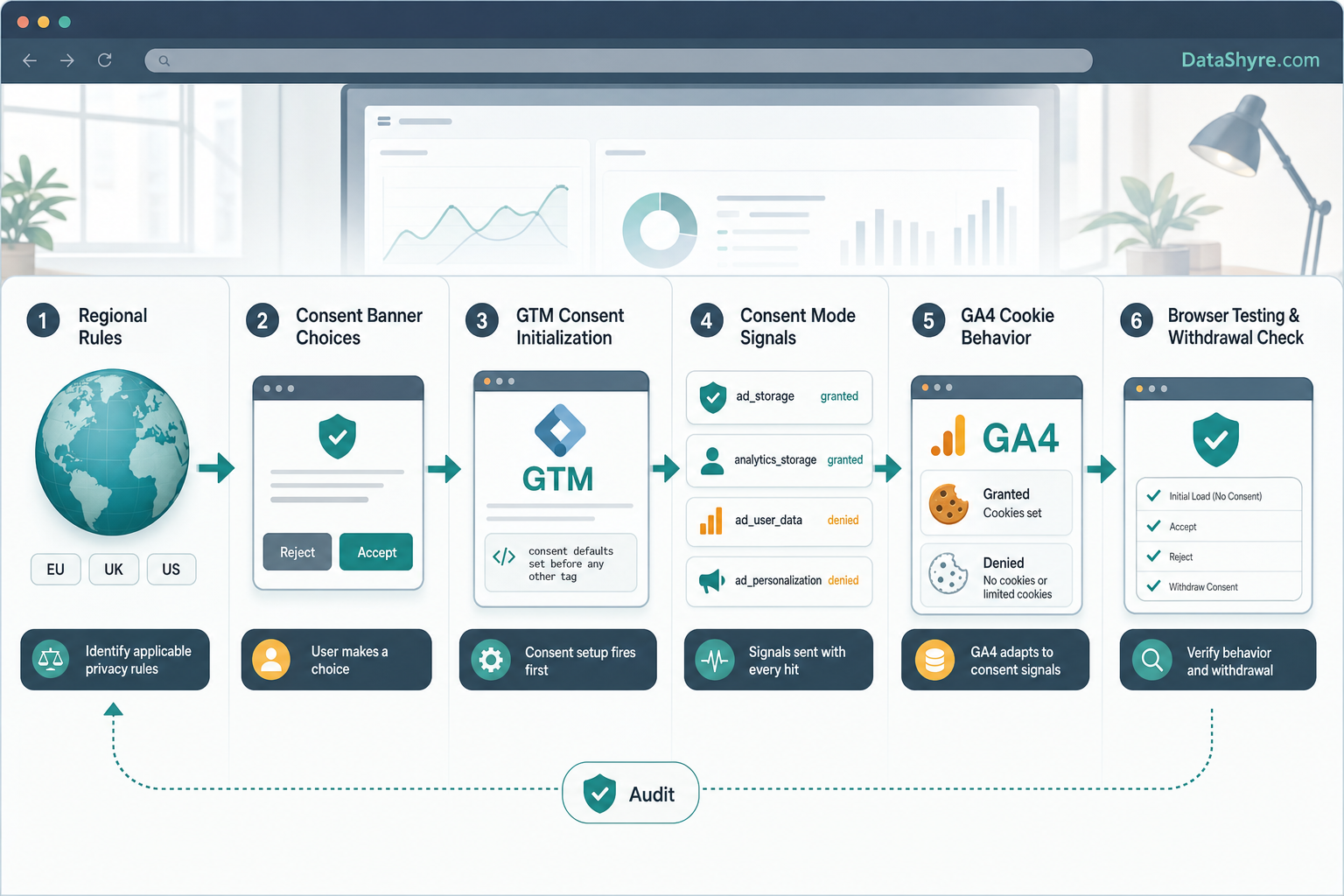
3. Set denied defaults before GA4 gets a chance to run
This is where a lot of google analytics cookies consent setups fail.
Google’s current consent setup guide says the default consent state should be set before a user grants consent, then updated based on the user’s interaction. Its troubleshooting guidance also says the default consent state needs to be set before any tags or other code use or update consent.
If you use GTM, Google is even more explicit: the Consent Initialization trigger fires “before all other tags.”
In practical terms, that means:
- your CMP or consent code has to establish denied defaults early enough;
- GA4 should not outrun that default on the first page view;
- custom HTML or legacy tags should not bypass the same control path; and
- consent updates should happen on the page where the user acts, not one navigation later.
If the container sequence is wrong, your banner copy does not save you.
4. Decide whether you are running basic or advanced consent mode on purpose
Google’s current consent-mode documentation still distinguishes between basic and advanced implementations.
In basic consent mode, Google says tags do not load until the user interacts with the consent banner, and if the user does not consent, no data is sent to Google at all. In advanced consent mode, tags load earlier and adjust behavior based on consent signals. Google’s consent reference says that when analytics_storage='denied', cookieless pings are sent to Google Analytics.
That means a serious google analytics cookies consent review should not stop at “consent mode is enabled.”
You should also ask:
- which mode are we actually using;
- does legal want a no-data-before-choice approach in the affected regions;
- do stakeholders understand the tradeoff between stricter blocking and broader modeled measurement; and
- is the live implementation behaving the way the team believes it is.
Neither mode should be accidental.
5. Test the reject path in the browser, not just the settings screen
This is the fastest reality check for google analytics cookies consent.
If the user rejects analytics cookies, you want evidence that the site behaves differently right away. Google documents analytics_storage as the control for analytics-related storage. CNIL is equally clear that rejecting should be “just as easy as accepting them.”
So test a clean first visit and inspect:
- whether analytics cookies appear before the user acts;
- whether they still appear after an explicit reject;
- whether network activity changes after accept versus reject;
- whether the banner makes refusal genuinely usable on desktop and mobile.
If refusal is visible but the browser outcome does not change, the setup is still weak.
6. Verify withdrawal and later page views, not only the first click
The European Commission’s current consent guidance is useful here because it ties collection and withdrawal together. If consent must be as easy to withdraw as to give, google analytics cookies consent also has to survive the second half of the user journey.
Check whether people can:
- reopen preferences without hunting for the control;
- change analytics consent during the same session;
- see the new state respected on the next page view or route change; and
- avoid old consent being silently replayed after withdrawal.
This is where plenty of seemingly compliant setups start drifting.
7. Keep proof that explains both the legal choice and the technical state
The best google analytics cookies consent records connect the words on the screen to what the browser actually did.
At minimum, I would want to know:
- which banner or preference version was shown;
- whether analytics was offered separately from advertising or other purposes;
- what the visitor chose and when;
- what consent state the tags received; and
- what browser evidence confirmed the result.
Google’s current troubleshooting materials point teams back to Tag Assistant for verification, which is a good reminder that consent should be debugged like a live system, not treated as a one-time copy task.
A short review order for this week
If I were checking google analytics cookies consent today, I would use this order:
- inventory every GA4 and GTM path on the site;
- confirm whether EU or UK prior-consent logic applies on the pages in scope;
- verify denied defaults load before GA4 can store analytics cookies;
- test accept and reject on a clean browser profile;
- check whether the implementation is basic or advanced consent mode;
- verify withdrawal on later page views or route changes; and
- save browser and tag-debug evidence with the release notes.
That process usually exposes the real problem faster than another redesign of the banner.
FAQ
Does GA4 always require a consent review?
If GA4 is active on pages where prior-consent rules apply, yes. Google’s own docs say analytics_storage governs analytics-related storage such as cookies, so you should not assume analytics is outside the consent conversation.
Is consent mode the same as a compliant banner?
No. Consent mode is an implementation framework, not a legal conclusion. Google also says the consent illustrations in its help material should not be treated as legal guidance.
If analytics_storage is denied, is GA4 fully silent?
Not necessarily. Google’s current consent reference says denied analytics_storage can still allow cookieless pings in advanced consent mode. That is why you should know which mode you are using and make that decision deliberately.
Bottom line
In 2026, strong google analytics cookies consent is not the site that merely displays a notice before loading GA4.
It is the site that knows where GA4 runs, sets denied defaults early enough, chooses basic or advanced consent mode on purpose, makes refusal as usable as acceptance, updates the live state when the user changes their mind, and keeps proof that the browser behaved the way the policy promised.
If those pieces line up, your GA4 consent story is probably in decent shape. If they do not, the banner may be live while the actual google analytics cookies consent control is still leaking.
Sources
- European Commission, Information for individuals: https://commission.europa.eu/law/law-topic/data-protection/information-individuals_en
- European Commission, Legal grounds for processing data: https://commission.europa.eu/law/law-topic/data-protection/information-business-and-organisations/legal-grounds-processing-data_en
- ICO, Final storage and access technologies guidance published, April 29, 2026: https://ico.org.uk/about-the-ico/media-centre/news-and-blogs/2026/04/final-storage-and-access-technologies-guidance-published/
- Google for Developers, Set up consent mode on websites: https://developers.google.com/tag-platform/security/guides/consent
- Google Tag Manager Help, Tag Manager consent mode support: https://support.google.com/tagmanager/answer/10718549?hl=en-GB
- Google Analytics Help, About consent mode: https://support.google.com/analytics/answer/10000067?hl=en
- Google Analytics Help, Consent mode reference: https://support.google.com/analytics/answer/13802165?hl=en
- Google Analytics Help, Consent type: https://support.google.com/analytics/answer/12334711?hl=en
- Google Analytics Help, Safeguarding your data: https://support.google.com/analytics/answer/6004245?hl=en
- Google Analytics Help, Troubleshoot consent mode: https://support.google.com/analytics/answer/14522438?hl=en
- CNIL, Dark Patterns in Cookie Banners: CNIL issues formal notice to website publishers: https://www.cnil.fr/en/dark-patterns-cookie-banners-cnil-issues-formal-notice-website-publishers