

Consent Mode Google Ads in 2026: 7 Live Checks Before You Trust the Signal
If your team is working through consent mode google ads on August 26, 2026, the useful question is not whether a CMP badge appears somewhere on the site.
It is whether Google Ads receives the right consent state at the right time, whether denied users stay denied across tags and uploads, and whether your implementation still holds up when remarketing, Customer Match, or publisher monetization enters the picture.
That is a more practical review in 2026 because Google’s current documentation is clear on the mechanics. Consent mode does not give you a banner by itself. Your banner or CMP collects the choice, your implementation sends the state to Google, and your tags have to behave accordingly. If any link in that chain is weak, consent mode google ads becomes a false sense of control rather than a real operating control.
If you want the adjacent implementation context first, start with our guides to Google Analytics cookie consent, Google Tag Manager cookie consent, and consent management provider. This article stays narrower. It is the seven-part live review I would run before trusting consent mode google ads in production this week.

Why this review is more than a banner check
Google’s current consent mode materials split the job into three parts:
- obtain the user’s consent choice;
- communicate that choice to Google; and
- ensure tags behave according to that choice.
That sounds simple until a real stack gets involved.
Many sites now mix Google Ads conversion tracking, remarketing, Google Analytics, Google Tag Manager, enhanced conversions, imported offline events, and CRM audience uploads. A team can honestly believe it has solved consent mode google ads because the banner appears and one tag looks quiet. Meanwhile, the default consent state may load too late, ad_user_data may not match the legal basis used for uploads, or a separate publisher requirement may still be unmet.
That is why the safest way to review consent mode google ads is to trace the signal from first page load to downstream Google Ads use.
1. Map each consent type to the Google Ads feature you actually use
A lot of confusion starts here.
Google’s current consent mode documentation still distinguishes four common web consent types: ad_storage, ad_user_data, ad_personalization, and analytics_storage. For consent mode google ads, the three most important are usually the ad-related ones.
ad_storagegoverns advertising-related storage such as cookies;ad_user_datacovers consent for sending user data related to advertising to Google;ad_personalizationcovers consent for personalized advertising.
That matters because different Google Ads features stress different parts of the stack.
If you only review ad_storage, you can miss the more consequential branch. Google’s own consent reference says both ad_user_data and ad_personalization need to be granted to enable personalized advertising in Google advertising platforms. So before you inspect code, write down which of these are really in scope for your setup:
- website conversion tracking;
- remarketing;
- enhanced conversions;
- Customer Match or similar audience uploads;
- linked Google Analytics advertising features;
- publisher monetization.
Until that map exists, a consent mode google ads review is mostly guesswork.
2. Set denied defaults before any measurement command can act
This is still the most common implementation failure.
Google’s developer guidance says to call the default consent command on every page before commands that send measurement data, such as config or event. It also gives a straightforward denied-by-default example for ad_storage, ad_user_data, ad_personalization, and analytics_storage.
That timing is not decorative.
If the denied default arrives after a Google tag has already initialized, your implementation can look fine in a configuration screenshot while still sending signals too early on a real first visit. Google’s setup documentation also says consent updates should be tracked on the page where they occur before any page transition.
For a real consent mode google ads check, I would test the first uncached visit, not the polished repeat visit:
- open a clean browser session;
- load the page with dev tools or Tag Assistant active;
- confirm the denied default exists before measurement commands;
- reject first, not accept first;
- watch whether any advertising-related tag fires before interaction.
If the implementation only works after the second page view, it is not ready.
3. Choose basic or advanced consent mode on purpose
Google still supports both models, and the difference matters.
In basic consent mode, Google tags are blocked until the user interacts with the banner. Google says no data is sent before consent in that model. In advanced consent mode, tags load with defaults set to denied, and while consent is denied Google says tags send “cookieless pings” and adjust behavior based on the user’s later choice.
That is not a small distinction for consent mode google ads.
Basic mode is easier to explain internally because the browser is quieter before consent. Advanced mode can preserve more modeling value for Google Ads, but it raises the bar for implementation quality because denied does not mean the stack is completely silent. It means Google is receiving a more limited signal shape.
So the review question should not be, “Which mode is best in general?”
It should be:
- which model did we choose;
- why did we choose it for these regions and use cases;
- did legal, product, and marketing all understand the tradeoff;
- did we test the live runtime against that decision.
Teams that cannot answer those questions usually have a consent mode google ads implementation that drifted in from vendor defaults.
4. Verify the signal in Tag Assistant, not just in the CMP dashboard
Dashboards are reassuring. Runtime evidence is better.
Google Ads Help now gives a plain verification sequence in Tag Assistant. For the earliest consent event, it says to check that ad_storage, ad_personalization, ad_user_data, and analytics_storage were set, and that the on-page default is Denied. For the most recent consent event, it says to verify the same parameters again and make sure the on-page update is Granted after acceptance.
That gives you a practical audit routine for consent mode google ads:
- inspect the earliest consent event;
- inspect the latest consent event after interaction;
- check which tags fired or stayed blocked;
- repeat with reject-all and granular selections, not only accept-all.
Google Ads also warns that active consent mode status in the Google Ads interface can lag, sometimes by 48 hours and in some cases up to two weeks. That is another reason not to wait for the UI badge before deciding whether the implementation is healthy.
5. Review uploads and audience workflows separately from website tags
This is where many teams under-scope the job.
A clean website banner does not automatically solve the upload side of consent mode google ads.
Google’s current Customer Match API guidance says you should populate the consent field for create requests, and it is blunt about the consequence when consent is missing for EEA users: the user is treated as not consented, the data will not be processed, and it cannot be used for ad personalization in Customer Match.
That should trigger a separate internal review:
- where is consent for uploaded identifiers stored;
- how is that consent mapped to
ad_user_dataandad_personalization; - what happens when a user withdraws consent after an upload;
- do denied users get removed from relevant lists;
- are web consent choices and CRM audience choices actually aligned.
If your implementation tests only browser tags, you have reviewed one branch of consent mode google ads, not the whole system.
6. If you are a publisher, run the Google-certified CMP branch separately
Advertisers and publishers should not collapse these into the same check.
Google’s current publisher help still says that for personalized ads, publishers using AdSense, Ad Manager, or AdMob must use a certified CMP integrated with the IAB TCF for users in the EEA and UK as of January 16, 2024, and in Switzerland as of July 31, 2024.
That is a separate operational branch from ordinary website tagging.
A site may have a technically decent consent mode google ads implementation for conversion tracking while still failing a publisher-specific requirement tied to personalized ads. The reverse can also happen: the CMP may satisfy the Google publisher program requirement while the actual default and update timing on the site are still weak.
If publisher monetization is relevant, treat these as separate review questions:
- does the runtime consent implementation behave correctly on page;
- does the CMP satisfy the current Google publisher requirement where it applies;
- does TCF integration stay correct after vendor-list or template changes.
Combining them into one vague “Google compliant” claim hides useful failure modes.
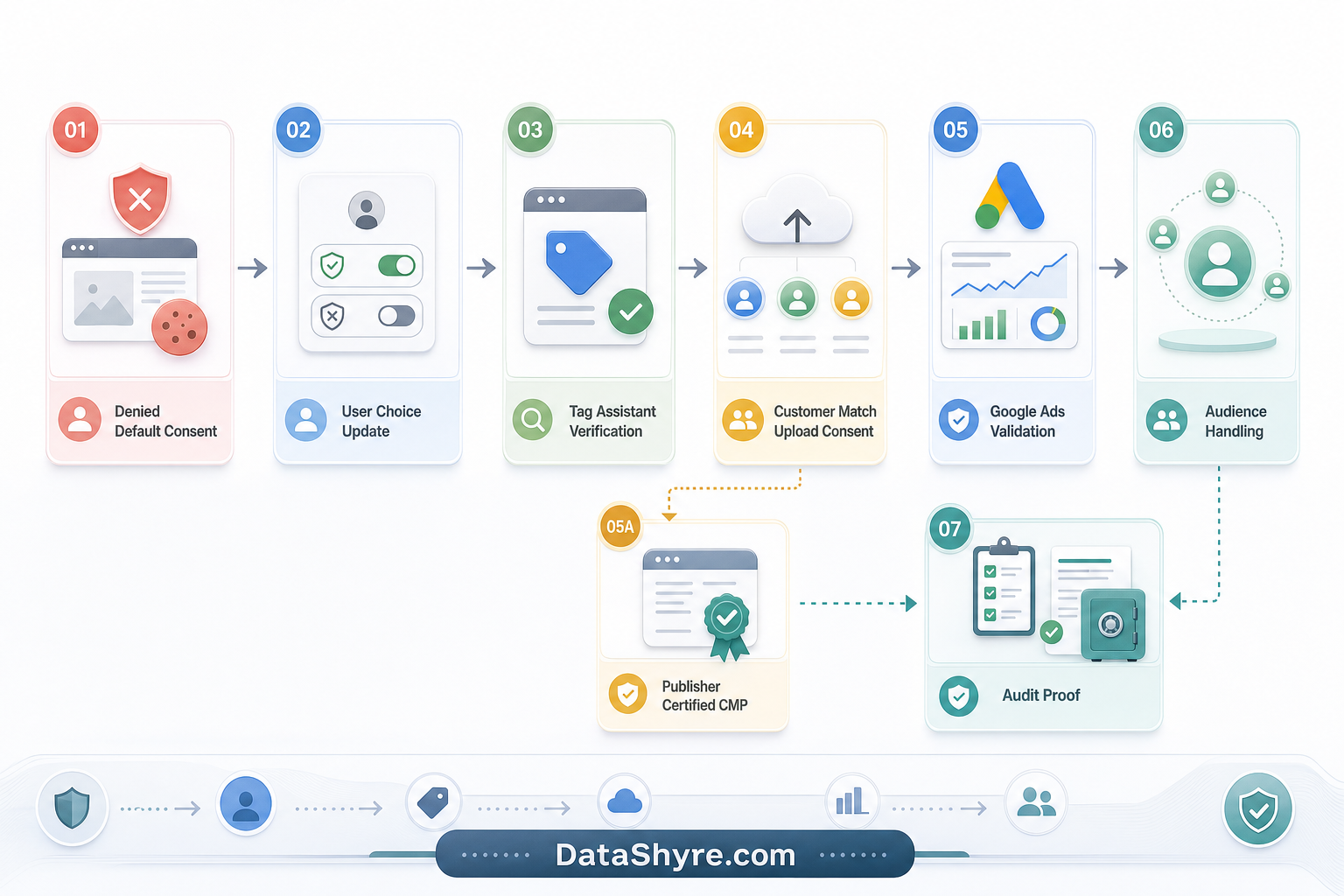
7. Test rejection and withdrawal, then keep proof
This is the part that turns policy into operations.
The ICO’s current storage-and-access guidance says consent mechanisms must “function as intended” and that users must be able to withdraw consent with the same ease they gave it. That is a helpful standard even for teams working beyond the UK because it forces a real runtime test instead of a policy-only review.
For consent mode google ads, I would keep evidence of:
- the denied default state on first load;
- the granted update after acceptance;
- reject-all behavior;
- later withdrawal behavior;
- blocked versus fired tags;
- any separate logic for uploads, remarketing, or Customer Match;
- any publisher-specific CMP or TCF checks.
This matters because privacy regressions rarely arrive with a big announcement. They usually arrive through a GTM publish, a CMP template change, a new conversion action, a remarketing launch, a CRM sync, or a marketing experiment that quietly widened data use.
A short review sequence for this week
If I were checking consent mode google ads right now, I would do it in this order:
- list every Google Ads use case in scope;
- confirm denied defaults load before any measurement call;
- verify basic versus advanced mode was a deliberate choice;
- run Tag Assistant on accept, reject, and granular flows;
- inspect Customer Match or offline-upload consent handling separately;
- run the publisher-certified-CMP branch if monetization makes it relevant;
- save evidence that survives the next deployment.
That sequence tends to surface the real defects faster than debating banner wording in isolation.
Bottom line
The right answer to consent mode google ads in 2026 is not, “we turned on consent mode.”
It is, “we mapped the right signals, denied by default where required, verified the runtime, handled uploads and personalization correctly, and kept proof after rejection and withdrawal.”
Do that, and Google Ads consent becomes much easier to defend. Skip it, and the implementation may look modern while still being fragile underneath.
Sources
- Google for Developers: Consent mode overview
- Google for Developers: Set up consent mode on websites
- Google Ads Help: About consent mode
- Google Ads Help: Set up consent mode
- Google Ads Help: Verify consent mode implementation
- Google Ads Help: Consent mode reference
- Google for Developers: Get started with Customer Match
- Google AdSense Help: Google consent management requirements for serving ads in the EEA, the UK, and Switzerland (for publishers)
- ICO: Guidance on the use of storage and access technologies
- ICO: How do we manage consent in practice?
This post was updated on August 26, 2026 using current official Google and regulator materials available at publication time.