

Google Consent Mode in 2026: 7 Live Checks Before You Trust the Setup
If your team is working through google consent mode on August 26, 2026, the useful question is not whether a CMP badge appears somewhere on the page.
It is whether Google tags receive the right consent state at the right time, whether denied users stay denied across analytics and ads use cases, and whether your implementation still works after the next template change, GTM publish, or server-side tagging update.
That review matters more in 2026 because Google’s own setup guidance was refreshed on July 30, 2026, and Google Analytics changed one important linked-property control on June 15, 2026. If Analytics is linked to Google Ads, Google says Ads-side Consent Mode settings now become the single control for how that shared data is collected and used. So google consent mode is no longer something you can safely treat as a one-tag configuration detail.
If you want the adjacent implementation detail first, start with our guides to Consent Mode Google Ads, Google Analytics cookie consent, and Google Tag Manager cookie consent. This article stays broader. It is the seven-part live review I would run before trusting google consent mode on a production stack this week.

Why this is broader than a banner decision
Google’s current consent-mode overview still breaks the job into three parts:
- obtain the user’s choice;
- communicate that choice to Google; and
- ensure tags behave according to that choice.
That sounds tidy until a real implementation gets involved.
Many teams now mix Google Ads, GA4, GTM, enhanced conversions, linked properties, CMP templates, and server-side tagging. A business can honestly think it has solved the setup because the banner is visible and one dashboard looks healthy. Meanwhile, the denied default may load too late, the wrong consent type may be mapped to the wrong use case, or the server container may be receiving data the team never meaningfully reviewed.
That is why the safest review is to trace consent from first page load through every Google branch that depends on it.
1. Decide which branches are actually in scope
This is the first place many reviews go wrong.
Google’s consent-mode materials cover more than one environment. Google’s current documentation addresses websites, apps, data uploads, and server-side tagging. So before you inspect code, write down which of these are real for your stack:
- website tags using
gtag.js; - Google Tag Manager on the web;
- linked Google Analytics and Google Ads behavior;
- enhanced conversions or user-provided data;
- server-side tagging;
- mobile-app consent flows.
If you skip that scope step, google consent mode turns into a vague label rather than a reviewable control.
2. Set denied defaults before any measurement command can act
This is still the most common implementation failure.
Google’s current website setup guide says to call the default consent command on every page before any commands that send measurement data such as config or event. Its current example still shows a denied-by-default baseline for ad_storage, ad_user_data, ad_personalization, and analytics_storage.
That timing is not decorative. If the denied default lands after the tag is already active, the site can look correct in screenshots while still letting measurement start too early on a real first visit.
Google also says consent updates should be tracked on the page where they occur before any page transition. So a real review should test the first uncached page load, not the polished repeat visit:
- open a clean browser session;
- load the page with Tag Assistant or equivalent inspection active;
- confirm the denied default exists before measurement commands;
- reject first, not accept first;
- check what fires before the user acts.
If your CMS or website builder makes ordering difficult, Google’s own tag-settings help says a default-denied tag setting can help when existing default consent commands are not taking effect before Google tags load.
3. Choose basic or advanced consent mode on purpose
Google still supports both models, and the difference matters.
In basic consent mode, Google says tags are blocked until the user interacts with the consent banner and that no data is sent before consent. In advanced consent mode, Google says tags load with defaults set to denied and can send consent state plus “measurements without cookies” while consent remains denied.
That is not a cosmetic distinction for this setup.
Basic mode is easier to explain internally because it keeps Google tags fully blocked before interaction. Advanced mode can preserve more modeling value, but it raises the bar for implementation quality because denied does not mean the stack is completely silent. It means Google is receiving a more limited signal pattern.
The useful review questions are:
- which model did we choose;
- why did we choose it for these regions and products;
- did legal and marketing understand the tradeoff;
- did we test the runtime against that decision.
When a team cannot answer those, the implementation usually drifted in from vendor defaults rather than design.
4. Map each consent type to the Google feature you actually use
A lot of consent-mode confusion starts here.
Google’s current consent reference still distinguishes the main web consent types clearly:
ad_storagefor advertising-related storage;ad_user_datafor sending user data related to advertising to Google;ad_personalizationfor personalized advertising;analytics_storagefor analytics-related storage.
Google also says both ad_user_data and ad_personalization need to be granted to enable personalized advertising in Google advertising platforms. That means a shallow check of ad_storage alone can miss the more consequential branch.
For a practical review, I would map those consent types to the exact features in use:
- GA4 measurement;
- Google Ads conversion tracking;
- remarketing;
- enhanced conversions;
- Customer Match or other uploads;
- linked Analytics-to-Ads data sharing.
Until that map exists, a consent review is mostly guesswork.
5. Verify the implementation in Tag Assistant, not only in dashboards
Dashboards are reassuring. Runtime evidence is better.
Google’s current Tag Assistant guidance says you can verify whether the site sets the correct default consent state before tags fire, whether consent states update correctly after grant or denial, which tags check which consent types, and whether the required consent types were granted when each tag triggered.
That gives you a clean audit sequence:
- inspect the earliest consent event;
- inspect the latest event after interaction;
- check which consent types each tag required;
- repeat with reject-all and granular selections, not only accept-all.
This matters even more because some Google interface signals lag. The more defensible truth is what happened in the browser at the moment the tag loaded and fired.
6. Review server-side tagging as a separate branch, not a magic fix
Server-side tagging is useful, but it does not erase the consent problem.
Google’s current server-side tagging guide says the web container still gathers the user’s choice, the Google tag sends consent parameters to the server container, and the server-side Google product tags adjust the amount and kind of data they send based on those preferences. Google also says that because of this architecture, you only need to set up consent mode in the web container.
That can be misunderstood.
It does not mean server-side tagging makes consent review unnecessary. It means the web container becomes even more important because it is the branch that establishes and forwards the consent state. If that state is wrong, the server container inherits the wrong premise.
So if your stack uses server-side GTM, review these separately:
- how the web container sets and updates consent;
- which consent parameters reach the server container;
- which server-side tags still send limited measurement when consent is denied;
- which features require granted consent to work fully.
Google’s own server-side guide is explicit that tags can still operate with limited functionality in denied states and that some branches use measurements without third-party cookies. That is operationally useful, but it is not the same as saying every denied-state flow is harmless or fully reviewed.
7. Test rejection and withdrawal, then keep proof
This is the part that turns policy into operations.
The ICO’s current guidance says a consent mechanism should make refusal as easy as acceptance and should “function as intended.” It also says storage and access technologies should only be set when valid consent is gathered or when an exception applies.
That is a helpful standard even if your stack is not UK-only because it forces a runtime review instead of a policy-page review.
For this control, I would keep evidence of:
- the denied default state on first load;
- the update after acceptance;
- reject-all behavior;
- later withdrawal behavior;
- which tags stayed blocked or sent limited signals;
- any linked Google Ads or server-side branches tested separately.
This matters because privacy regressions rarely arrive with a dramatic legal memo. They arrive through a GTM publish, CMP template change, new conversion action, or analytics-to-ads link that quietly changed the data path.
A short review sequence for this week
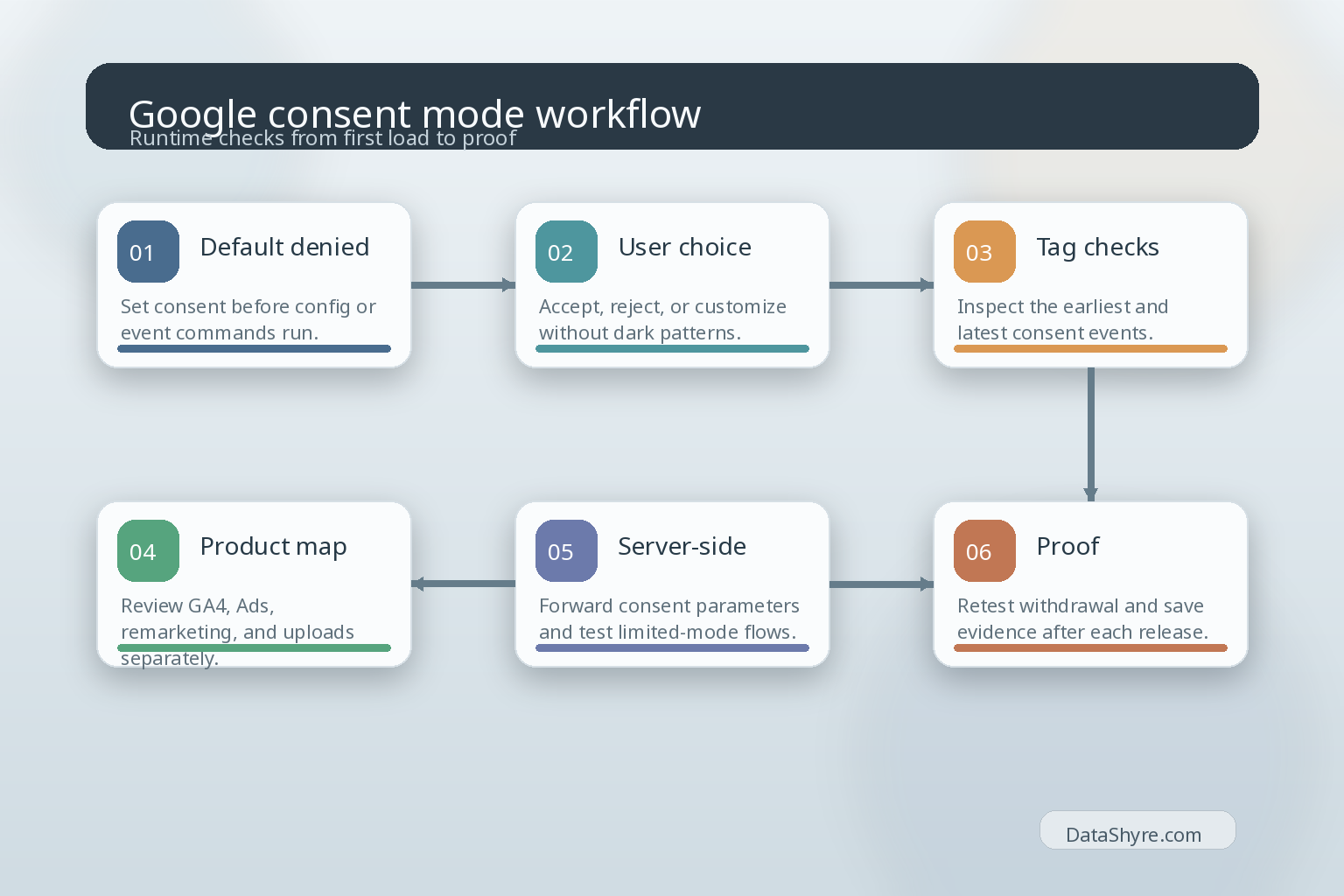
If I were checking google consent mode right now, I would do it in this order:
- list every Google product and tagging path in scope;
- confirm denied defaults load before measurement commands;
- verify basic versus advanced mode was a deliberate decision;
- map each consent type to the feature that depends on it;
- run Tag Assistant on accept, reject, and granular flows;
- inspect the server-side branch separately if it exists;
- save evidence that survives the next deployment.
That sequence surfaces the real defects faster than debating banner wording in isolation.
Bottom line
The best answer to google consent mode in 2026 is not, “we turned it on.”
It is, “we mapped the right use cases, denied by default where needed, chose the implementation model intentionally, verified the runtime, reviewed the server-side branch, and kept proof after rejection and withdrawal.”
Do that, and Google’s consent layer becomes much easier to defend. Skip it, and the setup may look modern while still being fragile underneath.
Sources
- Google for Developers: Set up consent mode on websites
- Google for Developers: Consent mode overview
- Google for Developers: Troubleshoot consent mode with Tag Assistant
- Google Tag Manager Help: Consent mode reference
- Google Ads Help: Configure your Google tag settings
- Google Analytics Help: Updates to Google Analytics Data Controls
- Google for Developers: Implement consent mode with server-side Tag Manager
- ICO: How do we manage consent in practice?
This post was updated on August 26, 2026 using current official Google and regulator materials available at publication time.