

TrustArc Cookie Consent Manager Language Switching: 6 Checks Before You Go Live in 2026
If you are searching for trustarc cookie consent manager language switching, you probably are not asking whether TrustArc can display more than one language in theory. You are trying to find out whether the banner language changes cleanly, whether the right version appears for the right visitor, and whether the consent choice still holds up after translation, regional logic, and later review all get involved.
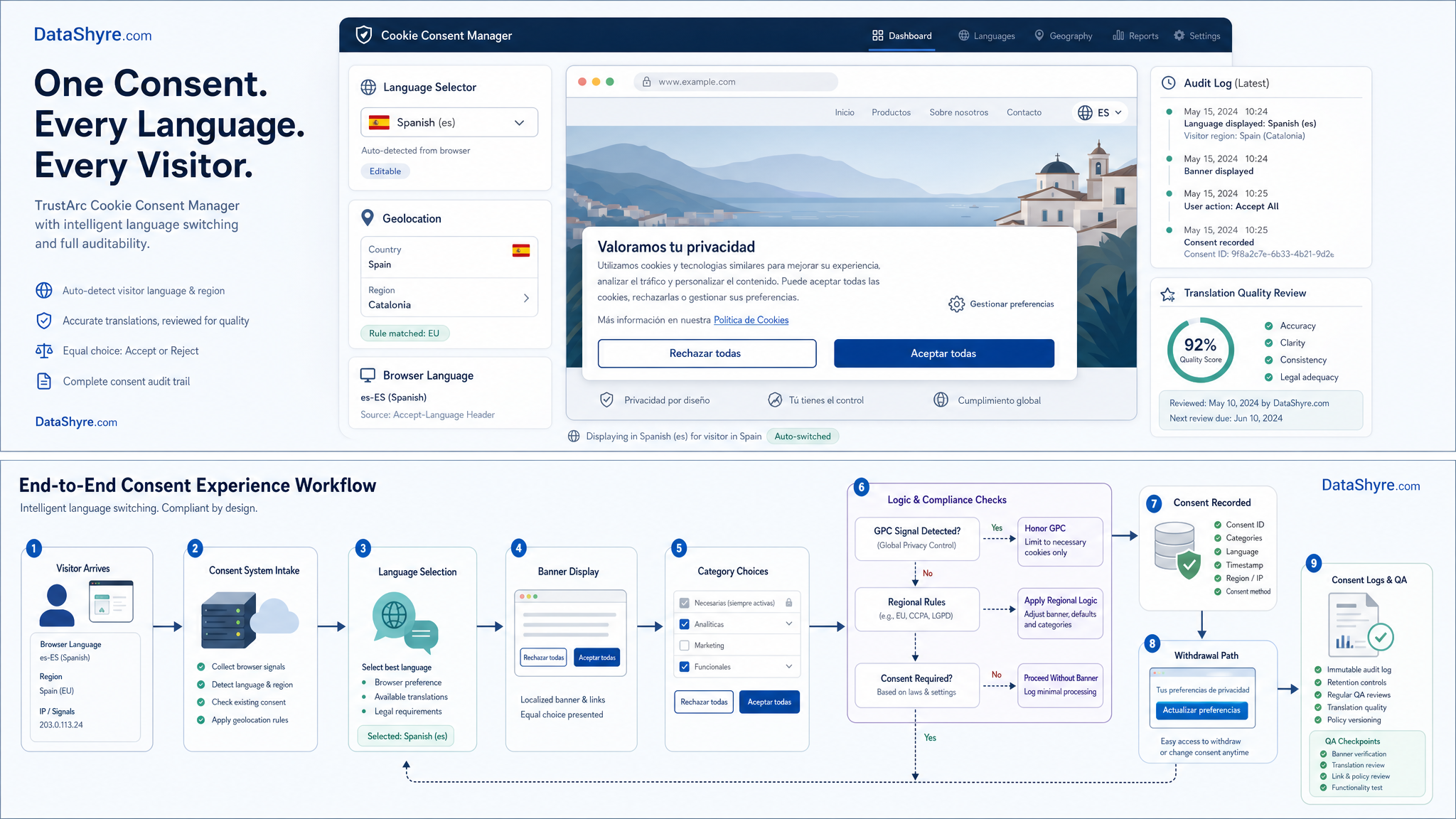
That is the right question on August 2, 2026. TrustArc’s current materials say Cookie Consent Manager supports multi-language and geo-specific deployment, and its Q1 2026 updates say CCM Pro now supports 20+ Indian languages while legacy templates include a built-in language selector. But that feature list is only the starting point. A multilingual banner becomes useful only when it preserves real choice, accurate meaning, and technical consistency across the paths your users actually take.
If you want the broader baseline first, start with our guides to cookie consent manager, consent management solutions, and cookie consent tool. This article is narrower. It is the review I would run before trusting TrustArc Cookie Consent Manager language switching on a live global site.
What current TrustArc materials actually say
The useful current signals are fairly specific.
- TrustArc’s current Cookie Consent Manager product page says the platform supports customized banner settings with geographic IP detection and integrations across systems such as WordPress, Shopify, Drupal, Joomla, Segment, Tealium, Adobe, and Webflow.
- TrustArc’s geo-specific banner page says the product can manage multiple international domains and over 70 languages.
- TrustArc’s cookie-consent guide asks a practical buyer question that matters here: whether the banner dynamically displays the right language based on the visitor’s location or browser-language preference.
- TrustArc’s Q1 2026 product update adds one more implementation detail: legacy templates include a built-in language selector so visitors can switch banner languages and review consent choices in their preferred language.
That combination tells you the product can support multilingual consent. It does not tell you your configuration is already sound. For that, you need to test how detection, switching, translation, and regional privacy behavior work together.
6 checks before you rely on TrustArc language switching
1. Decide which signal should control the first language shown
The first question is not visual. It is operational.
TrustArc publicly frames the issue around two main signals: location and browser language. Those are not always the same. A traveler in Germany may browse in English. A Canadian user may prefer French. A multilingual corporate office may route traffic through a US network while employees still expect a local-language consent experience.
So before launch, decide which rule wins:
- geolocation first;
- browser language first;
- a saved site preference first;
- or a manual selector shown immediately.
If that priority order is not documented, teams end up guessing from outcomes after complaints arrive. For TrustArc cookie consent manager language switching, that is one of the fastest ways to create confusion around what the user actually saw.
2. Make sure switching languages does not make refusal harder
The next check is simple and important. A translated banner still has to preserve the same balance of choice.
On December 12, 2024, the CNIL said:
“Rejecting cookies should be just as easy as accepting them.”
>
CNIL
That rule does not become weaker because a site offers five languages instead of one. If Reject all becomes less visible in German, longer and awkward in French, or buried after the user switches languages, the problem is still the same problem.
This is where multilingual consent often fails in practice. Teams localize the text but forget to test button hierarchy, overflow, spacing, or selector behavior on smaller screens. The language switch works. The fairness of the interface does not.
3. Test whether each translated version still says the same legal thing
A consent banner is not compliant because it was translated. It is useful only if the translated version preserves the meaning that makes consent valid.
The European Commission still says valid consent must be freely given, specific, informed, and unambiguous, expressed through a clear affirmative action. That sounds abstract until you look at real banner copy. Then it becomes a translation-control problem.
Review every active language for these failures:
- one language says
analyticswhile another implies broader marketing use; - one version describes third-party sharing plainly while another softens it;
- one version uses vague phrases like
improve your experienceinstead of naming purposes; - one version keeps category labels clear while another becomes legalistic or unclear.
For a multilingual CMP, those are not copy polish issues. They are consent-quality issues.
4. Check the full return path after the user changes language
TrustArc’s Q1 2026 update is useful here because it says visitors can switch banner languages and review consent choices in their preferred language. That is exactly the path I would test, not just the first-load banner.
Run this sequence:
- Land on the site in one language.
- Open preferences without consenting.
- Switch the banner language.
- Reject optional categories.
- Return later and reopen preferences from the normal settings path.
- Confirm the same user can still understand, change, and withdraw choices in the selected language.
That test matters because withdrawal has to stay practical after the first interaction. If the initial banner is translated but the later preference center falls back to English, the setup is weaker than it looks.
5. Separate language switching from regional privacy logic
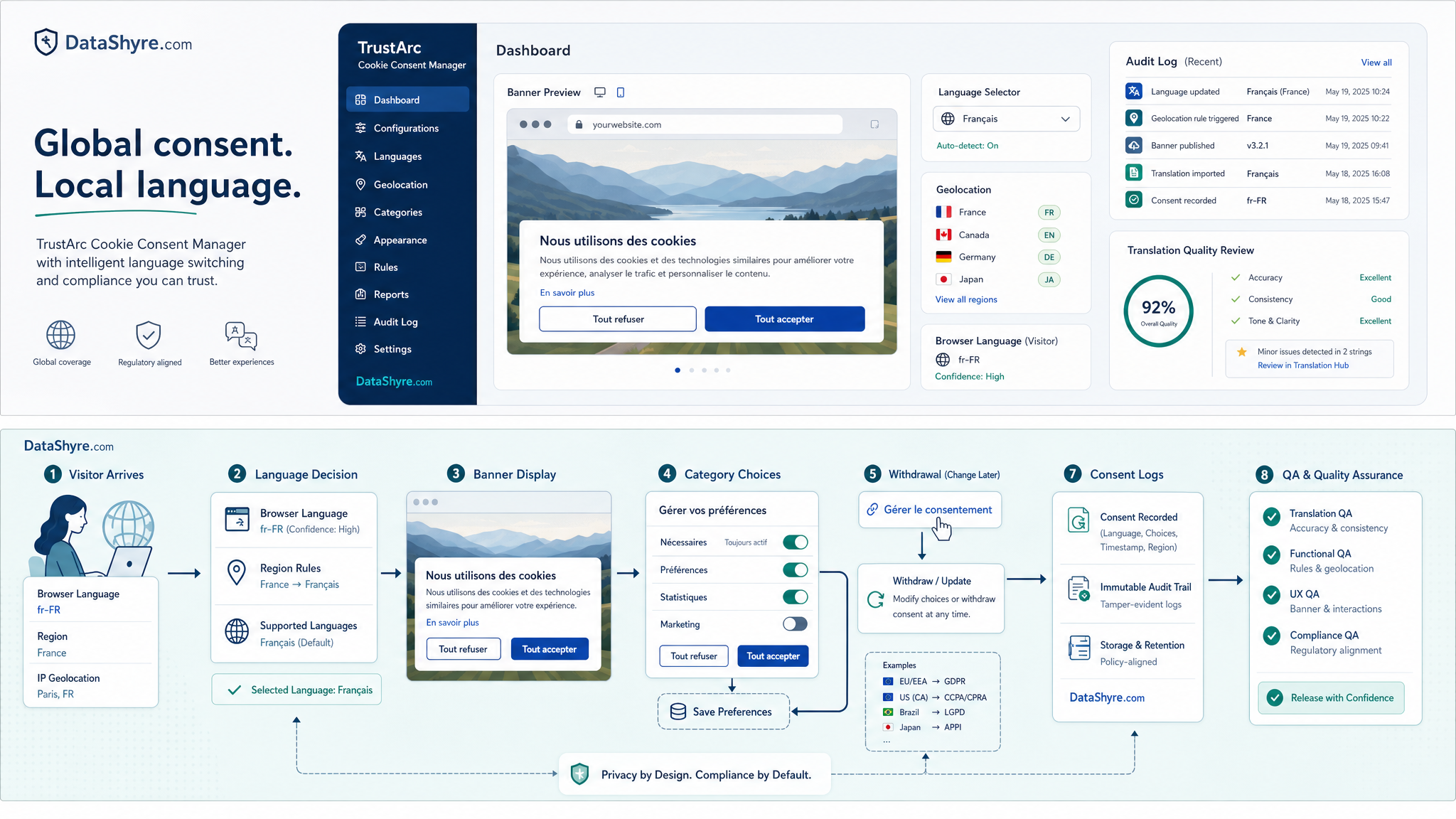
A multilingual banner is not the same thing as a region-aware privacy workflow.
On April 29, 2026, the UK ICO published final storage-and-access technologies guidance covering cookies, tracking pixels, device fingerprinting, and similar tools. In California, the Department of Justice still says Global Privacy Control must be honored as a valid opt-out request by covered businesses, and the CPPA’s current law-and-regulations page lists both the CCPA and the CCPA Regulations as effective on January 1, 2026.
That means your TrustArc setup should answer two different questions:
- what language should this visitor see; and
- what legal action should this visitor be offered?
Those are related, but they are not the same. An English banner shown to a user in France may still require prior consent before non-essential technologies fire. A Spanish-language banner shown to a California resident may still need opt-out handling and GPC recognition where sale or sharing rules apply.
If your implementation treats language choice as a proxy for jurisdiction, it can drift quickly.
6. Record which language and version the user actually saw
This is the audit question teams skip until they need it.
For TrustArc cookie consent manager language switching, you want to be able to answer:
- Which banner language was displayed first?
- Did the user switch languages before making a choice?
- Which banner version and text set were live at that moment?
- Which categories or purposes did the user accept or reject?
- Could the user return later and change that decision in a usable language?
If your logs can show a consent event but not the language and version context around it, multilingual troubleshooting becomes much harder. You end up debating what a user probably saw instead of verifying what they actually saw.
A short QA run I would use this week
If I were checking TrustArc cookie consent manager language switching right now, I would run this sequence:
- Test first load with browser language set to one language and IP geolocation suggesting another.
- Confirm which rule wins and whether that result matches the intended policy.
- Switch languages before choosing anything and check that buttons, copy, and category labels remain balanced.
- Reject optional categories and verify that the site’s actual tracking behavior changes where it should.
- Reopen preferences later from the normal footer or persistent icon and confirm the user can still understand and withdraw choices.
- Test California-facing traffic separately for opt-out mechanics and GPC handling.
- Export or inspect the record so the team can prove which language and configuration version were involved.
That review reveals more than a quick visual check ever will.
Bottom line
TrustArc appears to offer real multilingual consent capabilities in 2026, including geo-specific configuration, broad language coverage, and a built-in selector path on legacy templates. But the feature that matters is not language switching by itself. It is whether the switch preserves fair choice, correct meaning, regional compliance behavior, and usable proof.
If those four things hold, TrustArc cookie consent manager language switching can be a strong operational feature for global sites. If they do not, the language selector becomes decoration around a harder compliance problem.
Sources
- TrustArc: Cookie Consent Management Platform & Software
- TrustArc: Smart Consent, Faster Risk Reviews, and Broader Coverage
- TrustArc: Your Guide to Cookie Consent, Privacy and Building Trust
- TrustArc: Why Do You Need A Cookie Consent Banner?
- European Commission: When is consent valid?
- UK ICO: Final storage and access technologies guidance published
- CNIL: Dark Patterns in Cookie Banners: CNIL issues formal notice to website publishers
- California Department of Justice: Global Privacy Control
- California Privacy Protection Agency: Law & Regulations
This post was updated on August 2, 2026 using current official vendor, regulator, and government materials available at publication time.