

One Trust Cookie Consent: 5 Checks Before You Push It Live in 2026
Teams searching one trust cookie consent usually do not need another definition of cookies. They need a launch checklist: will the site actually hold optional trackers until a visitor makes a choice, will the proof be usable later, and will the setup survive a real stack of tags, pixels, embeds, and regional rules?
That is where OneTrust can help, and also where teams get a false sense of security. OneTrust’s current Cookie Consent materials say the product can detect cookies and trackers, apply geolocation rules, auto-block trackers until explicit consent is gained, maintain a consent transaction database, and sync consent for known users across devices. The feature list is strong. The real question is whether your implementation is actually using it well. If you want the broader setup background first, start with our OneTrust cookie consent checklist, the more implementation-heavy Cookie Consent Manager OneTrust rollout guide, or the GTM-specific OneTrust cookie consent Google Tag Manager guide.
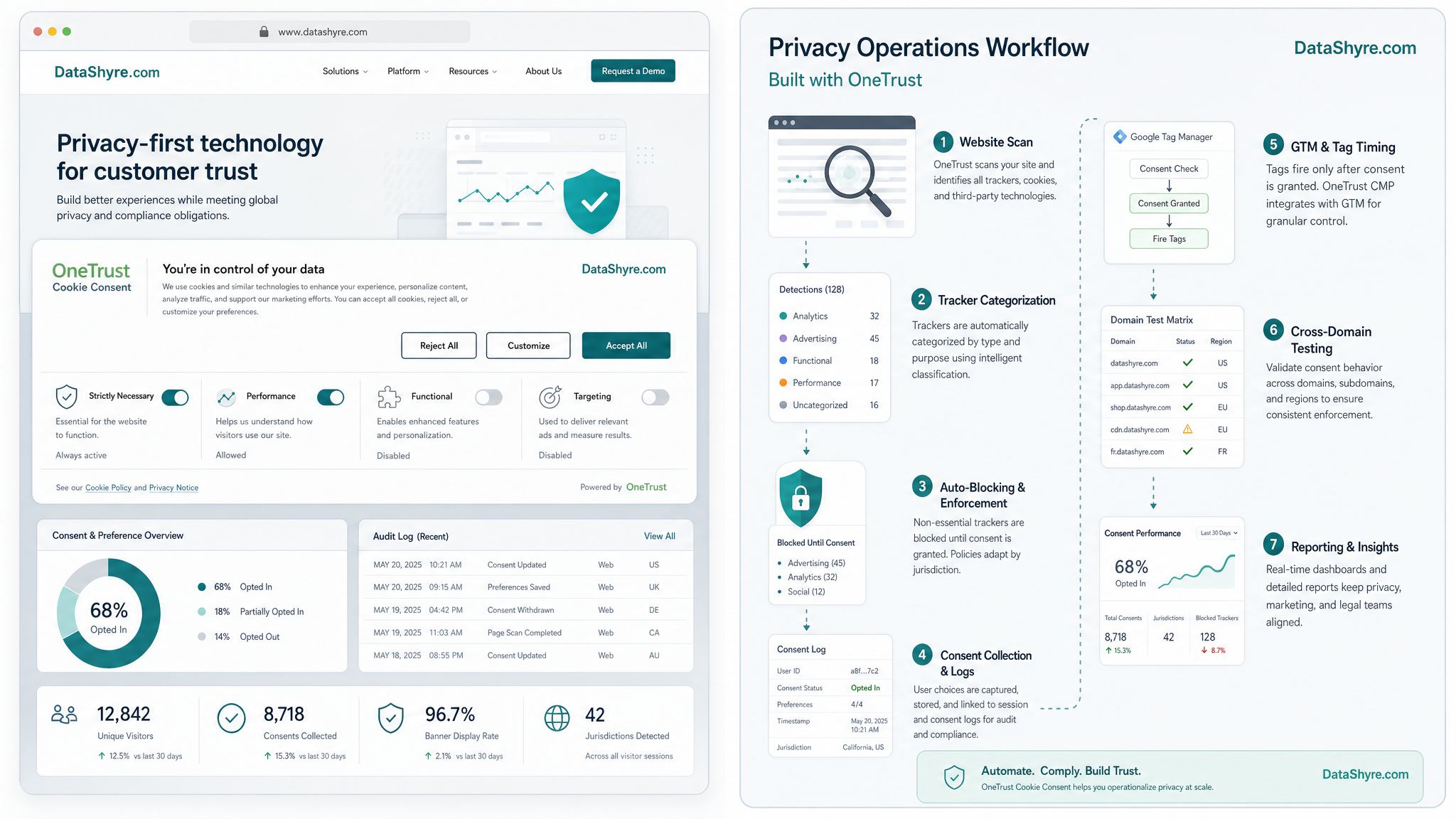
One Trust cookie consent: what to confirm before launch
The cleanest way to review this rollout is to ignore the banner design for a minute and inspect the operating model underneath it.
Leanne White, Data Privacy Manager at Samsung, said OneTrust helped give users the “best possible experience.” That is a fair aspiration. In practice, the experience only feels good if the site asks clearly, blocks optional technologies when it says it will, and remembers the choice in a way your team can verify later.
The 5 checks that matter most
1. Confirm blocking is real, not just assumed
This is the first check because it is the easiest place to get false confidence. OneTrust’s January 13, 2026 support guidance says that, by default, implementing the OneTrust scripts on a site will not block cookies when consent is not provided unless the auto-blocking script is enabled. Its Auto-Blocking guidance adds two practical details that matter in testing: the AutoBlock script needs to be the first item in the head, and uncategorized cookies will not be blocked.
So do not stop at “the banner is visible.” Test a fresh visit and confirm that optional analytics, ad tech, chat widgets, and embedded tools stay off before choice. Then test again after your next cookie scan, because newly found cookies still need correct categorization and a republished AutoBlock script.
2. If you use GTM, set consent before other tags fire
Many OneTrust rollouts live inside Google Tag Manager. Google’s current help documentation says the Consent Initialization trigger fires before all other tags, including Initialization, and is designed for CMP tags or tags that set default consent states. Scott Herman described the goal as making tags “respect cookie consent choices.” That is still the right frame. If the consent signal lands late, the rest of the setup is already compromised.
In other words, do not judge the setup only by what happens after an accept click. Look at the no-choice state, the reject path, and any preference update path. GTM sequencing problems usually show up there first.
3. Test what happens when the scan finds something new
OneTrust’s product page emphasizes scheduled scans and tracker inventory for a reason: websites drift. Marketing adds a new pixel, a plugin injects something unexpected, or a third-party script changes how it behaves. OneTrust’s Auto-Blocking guidance says newly added cookies will not be blocked until they are categorized, have the correct source URLs included, and the AutoBlock script has been republished.
That makes this a maintenance control, not a one-time launch task. A mature rollout has a rescan cadence, an owner for category cleanup, and a habit of re-testing before pushing script changes live.
4. Verify the record you will need later
OneTrust markets a consent transaction database, and its consent logging guidance says user consent transaction data appears in the Cookie Consent dashboard when the Capture Records of Consent setting is enabled in a published script. That is the feature. The operational question is whether your team can use it quickly.
Check whether you can pull the details you would actually need in an audit, customer complaint, or procurement review: when consent was captured, what banner or policy version was shown, which categories were accepted or rejected, and whether later preference changes are easy to see.
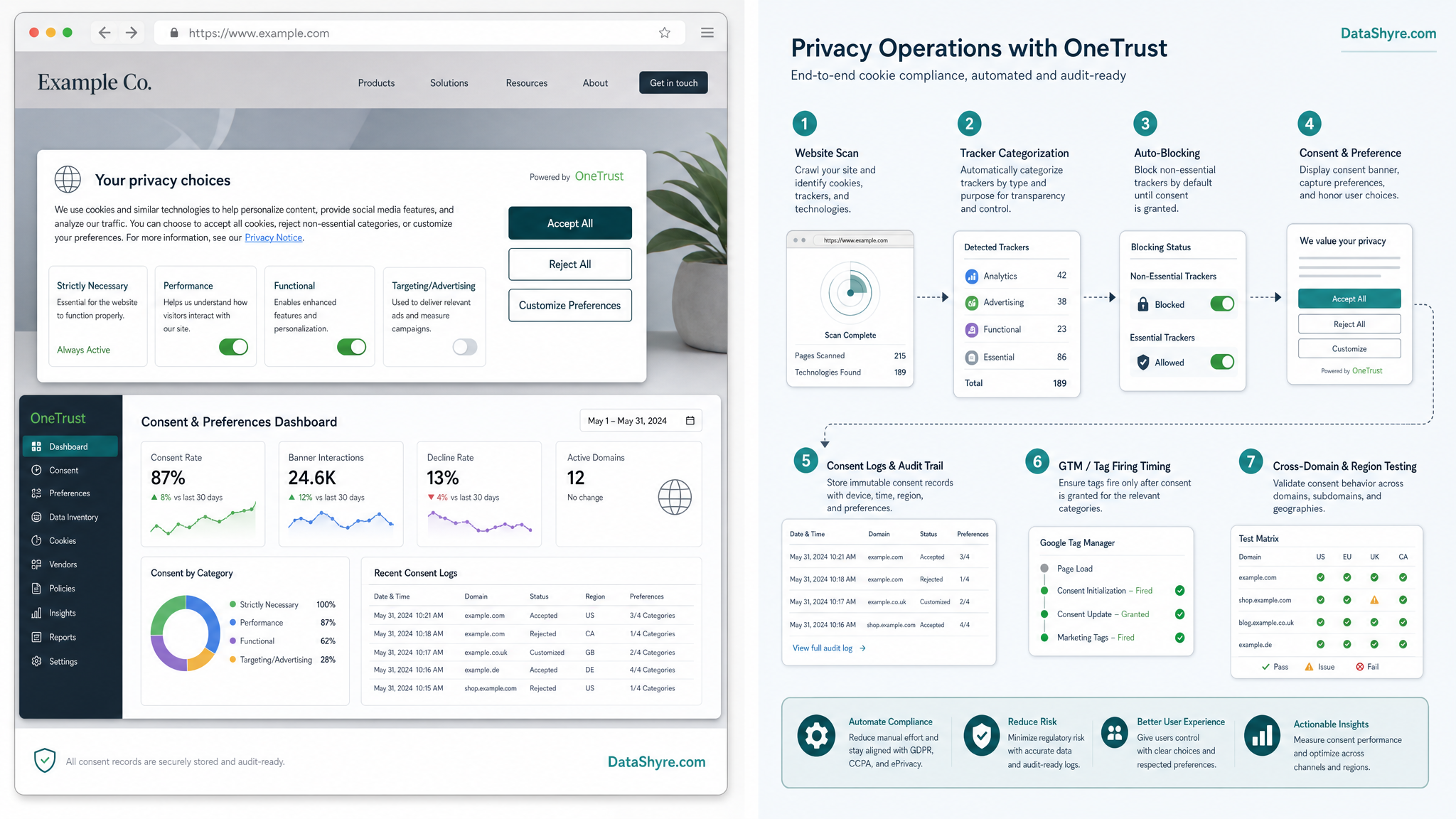
5. Treat cross-domain and known-user journeys as a separate test plan
This is the advanced step teams often leave for later. OneTrust’s current materials explicitly promote syncing consent for known users across devices. That can be useful, but it also creates more places for a mismatch. One property may update immediately while another lags. A logged-in user may see a different banner model from an anonymous visitor. A regional rule may conflict with a remembered preference.
If your program uses multiple domains, subdomains, logged-in experiences, or shared identity, test those journeys separately. Do not assume that a clean homepage demo proves the rest of the stack is aligned.
Why this still matters in 2026
The enforcement bar has not relaxed. On April 29, 2026, the ICO published final Storage and Access Technologies guidance covering cookies, tracking pixels, device fingerprinting, and similar technologies. In the launch announcement, William Malcolm said people should have “meaningful control over how their data is used.”
That line is useful because it cuts past UI polish. If a visitor clicks reject and optional tracking still runs somewhere in the stack, the control was never meaningful. That is why a strong OneTrust rollout is less about banner copy and more about how reliably the rest of the system obeys it.
Bottom line
Good one trust cookie consent work is not mainly about banners. It is about reliable blocking, clean GTM timing, scan discipline, usable proof, and realistic testing across the properties you actually run. If your one trust cookie consent setup passes those five checks, you probably have something dependable. If it does not, you have interface polish sitting on top of a privacy gap.
Sources
- OneTrust Cookie Consent product page
- OneTrust support article on publishing and implementing Cookie Consent scripts
- OneTrust support article on Auto-Blocking
- OneTrust support article on consent logging
- OneTrust Samsung case study
- Google Tag Manager Help
- Google blog post by Scott Herman
- ICO final Storage and Access Technologies guidance announcement