

Cookiebot Consent Management Platform in 2026: 7 Live Checks Before You Trust It
If you are evaluating a cookiebot consent management platform on September 25, 2026, the useful question is not whether the banner looks polished in a screenshot.
It is whether the live setup creates a fair refusal path, keeps optional technologies off until they should run, passes the right consent state into Google and non-Google tools, and leaves behind evidence your team can still use after the next release.
That is still the live official pattern. Google says consent mode “doesn’t provide a consent banner or widget.” The ICO says a consent mechanism must have the technical capability to let users withdraw consent with the same ease they gave it. CNIL still states one of the clearest banner rules available: “rejecting cookies should be just as easy as accepting them.” And Cookiebot’s own current support materials still describe scanner, blocking, and Google consent-mode checks as separate pieces you need to validate together.
If you want nearby context first, start with our guides to consent management platform, GTM consent mode, and Google Analytics cookie consent. This article is narrower. It is the seven-check runtime review I would use before trusting a cookiebot consent management platform on a live site this week.

1. Check whether refusal is truly as easy as acceptance
This is still the fastest way to eliminate weak consent setups.
CNIL’s current dark-pattern enforcement notice says that, with limited exceptions, cookies require consent and “rejecting cookies should be just as easy as accepting them.” So before you inspect technical features, compare Accept all and Reject all on desktop and mobile.
For a cookiebot consent management platform review, I would check:
- whether refusal appears on the first layer or is buried;
- whether the reject path is visually downgraded;
- whether the banner behaves consistently across viewport sizes;
- whether reopening preferences later is obvious.
If refusal is slower, harder to see, or harder to reach than acceptance, the rest of the setup starts from a weak baseline.
2. Check whether the scanner and declaration still match the live site
One of Cookiebot’s most practical strengths is not the banner. It is the discovery layer behind it.
Usercentrics Support currently says the Cookiebot CMP scanner:
- detects cookies and trackers in operation on the site;
- generates a cookie statement with type, duration, provider, and purpose details;
- supports blocking and opt-out workflows around that inventory.
That makes the scanner useful, but it does not make it self-proving. A cookiebot consent management platform can still drift if the live site changes faster than the declared inventory.
So I would compare the current scan output with:
- your live tag manager container;
- embeds added outside GTM;
- plugins, theme scripts, testing tools, and chat widgets;
- the actual purposes shown in the banner.
If the cookie declaration looks neat but the live site has new vendors or uncategorized scripts, the compliance story is already out of date.
3. Treat auto-blocking and GTM as separate systems
This is where many teams get overconfident.
Cookiebot support still says it can automatically block cookies and trackers until users consent. But its current support guidance also warns that if third-party services are implemented through Google Tag Manager, the auto-blocking mechanism “may not function reliably” because GTM loads and executes tags asynchronously after the page starts loading.
That means a cookiebot consent management platform review should not collapse everything into one checkbox called Auto blocking enabled.
If your stack uses GTM heavily, test two separate things:
- what the CMP blocks directly in page source;
- what GTM still needs to gate through consent-aware tag logic.
If you do not separate those two, you can end up with a clean-looking banner and a noisy runtime.
4. Verify Google consent defaults and updates before measurement matters
This is the core Google implementation check.
Google’s current consent-mode setup guide still says you need to:
- set the default consent state before a user grants consent;
- update the consent state based on the user interaction;
- record that update on the page where it happens before any page transition.
Google also still distinguishes between basic and advanced consent mode. Its help documentation says basic mode blocks Google tags until the user interacts with the banner, while advanced mode loads Google tags with consent defaults and can send cookieless pings when consent is denied.
For a cookiebot consent management platform, the practical test is simple:
- on a clean visit, confirm the Google default state is what you intended;
- verify the update lands before navigation or reload interrupts it;
- confirm Google Analytics or Google Ads tags behave according to that state;
- verify that the implementation matches the basic-versus-advanced model you think you deployed.
If the consent update arrives late, fires only after a page transition, or differs between pages, you do not really have a stable consent implementation.
5. Make non-Google tags consent-aware too
This is the trap Google consent mode does not solve for you.
Google’s own help says certain Google tags have built-in consent checks. But current Usercentrics support is just as explicit on the boundary: Google Consent Mode only affects the tracking behavior of Google products. Non-Google scripts and tags must be configured to be consent-aware.
The same support guidance says that if Google services are loaded via GTM, the tags need to be configured accordingly, and the Google Consent Mode Checker can flag cases where services execute without consent.
So when reviewing a cookiebot consent management platform, trace at least one non-Google tool end to end:
- a heatmap or session-replay tool;
- a video embed;
- a chat widget;
- a testing or personalization script.
If your Google setup looks correct but third-party tags still run too early, the implementation is not fixed. It is only partially fixed.
6. Check whether withdrawal and proof are actually usable
Collection is only half of the job.
The ICO’s current guidance says consent mechanisms must let users withdraw with the same ease they gave consent. It also says you need to be able to demonstrate consent and keep records of what happened.
For a cookiebot consent management platform, that means your team should be able to reconstruct:
- what the person saw;
- what purposes and services were presented;
- what they selected, and when;
- whether the site behavior changed after that choice;
- what happened when they later updated or withdrew preferences.
If support, legal, engineering, and marketing cannot tell the same story from the evidence, the record layer is too weak.
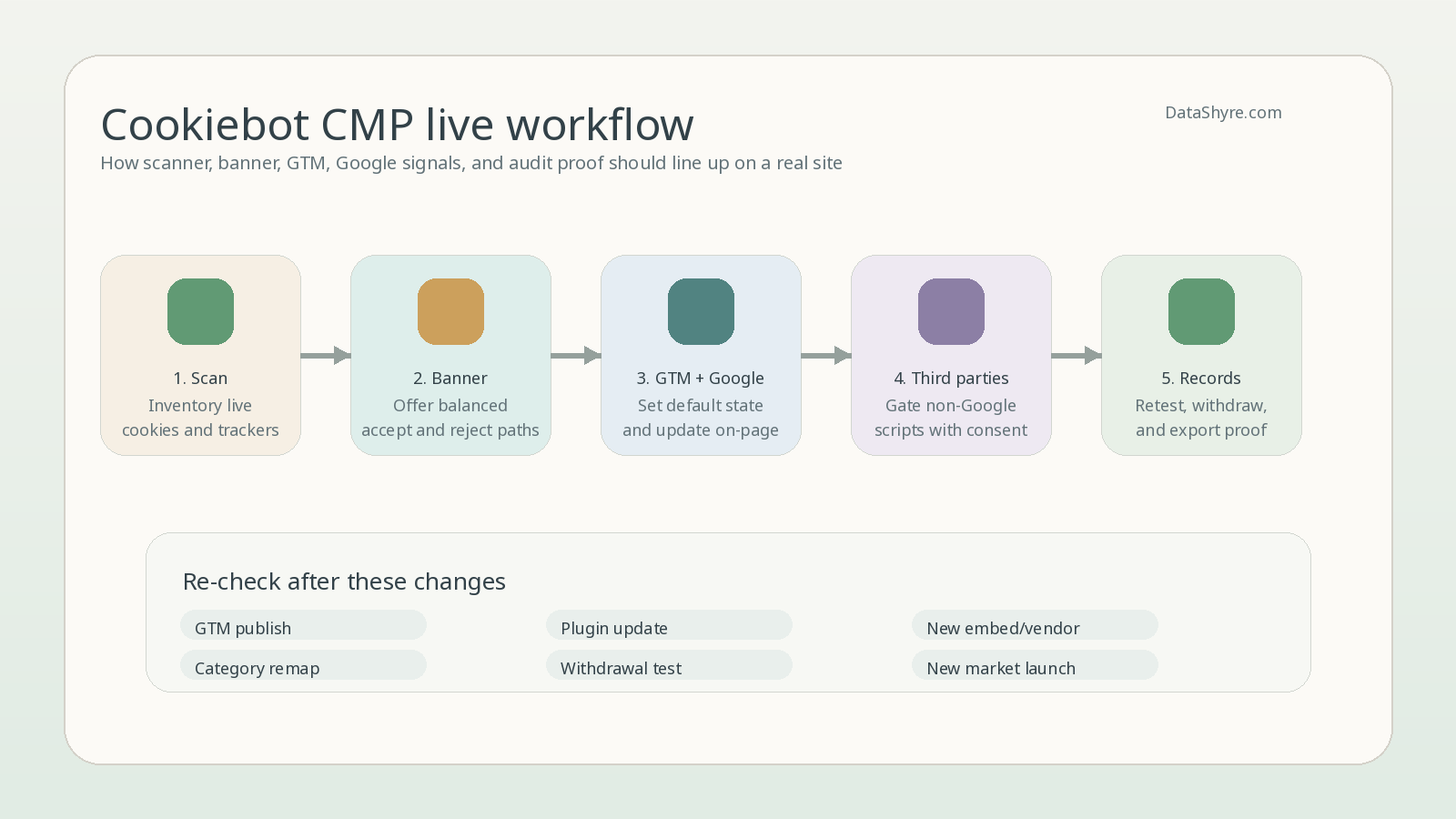
7. Re-test after changes instead of trusting the launch state
This is where mature programs separate themselves from banner installs.
The ICO says that if you introduce new storage-and-access technologies for a different purpose, you must obtain fresh consent for the new technology or purpose. Cookiebot’s support materials also make clear that scan results, blocking behavior, and Google consent-mode status are separate things to review.
That is why a cookiebot consent management platform should be re-tested after:
- GTM publishes;
- new plugins or embeds go live;
- theme or template changes alter script order;
- analytics, ads, or personalization vendors are added;
- banner copy, categories, or service mappings change.
The current Google Consent Mode Checker for Cookiebot and Usercentrics CMPs can help identify immediate browser-side risks. But it should be treated as a fast check, not the full audit.
A short review sequence for this week
If I were reviewing a cookiebot consent management platform today, I would do this in order:
- compare
Reject allfriction withAccept all; - run a clean session and watch what fires before any click;
- compare the latest scanner output with the real tag and embed inventory;
- test one Google path through GTM or direct tags;
- test one non-Google script path through the same consent flow;
- update or withdraw preferences and confirm runtime behavior changes;
- export the evidence and decide whether a non-technical stakeholder could actually use it.
That sequence usually reveals more than another feature matrix or sales demo.
Bottom line
The right cookiebot consent management platform in 2026 is not the one with the smoothest setup wizard.
It is the one that creates a fair refusal path, keeps live technologies aligned with the user’s choice, handles GTM and non-GTM behavior honestly, and leaves behind proof your team can still trust after the site changes.
If those pieces are weak, the interface polish will not save the rollout.
Sources
- Google Tag Manager Help: About consent mode
- Google for Developers: Set up consent mode on websites
- ICO: How do we manage consent in practice?
- CNIL: Dark Patterns in Cookie Banners: CNIL issues formal notice to website publishers
- Usercentrics Support: Google Consent Mode Checker
- Usercentrics Support: Auto blocking in detail
- Usercentrics Support: How to Configure Google Tag Manager Tags to be Consent-Aware
- Usercentrics Support: Why does the scan indicate negative results even though the Usercentrics/Cookiebot CMP has been installed?
—
Published: September 25, 2026. Updated using current official regulator, platform, and vendor materials available at publication time.