

What Are Cookies in Websites in 2026? Plain-English Definition, Why They Exist, and 7 Live Checks
If you are searching what are cookies in websites on November 16, 2026, the shortest useful answer is this:
they are small browser-side data records that help a website remember something from one request to the next.
That answer is true.
It is also incomplete.
In practice, what are cookies in websites is really a question about purpose:
- what the site wants to remember;
- whether that memory is necessary for the service a person asked for;
- whether another company receives data through it;
- how long the identifier lasts; and
- whether consent, opt-out, or browser protections actually change the live behavior.
If you want the adjacent explainers first, start with what are cookies for websites, website cookies, and tracking cookies. This page stays focused on what are cookies in websites and the practical review I would use this week before trusting a banner, a cookie table, or a vendor promise.
If your team needs help sorting necessary versus optional cookies, testing consent behavior, or checking whether tags and embeds still leak data before user choice, DataShyre can help with consent implementation, runtime QA, and privacy-focused cleanup.

1. Cookies in websites are browser memory, not magic
The easiest way to answer what are cookies in websites is to think of them as memory with a job.
When a browser requests a page, the server can ask it to save a small value. On a later request, the browser may send that value back. That allows the site to recognize some earlier state without making the user start from zero every time.
That is why cookies in websites often support things like:
- keeping a user signed in;
- remembering a shopping cart;
- saving language or region settings;
- preserving consent choices; and
- supporting analytics, advertising, or personalization.
The storage mechanism itself is not unusual. The important question is what the saved value actually helps the website or its vendors do.
2. Some cookies in websites are necessary, and some are optional
This is where what are cookies in websites turns into a useful review instead of a glossary definition.
The ICO’s current cookies guidance still says organizations generally need to tell people what cookies do and “get the person’s consent” unless an exception applies. It also explains that some cookies can be exempt when they are strictly necessary for a service the user requested.
So a better working model is to split cookies in websites into groups like:
- necessary service or security cookies;
- preference cookies;
- analytics and measurement cookies;
- advertising or retargeting cookies; and
- personalization or profiling cookies.
That separation matters because those groups do not create the same legal or operational risk.
3. The real question is purpose, not only whether a cookie exists
People often ask what are cookies in websites as if every cookie creates the same issue.
They do not.
A cookie that keeps a session alive during checkout is different from a cookie that helps a vendor recognize a visitor later for advertising or audience building.
The EDPB’s Guidelines 2/2023, in Version 2.0 adopted on October 7, 2024, reinforce that Article 5(3) of the ePrivacy Directive can apply to “different technical solutions”, not only the classic cookie label. That matters because a website can reduce obvious cookie clutter while still doing similar tracking through pixels, scripts, or other storage and access technologies.
So when someone asks what are cookies in websites, I would ask back:
- what function does each identifier support;
- does the user expect that function;
- is another party receiving the resulting data;
- would the site still work without it; and
- is some non-cookie technology doing the same job anyway.
4. Browser changes do not make cookies disappear; they make testing more important
Another common misunderstanding behind what are cookies in websites is the idea that browser privacy features made cookies mostly irrelevant.
They did not.
Browsers still handle lots of ordinary website state through cookies. What changed is that cross-site tracking and optional identifiers are getting more scrutiny from browsers, regulators, and users.
Chrome’s developer documentation still shows teams how to inspect cookies and third-party cookie behavior in DevTools. Firefox’s support documentation still says cross-site tracking cookies are “disabled by default” for Firefox users, and Total Cookie Protection isolates cookies by site.
That means a practical cookies-in-websites review should test:
- what appears before the user acts;
- what changes after reject or accept;
- which third parties still receive requests;
- which cookies are long-lived versus session-only; and
- whether the site behaves differently in a more privacy-protective browser.
5. Regional privacy rules change the answer
There is no single worldwide answer to what are cookies in websites because the compliance branch changes by region.
EU and UK branch
The ICO still says organizations must explain what cookies do and usually obtain consent before storing non-essential cookies or using similar technologies. That is why many EU- and UK-facing sites still need a serious pre-consent review for optional analytics, advertising, and profiling behavior.
California branch
California often shifts the question from prior consent to notice and opt-out mechanics. The California DOJ still says businesses must provide a “notice at collection” that lists categories of personal information and purposes, and that this notice must appear at or before collection. For some businesses, California also adds separate opt-out obligations around sale or sharing.
So if you ask what are cookies in websites from an operating perspective, the right follow-up is not just do we have a banner.
It is:
- what are we collecting;
- how are we disclosing it;
- what choices do users actually have;
- and does the live site honor those choices.
6. Enforcement still turns on runtime behavior
This topic is not theoretical.
On October 22, 2026, the CNIL fined FNAC DARTY entities 7 million euros after finding a mobile-app tracker that users “had not consented to” and that collected browsing-history data for recommendations and algorithm training.
That case is useful for what are cookies in websites because it shows the same broader truth:
regulators care what the identifier or tracker is actually doing, not just what the interface says it does.
If a cookie, pixel, or similar technology supports recommendations, audience building, advertising, or profiling, the live runtime matters more than polished compliance copy.
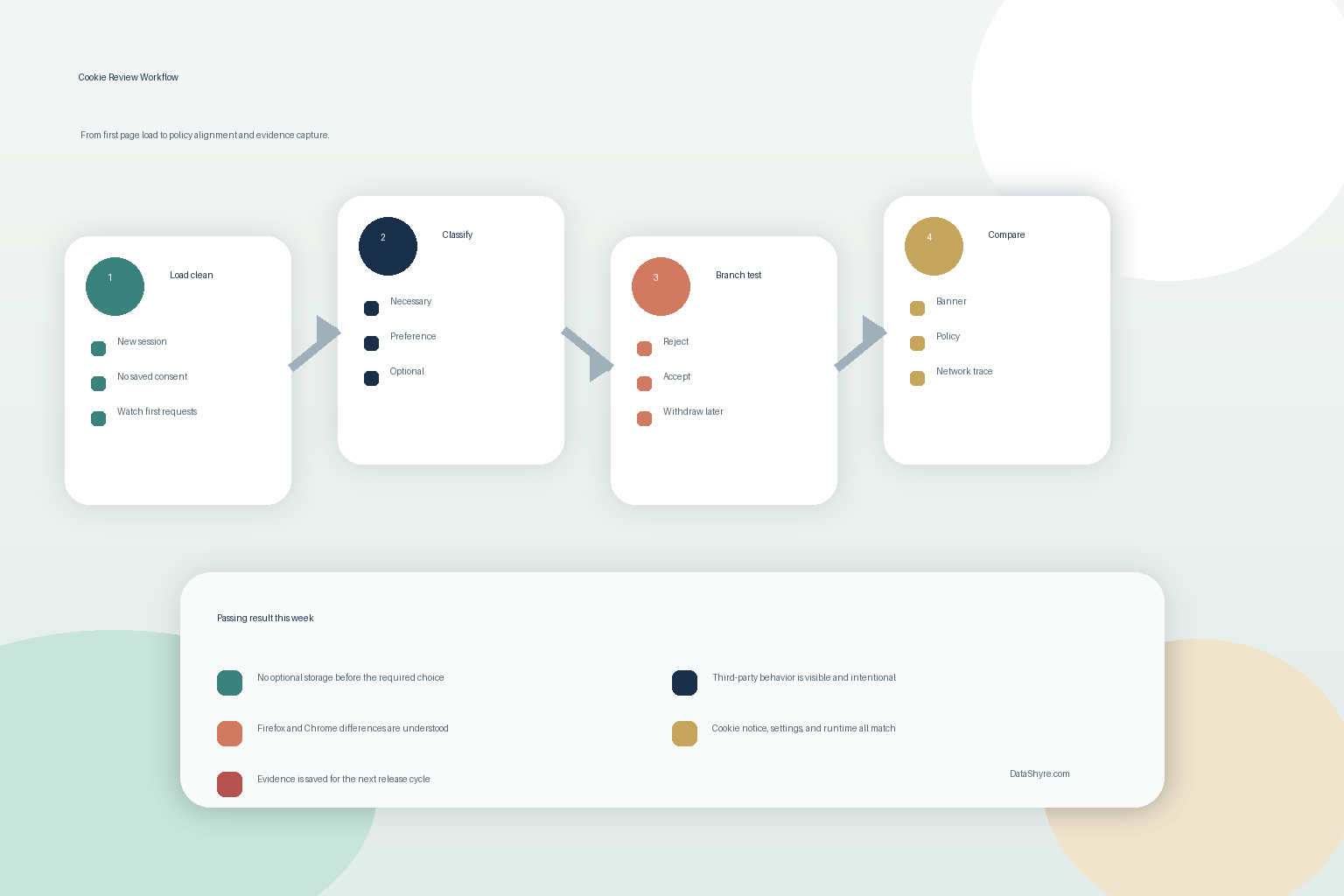
7. Seven live checks I would run this week
If I needed to answer what are cookies in websites on a real property instead of in abstract terms, I would use this order:
- list every cookie and similar client-side technology that appears before any user choice;
- classify each one as necessary, preference, analytics, advertising, or profiling;
- check domain, expiry, and whether another vendor receives the data;
- compare no-choice, reject, accept, and later-withdrawal behavior;
- compare the live browser behavior against the banner and privacy notice;
- test in more than one browser, especially one with stronger privacy defaults; and
- save the findings so the next release can be checked against the same baseline.
That workflow usually answers the real question faster than another round of banner design edits.
Short answer
If you need the shortest practical definition, use this:
cookies in websites are small pieces of browser memory used to keep a site working, remember a user’s settings, or help measure and influence behavior across visits.
That last branch is where privacy trouble usually begins.
FAQ
Are cookies in websites always used for tracking?
No. Many cookies support ordinary functions such as login state, shopping carts, saved preferences, or consent records. The higher-risk branch is usually optional analytics, advertising, or profiling.
Do all cookies in websites need consent?
No. Some cookies can be exempt when they are strictly necessary for the service the user requested. Optional uses often need a different analysis and, in many jurisdictions, a real user choice.
Are cookies the only thing I should test?
No. Modern website tracking can also involve pixels, scripts, local storage, and other storage or access technologies. A clean cookie table by itself does not prove the runtime is clean.
Bottom line
The best answer to what are cookies in websites in 2026 is not just small files websites use.
It is:
browser-side memory that may support necessary service functions, user preferences, analytics, advertising, or profiling.
Once you describe cookies that way, the next step becomes obvious: test the real site and make sure the runtime, the notice, and the user choice all tell the same story.
Official sources used
- ICO cookies and similar technologies guidance
- EDPB Guidelines 2/2023 on the technical scope of Article 5(3) of the ePrivacy Directive
- California Attorney General CCPA page on notice at collection
- Chrome DevTools guide to viewing and inspecting cookies
- Firefox Help on third-party cookies and tracking protection
- CNIL enforcement notice on the 22 October 2026 FNAC DARTY cookies sanction
- Firefox help on third-party cookies and tracking protection
- California DOJ CCPA page on notice at collection
- CNIL notice on the FNAC DARTY cookies and mobile-app tracker sanction