

Tracking Cookies in 2026: What They Do, When Consent Matters, and 7 Live Checks
If you are searching tracking cookies on November 1, 2026, the useful answer is not just small files websites use.
It is this:
tracking cookies are browser-side identifiers or related tracking tools used to remember behavior over time so a site or another company can measure visits, personalize experiences, or target ads later.
That wider definition matters because the official guidance has become more explicit. MDN still describes a cookie as a small piece of information a website leaves through the browser. The FTC still warns that websites may “track your online activity” with a cookie or pixel even after you leave the site. The ICO’s finalized April 29, 2026 storage-and-access-technologies guidance also makes clear that modern tracking is broader than classic cookies alone and includes pixels, scripts, tags, web storage, and device fingerprinting.
So a practical review of tracking cookies in 2026 has to answer four questions:
- what is being remembered or observed;
- whether the purpose is necessary or optional;
- whether another company receives or reuses the data; and
- whether the site’s consent flow changes real runtime behavior.
If you want nearby explainers first, start with browser cookies, third party cookies, and what are cookies on a website. This page stays narrower. It explains tracking cookies in plain English and then shows the live checks that matter now.

1. Start with the plain-English definition
The technical mechanism behind tracking cookies is simple.
MDN’s current glossary says a cookie is a small piece of information a website leaves on a visitor’s computer through the browser, and that it can be set through the Set-Cookie header or through JavaScript in some cases.
What makes a cookie a tracking cookie is not the file format.
It is the purpose.
A site may use cookies to remember:
- that a user signed in;
- what is in a shopping cart;
- which language or region was chosen;
- whether someone visited a page before;
- which pages or actions can be tied together later.
The FTC’s consumer guidance is still practical here. It says companies may use cookies or pixels to save preferences, keep items in a cart, gather analytics, remember searches, or show personalized ads.
So the clean answer to tracking cookies is:
they are cookies used to link activity, preferences, or behavior across requests in a way that helps a publisher or third party recognize what a browser has done before.
2. Separate useful site memory from optional tracking
This is the part most people actually care about.
Not every cookie is a tracking cookie in the same sense.
The European Union’s official Your Europe guidance says some cookies do not require consent, including load-balancing cookies and cookies that are strictly necessary for a service the user explicitly requested, such as shopping-basket or authentication cookies.
The same official guidance says some cookies do require consent before use, including social plug-in tracking cookies and third-party cookies used for behavioural advertising. It also says those cookies cannot be set when the page first opens. They should only be set after the user’s consent is obtained.
That is why a serious tracking cookies review should distinguish between:
- necessary or authentication cookies;
- preference cookies;
- analytics cookies;
- advertising or retargeting cookies; and
- third-party cookies or related tools that follow the user beyond one page view.
If everything is grouped into one undifferentiated we use cookies notice, users still do not know what is essential and what is optional.
3. Remember that tracking often extends beyond cookies
One reason tracking cookies can be confusing is that the visible banner still uses the word cookies even when the stack is broader.
The ICO’s finalized 2026 guidance explicitly covers cookies, tracking pixels, link decoration, device fingerprinting, web storage, and scripts or tags. Its overview explains that cookies may be used for functions like logins and baskets, but also for analyzing traffic and tracking users’ browsing behaviour.
That means a site may claim to control tracking cookies while still using:
- tracking pixels that notify a server when content loads;
- scripts or tags that collect extra visitor data;
- local or web storage in the browser;
- fingerprinting methods that combine device details; or
- URL parameters that help connect one visit to later activity.
So when someone asks about tracking cookies, the right operational question is not only which cookies are set.
It is which tracking technologies are active before and after consent, and who do they serve.
4. Understand first-party versus third-party tracking
This distinction still explains most of the privacy risk.
The FTC says when a website you visit tracks you, that is first-party tracking. When the website lets another company track you, that is third-party tracking. The FTC also notes that third-party tracking companies can follow people across many sites and use that history for targeted advertising.
That makes tracking cookies easier to review in practice:
- first-party analytics may stay inside the publisher’s own environment;
- third-party advertising or social tools may let another company build its own view of the visitor;
- embedded videos, chat widgets, tag managers, and social plug-ins often create the third-party branch that teams forget to test.
If a website team only reviews the visible banner text and never checks who receives browser data after page load, the real tracking cookies picture can stay hidden.
5. Good consent is not only wording, it is behavior
For many sites, this is where tracking cookies become a compliance problem.
The European Commission’s data-protection guidance still says consent requests must be presented in a clear and concise way, using language that is easy to understand and distinguishable from other information. The Your Europe guidance says users must receive “clear and comprehensive information” about cookies used on the site and their purpose. It also says users should be able to give separate consent depending on the purpose and that it must be as easy to withdraw consent as it is to accept cookies.
CNIL’s current cookie FAQ remains directionally similar. It says sites using non-necessary trackers must provide a way to refuse them and that refusal should be presented as easily as acceptance.
So for tracking cookies, a working consent layer should let users:
- see what categories exist;
- understand the purpose of each category;
- refuse optional tracking without a maze;
- change their mind later without friction; and
- expect the browser behavior to change after that choice.
If the user can click accept all in one tap but needs several steps to refuse, the interface is already sending the wrong signal.
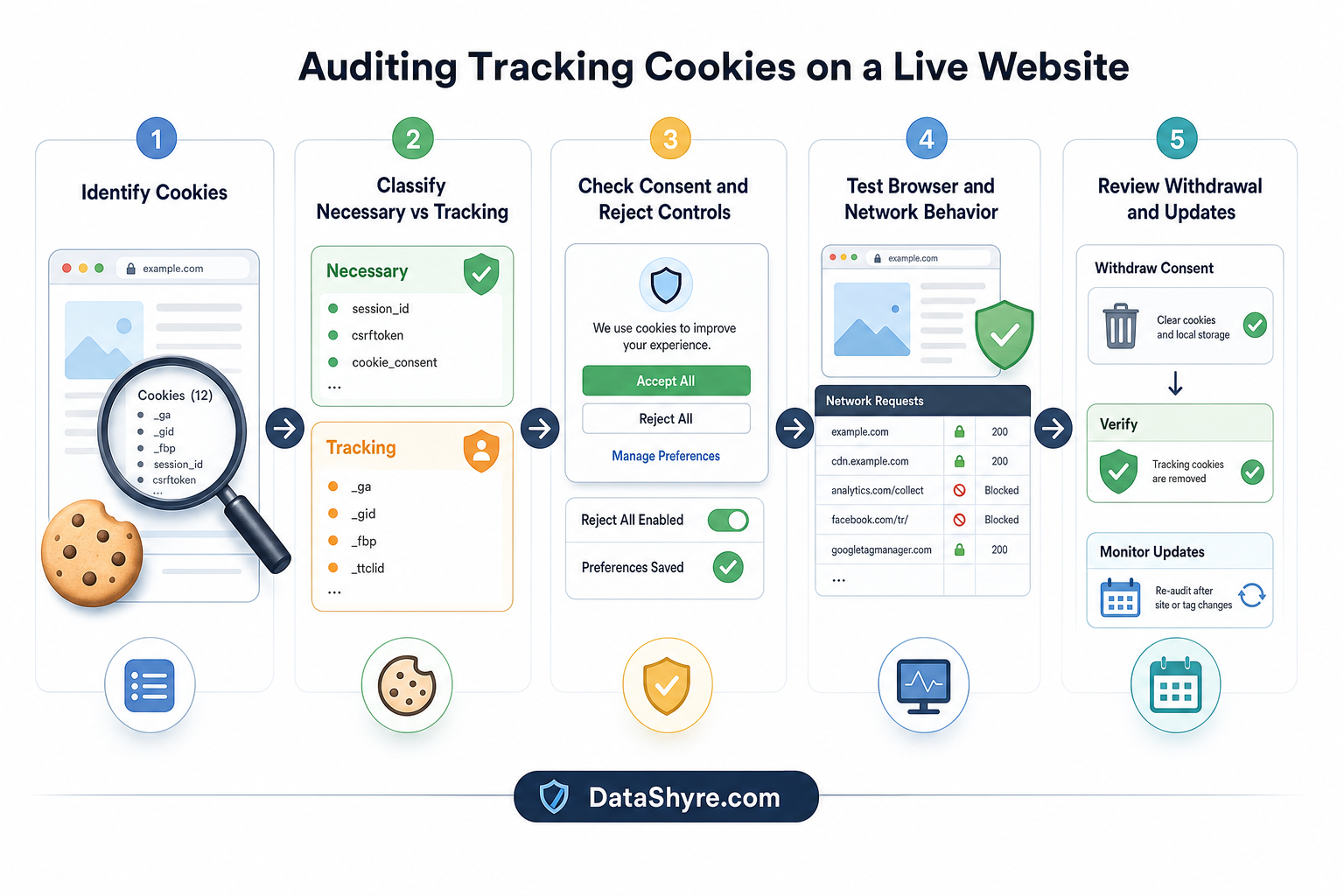
6. Run 7 live checks before you trust the setup
The fastest way to review tracking cookies is to test the live site instead of the policy draft.
I would use these seven checks:
- Inventory the active technologies. Confirm which cookies, pixels, scripts, tags, or storage entries appear on a clean visit.
- Classify each one by purpose. Separate login or cart state from analytics, personalization, and advertising.
- Check what loads before choice. Optional tracking cookies should not quietly appear before the user acts where prior consent is required.
- Check who receives data. Look for third-party endpoints, embedded tools, and ad-tech calls.
- Test reject all and withdraw later. Verify the browser state actually changes after refusal or withdrawal.
- Compare the banner to the policy. Category names, purposes, and user controls should match what the policy says.
- Re-test after site changes. A new tag-manager publish, plugin, or embed can change the tracking cookies story immediately.
That is the point where disclosure becomes operational instead of decorative.
7. Treat tracking cookies as a runtime issue, not a copywriting issue
Teams often try to solve tracking cookies with better policy text alone.
That is not enough.
The current official sources all point in the same direction:
- some cookies are functional and expected;
- some tracking uses require prior consent depending on purpose;
- users need clear information and a real refusal path;
- the live site has to honor the recorded choice.
That is where DataShyre can help. If your banner, cookie policy, and live browser behavior are drifting apart, DataShyre can help audit the tracking stack, identify third-party behavior, and tighten implementation logic so your consent experience reflects what the site actually does.
FAQ
Are all cookies tracking cookies?
No. Some cookies are strictly necessary for functions the user explicitly requested, such as login state or shopping-basket memory. The main question is purpose.
Do tracking cookies always need consent?
Not always in every jurisdiction and every use case, but many optional analytics, social-plug-in, and behavioural-advertising uses do require prior consent in EU-facing contexts. That is why purpose and geography need to be checked before launch.
Are tracking cookies the same as third-party cookies?
No. A tracking cookie can be first-party or third-party. Third-party cookies usually raise greater concern because another company may recognize the browser across multiple sites.
Bottom line
The most useful way to think about tracking cookies in 2026 is not as a technical footnote.
They are a live control question:
what is being remembered, why it is being remembered, who receives it, and whether the user’s choice changes that behavior in reality.