

OneTrust Tool Demo in 2026: 7 Things to Make Them Show Live
If you are searching for onetrust tool demo on August 12, 2026, the real job is not to admire polished admin screens. It is to force the vendor to prove what changes on the site, in the app, across regions, and after a user changes their mind.
That is the right frame now because OneTrust’s current public product pages still position the platform far beyond a simple banner. The company says its Consent Management Platform captures and signals purpose-based consent, supports websites, mobile apps, and OTT/CTV, blocks trackers until consent is received, and stores consent receipts in an audit-ready database. Regulators are still setting a hard baseline too. The European Commission still says valid consent must be freely given, specific, informed and unambiguous, the ICO finalized updated storage-and-access-technologies guidance on April 29, 2026, California’s Department of Justice still says Global Privacy Control is a valid opt-out signal, and Google still requires a certified CMP for publisher monetization paths in the EEA, the UK, and Switzerland.
If you want adjacent context first, start with our guides to OneTrust consent tool, OneTrust software demo, and OneTrust comparison. This article is narrower. It is the live scorecard I would use in an onetrust tool demo before a shortlist becomes a contract.
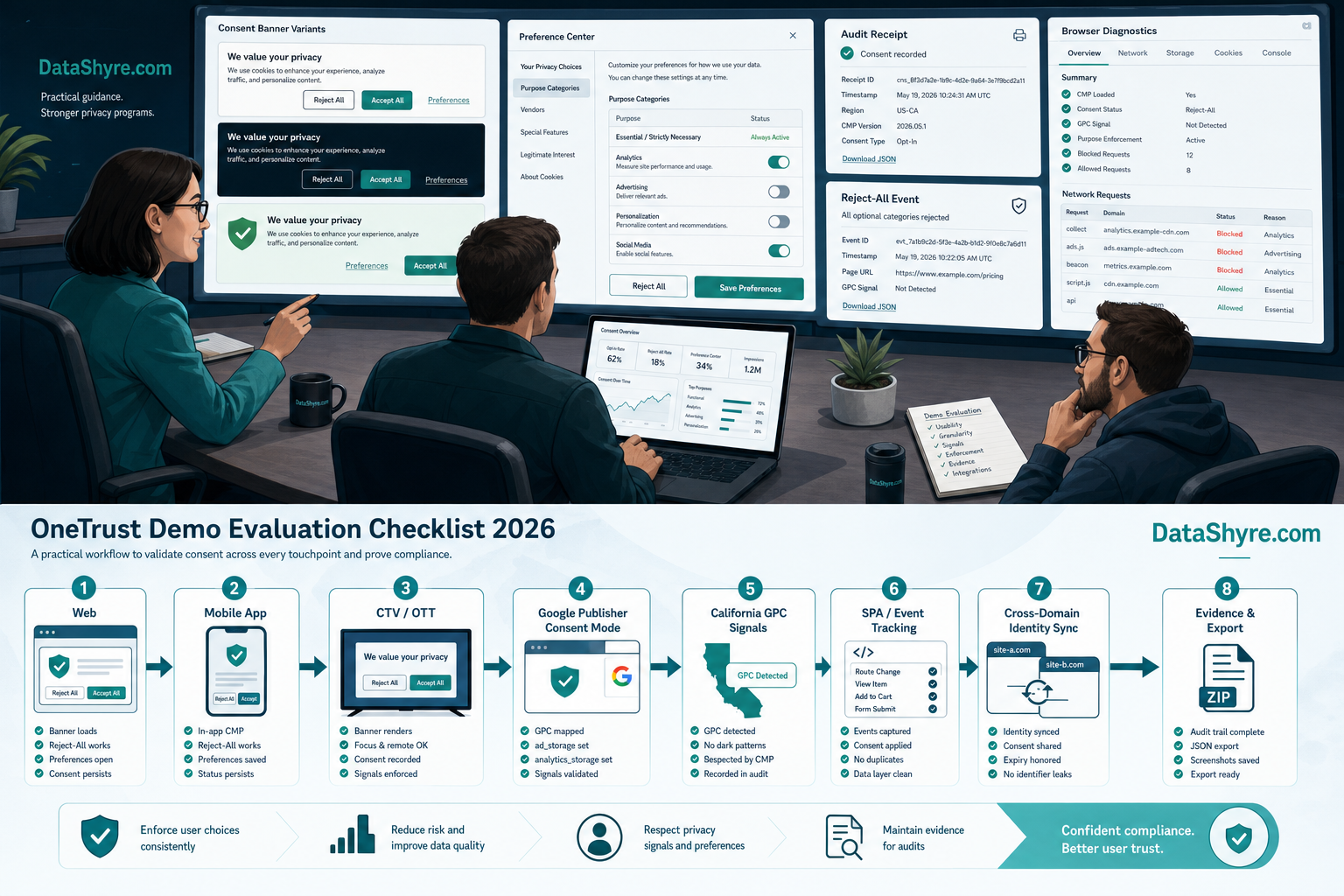
Why a OneTrust tool demo can look stronger than the implementation really is
Consent demos usually stay inside the safe parts:
- the configuration console;
- the vendor taxonomy;
- the localization rules;
- the screenshot-friendly dashboards;
- and the promises about records, automation, and optimization.
None of that is useless. It just is not the risky part.
The risky part is whether the onetrust tool demo can prove all of this live:
- rejection is as real as acceptance;
- optional trackers really stay blocked before consent;
- publisher-specific Google signaling is handled separately from broader compliance;
- California opt-out logic is not collapsed into an EU-only banner story;
- identity-linked syncing behaves correctly across properties;
- and support can reconstruct what a user saw and chose months later.
That is why the best demo is not a walkthrough. It is a stress test.
1. Ask which product path the demo is actually showing
This should be the first question because the label OneTrust can hide a scope problem.
OneTrust’s current public materials separate at least three related layers:
- the CMP for websites, mobile apps, and OTT/CTV;
- cookie-consent controls with scanning, blocking, and records;
- broader consent-and-preferences capabilities that unify choices across touchpoints.
In a real onetrust tool demo, ask the rep to name exactly which layer you are seeing and which parts require extra implementation, licensing, or identity plumbing.
If that answer stays vague, the demo is already telling you something important.
2. Make them prove Reject all and withdrawal, not only Accept all
This is still the fastest credibility test in the room.
The European Commission’s current guidance says consent must be freely given, specific, informed and unambiguous. OneTrust’s current cookie-consent page says it can use blocking and script controls to block trackers until explicit consent is gained. Those two points belong together in the demo.
So do not stop at the happy path. Make them show:
- first visit with no saved state;
Reject all;- granular category or purpose selection;
- later withdrawal from the persistent settings path.
Then ask the question that matters most: what changes in the runtime after each action?
If rejection updates the interface but not the actual tag behavior, the onetrust tool demo is not proving what you need.
3. Split web, app, and CTV coverage into separate proof points
OneTrust’s CMP page says the platform covers websites, mobile apps, and OTT/CTV. That sounds attractive, but in demos it often gets compressed into one generic answer.
Do not let that happen.
Ask for separate proof of:
- the browser-based website flow;
- the mobile-app consent path if apps matter to you;
- and the OTT or CTV branch only if your media footprint actually needs it.
The point is not to make the vendor perform tricks. It is to stop a broad platform claim from being mistaken for a ready implementation in your exact environment.
4. Treat Google publisher fit as its own branch
This is one of the most common buying mistakes around CMP demos.
Google’s current publisher help says partners using AdSense, Ad Manager, or AdMob for personalized ads in the EEA, the UK, or Switzerland must use a certified CMP integrated with the IAB Transparency and Consent Framework. Google’s published list also currently shows Onetrust / Cookiepro CMP certified for web, app and CTV.
That is useful, but Google also says its certification does not amount to a full check for legal compliance.
So a serious onetrust tool demo should answer two separate questions:
- does this fit our publisher monetization path if ads are in scope;
- does it also fit our broader runtime and regulatory requirements outside that path.
If a rep merges those into one reassuring answer, push harder.
5. Force a California path, especially GPC
California should not appear as a footnote inside an EU-style banner demo.
The California DOJ’s current GPC page says a user-enabled Global Privacy Control is one acceptable online opt-out method for covered businesses and calls it a “stop selling or sharing my data switch.” It also says the signal must be honored as a valid request to stop sale or sharing.
That means the onetrust tool demo should show:
- where GPC is detected;
- how the system branches California opt-out logic from European prior-consent logic;
- which downstream systems receive the effect of that signal;
- and what proof remains afterward.
If the answer is only we support GPC, you still do not know whether the implementation is good.
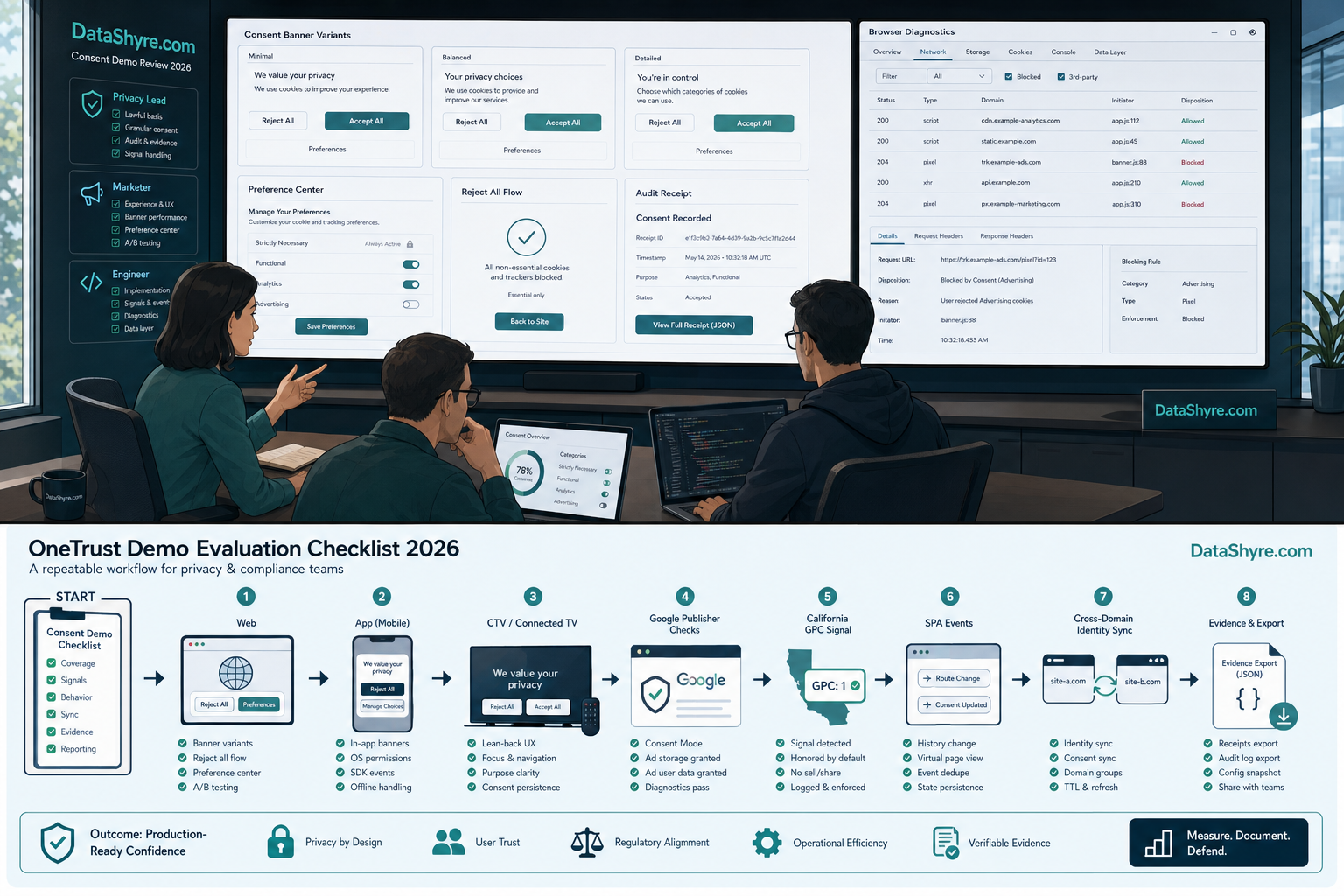
6. Make them walk through known-user and cross-property syncing
OneTrust’s public CMP materials say consent can stay consistent across websites, mobile apps, and other touchpoints. That is a real reason to look seriously at the platform, but it is also where many demos become too abstract.
Ask the vendor to show what happens when:
- a user begins anonymous on one property;
- becomes known later through login or another identifier;
- visits a second managed property;
- changes preferences after that identity is linked.
This part matters because the hardest bugs in consent programs often appear at the point where anonymous states, logged-in states, and regional rules overlap.
7. End with the evidence trail, not the banner
The last question should be the one your support, privacy, or legal team will care about months later.
OneTrust’s current public pages say the platform stores consent receipts, change history, and exportable logs. The ICO’s April 29, 2026 guidance update also reinforced that current rules cover more than old-style cookies alone, including pixels, fingerprinting, scripts, tags, and similar storage-and-access technologies.
So ask the vendor to show what your team can later reconstruct:
- what the user saw;
- what they chose;
- when they chose it;
- which categories or purposes were in scope;
- what changed after a later update or withdrawal.
If the onetrust tool demo cannot show that cleanly, it is still a sales asset more than an operating system.
A short demo script to use this week
If I were joining an onetrust tool demo right now, I would run it in this order:
- define whether the demo is CMP, cookie controls, or broader preferences;
- force
Reject alland later withdrawal; - watch live runtime behavior in a browser, not only the admin console;
- split web, app, and CTV proof into separate checks;
- run the Google publisher branch only if ad-supported inventory matters;
- run the California GPC branch;
- end with evidence exports and a support-style reconstruction.
That short script usually tells you more than a full feature tour.
Bottom line
The best onetrust tool demo in 2026 is not the one with the smoothest pitch. It is the one that survives bad-path questions.
If the vendor can prove live blocking, real rejection, distinct regional logic, publisher fit where relevant, identity-aware syncing, and exportable proof after withdrawal, the demo is doing its job. If it mostly proves that the admin console looks polished, you still do not know enough to buy safely.
Sources
- OneTrust: Consent Management Platform
- OneTrust: Cookie Consent
- European Commission: Information for individuals
- European Commission: What if somebody withdraws their consent?
- ICO: Final storage and access technologies guidance published
- California Department of Justice: Global Privacy Control
- Google AdMob Help: Google consent management requirements for serving ads in the EEA, the UK and Switzerland (for publishers)
This post was updated on August 12, 2026 using current official regulator, government, platform, and vendor materials available at publication time.