

Cookie Consent Banner Examples in 2026: 7 Live Patterns Worth Copying
If you are searching for cookie consent banner examples on October 22, 2026, the useful question is not which banner looks most polished in a design mockup.
It is which pattern still gives people a real choice, keeps optional tracking from firing too early, and remains understandable when privacy, engineering, and marketing teams test it later.
That is still the right frame this year. The European Commission still says consent requests need “clear and plain language.” The UK’s ICO finalized its storage-and-access-technologies guidance on April 29, 2026 and made clear the review is broader than classic browser cookies alone. On March 19, 2026, the EDPB launched a 2026 coordinated enforcement action focused on transparency and information duties under the GDPR. And on July 14, 2026, the EDPB said the Belgian DPA must address the merits of a NOYB complaint about a cookie banner used by broadcaster VRT.
If you want nearby context first, start with our guides to cookie consent banner, cookie consent message examples, and cookie consent requirements. This page is narrower. It is the set of cookie consent banner examples I would compare this week before publishing a new banner on a live site.

Why cookie consent banner examples still matter
The visible banner is only the first layer of the privacy control, but it is still the layer many teams get wrong in public.
CNIL’s warning on dark patterns remains the clearest first-screen test available: “rejecting cookies should be just as easy as accepting them.” That matters because many banners still fail in exactly the same ways:
- refusal is pushed into a second screen;
- categories are too vague to be meaningful;
- settings are hard to reopen later;
- embedded tools and tags still fire before the user has chosen;
- a copied EU-style flow is stretched over California or publisher-ad traffic without enough adjustment.
So cookie consent banner examples are not just inspiration. They are operating patterns. The one you copy will affect whether refusal is visible, whether categories match reality, whether withdrawal works, and whether the page behavior stays aligned with the promise made in the interface.
What strong cookie consent banner examples have in common
Before comparing layouts, it helps to know what tends to survive review:
- the first layer offers a real decision, not a decorated path to acceptance;
- optional technologies remain off until the required signal exists;
- purposes are explained in plain language instead of generic phrases;
- settings can be reopened later without friction;
- the banner logic matches the region and business model being served.
Those points are simple, but they rule out a surprising number of attractive designs.
1. The balanced bottom bar
This is still one of the safest starting points for many websites.
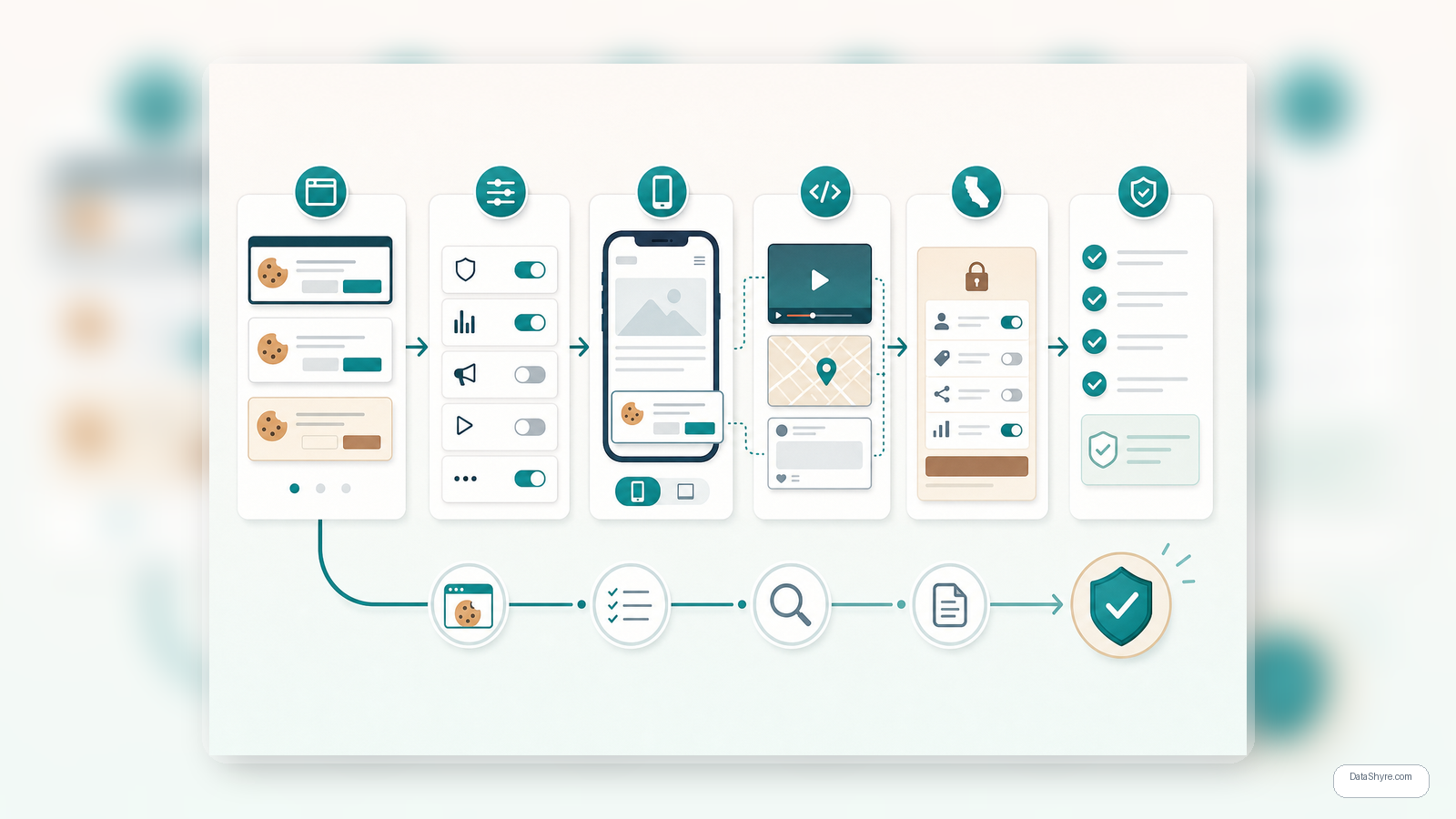
The pattern is simple: a short explanation, two equally prominent actions such as Accept all and Reject all, and a third path such as Manage settings. The best versions stay compact without turning refusal into a secondary experience.
Why it still works:
- the first screen is easy to compare for symmetry;
- mobile translation is usually manageable;
- design bias is easier to catch in review;
- it is fast for teams to test across templates.
For many businesses, this remains the most practical of the common cookie consent banner examples.
2. The three-choice modal
This pattern opens with Accept all, Reject all, and Customize on the same screen.
That sounds obvious, but it still solves an important problem: it lets people refuse, accept, or go granular without first being pushed through a maze. It is especially useful when a site has a heavier stack of analytics, advertising, personalization, or embedded third-party tools.
Why it still works:
- refusal is not delayed behind another click;
- category review is available immediately for users who want detail;
- it maps cleanly to the expectation that consent must be informed and freely given.
If a team asks me for cookie consent banner examples that fit a more complex stack without becoming misleading, this pattern is usually near the top.
3. The category-first panel
Some sites should not lead with a broad yes-or-no frame alone. They should lead with categories that actually match their technology stack.
In this pattern, the first layer still includes a refusal path, but the emphasis is on clearly labeled groups such as analytics, advertising, embedded media, personalization, and strictly necessary services. Non-essential toggles start off.
Why it still works:
- it makes purpose language more concrete;
- it reduces the risk that consent becomes too broad for the real stack;
- it makes it easier to compare the banner against the privacy notice and the live page behavior.
This is one of the stronger cookie consent banner examples when the site has enough vendors that vague labels stop being honest.
4. The mobile bottom sheet with a visible return path
Many banner designs look fair on desktop and quietly become biased on mobile.
The better mobile version uses a bottom sheet or slide-up panel with readable copy, equal-weight choices, and a visible settings path. After the first choice, a footer link, privacy icon, or stable settings link stays available.
Why it still works:
- it fits small screens without hiding refusal;
- it avoids the bright primary accept button plus tiny settings-text trap;
- it treats withdrawal as part of the design, not as an afterthought.
If mobile traffic matters, cookie consent banner examples should always be tested on real devices, not only in a browser inspector.
5. The California hybrid with a privacy-choices route
This is where many US teams expose that they copied an EEA banner and stopped there.
A California-oriented flow often needs a concise tracking notice plus a persistent Your Privacy Choices or similar route for sale-or-sharing controls. If the business is in scope and receives browser-level opt-out signals, that branch also needs to work with Global Privacy Control instead of ignoring it.
Why it still works:
- it separates California opt-out logic from EU-style prior-consent logic;
- it gives US users a durable place to revisit choices;
- it reduces the temptation to flatten every region into one incomplete banner.
The California Privacy Protection Agency’s February 27, 2026 Ford decision is a good reminder here: the agency emphasized that unnecessary friction in opt-out flows violates the CCPA. That is not just a form-design detail. It should influence how you judge cookie consent banner examples if your site serves California users.
6. The logged-in preference center
For SaaS products, subscription products, and member areas, the public banner is only the start of the job.
This pattern keeps the first layer simple but links it to an account-level privacy or cookie settings area. That makes it easier for repeat users to revisit preferences and easier for internal teams to align the public banner, account settings, and downstream systems.
Why it still works:
- withdrawal remains usable after the first session;
- support and legal teams have a clearer place to validate what users can change;
- it reduces drift between public-page consent and logged-in settings.
Not every site needs this pattern, but it is one of the most durable cookie consent banner examples for products with repeat users and complex journeys.
7. The embedded-media placeholder card
This is one of the most practical patterns and still one of the least copied.
Instead of loading optional videos, maps, chat widgets, or social embeds immediately, the page shows a placeholder card explaining that the feature uses optional technologies and offering a clear way to enable that category or open settings.
Why it still works:
- it aligns the request with the actual moment the third-party tool matters;
- it reduces pre-consent leakage from embeds;
- it gives users context at the point of decision instead of only at the homepage banner.
Many cookie consent banner examples look acceptable until an embedded tool starts placing identifiers before the main banner choice. Placeholder cards help close that gap.
What to test before copying a pattern
If I were reviewing cookie consent banner examples for a live site this week, I would test them in this order:
- confirm whether
Reject allis genuinely as visible and accessible asAccept all; - inspect the page before interaction to see whether optional cookies, tags, pixels, or embeds fire early;
- compare each stated category with the tools actually present on the page;
- reopen settings after the first choice and verify that withdrawal changes behavior;
- test region logic separately for EU or UK consent flows and California privacy-choice flows;
- retest on mobile, where spacing, contrast, and button hierarchy often drift;
- check content pages, embedded media, chat tools, and other templates beyond the homepage.
That short review usually tells you more than another vendor demo.
Keep Google’s publisher rule separate from the banner-design review
There is also a narrower branch that matters for some teams.
If the site serves personalized ads through AdSense, Ad Manager, or AdMob to users in the EEA, UK, or Switzerland, Google’s current publisher help still says a certified CMP integrated with the IAB Transparency and Consent Framework is required in those regions. Google also says it “does not check CMPs for full compliance” with applicable privacy laws.
That means one of the best habits when comparing cookie consent banner examples is splitting the review into two questions:
- does the banner pattern make the first-layer choice fair and usable; and
- if publisher ads matter, does the implementation also satisfy Google’s separate product requirement.
Those are related, but they are not the same test.
Bottom line
The best cookie consent banner examples in 2026 are not the prettiest ones.
They are the ones that make refusal obvious, keep optional technologies off until the right moment, explain categories clearly, support later withdrawal, and route the right people into the right privacy flow.
That is why banner design still deserves detailed review. Current materials from the European Commission, the ICO, the EDPB, the CNIL, the California Privacy Protection Agency, and Google all point in the same direction: the visible banner has to match real control, not decorative compliance.
If your current banner still hides refusal, collapses categories into vague labels, or breaks once a video embed or ad stack enters the page, the answer is usually not a copy edit. It is a pattern change.
Sources
- European Commission, legal grounds for processing data: https://commission.europa.eu/law/law-topic/data-protection/information-business-and-organisations/legal-grounds-processing-data_en
- European Commission, information for individuals: https://commission.europa.eu/law/law-topic/data-protection/information-individuals_en
- ICO, final storage and access technologies guidance published: https://ico.org.uk/about-the-ico/media-centre/news-and-blogs/2026/04/final-storage-and-access-technologies-guidance-published/
- ICO, guidance on the use of storage and access technologies: https://ico.org.uk/for-organisations/direct-marketing-and-privacy-and-electronic-communications/guidance-on-the-use-of-storage-and-access-technologies/
- EDPB, CEF 2026 coordinated enforcement action on transparency and information obligations: https://www.edpb.europa.eu/news/cef-2026-edpb-launches-coordinated-enforcement-action-on-transparency-and-information_en
- EDPB, Belgian DPA must handle the merits of NOYB cookie-banner complaint: https://www.edpb.europa.eu/news/edpb-requires-belgian-dpa-to-handle-the-merits-of-noyb-cookie-banner-complaint_en
- EDPB, report of the work undertaken by the cookie banner taskforce: https://www.edpb.europa.eu/our-work-tools/our-documents/report/report-work-undertaken-cookie-banner-taskforce_en
- CNIL, dark patterns in cookie banners: https://www.cnil.fr/en/dark-patterns-cookie-banners-cnil-issues-formal-notice-website-publishers
- CNIL, vanityfair.fr fined 750,000 euros for cookies placed without consent: https://www.cnil.fr/en/cookies-placed-without-consent-company-publishes-website-vanityfairfr-fined-750000-euros
- CalPrivacy, Ford Motor Company decision: https://privacy.ca.gov/2026/02/ford-motor-company/
- CPPA, laws and regulations: https://cppa.ca.gov/regulations/
- Google AdSense Help, publisher CMP requirements: https://support.google.com/adsense/answer/13554116?hl=en
—
Published: October 22, 2026. Updated using current official regulator, government, and platform materials available at publication time.