

Salesforce Consent Management: 6 Checks Before You Sync Preferences Across Clouds in 2026
salesforce consent management usually sounds easier in a demo than it feels in production. One form capture can feed Sales Cloud, Data 360, Marketing workflows, service teams, and downstream reporting. That is useful. It is also where consent mistakes get multiplied.
The problem is not whether Salesforce has consent features. It does. The problem is whether your design makes one customer choice travel cleanly across clouds, brands, channels, and purposes without drifting on the way.
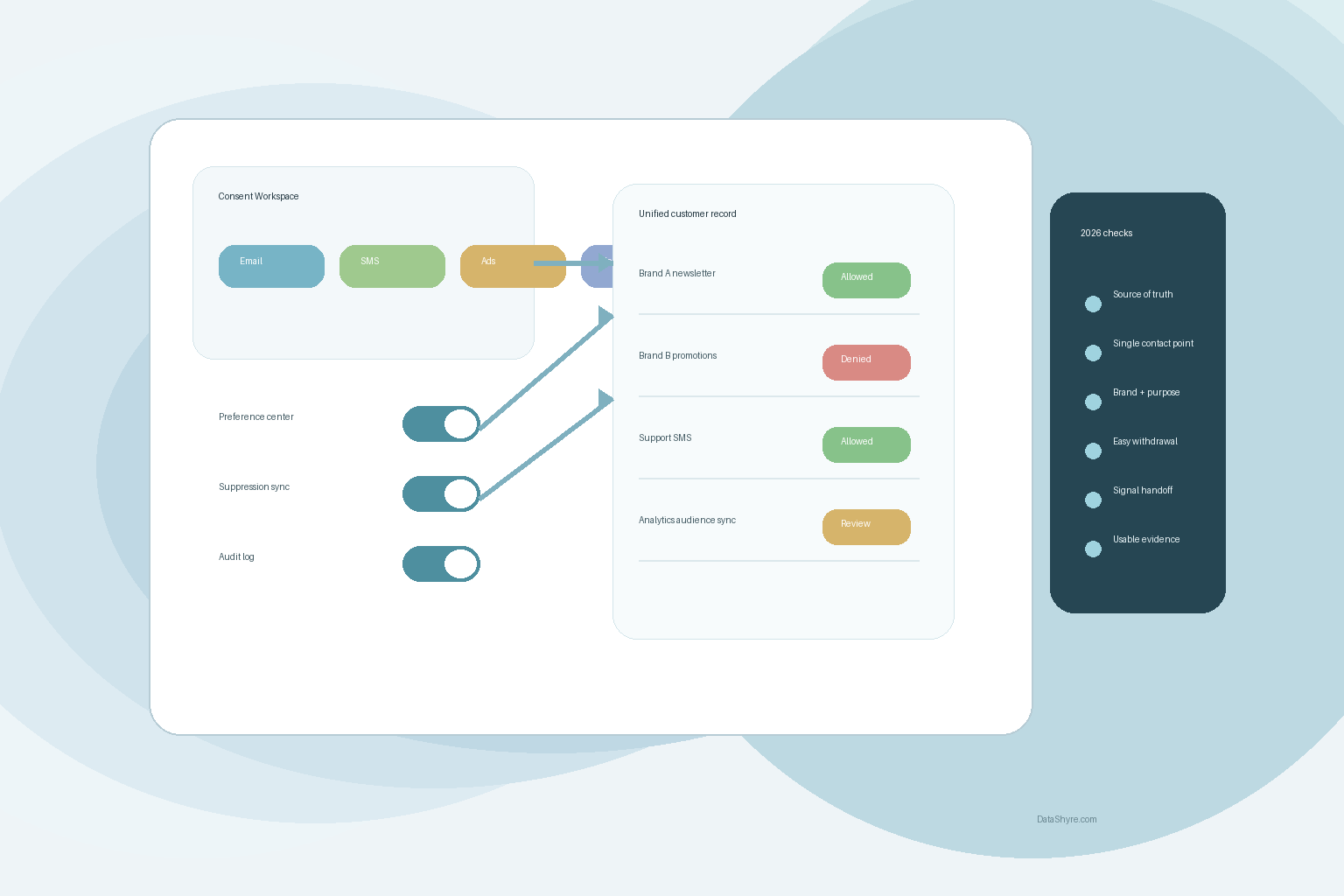
Salesforce’s current documentation says its consent data model manages consent at four levels: global consent, engagement channel consent, contact point consent, and data use purpose. It also calls out Brand as a critical dimension even though it is not itself a consent object. That is a solid starting point. It is not a launch checklist.
As William Malcolm of the ICO put it in April 2026, users need “meaningful control over how their data is used.” That is the right standard for any Salesforce rollout.
What Salesforce gives you, and where teams still slip
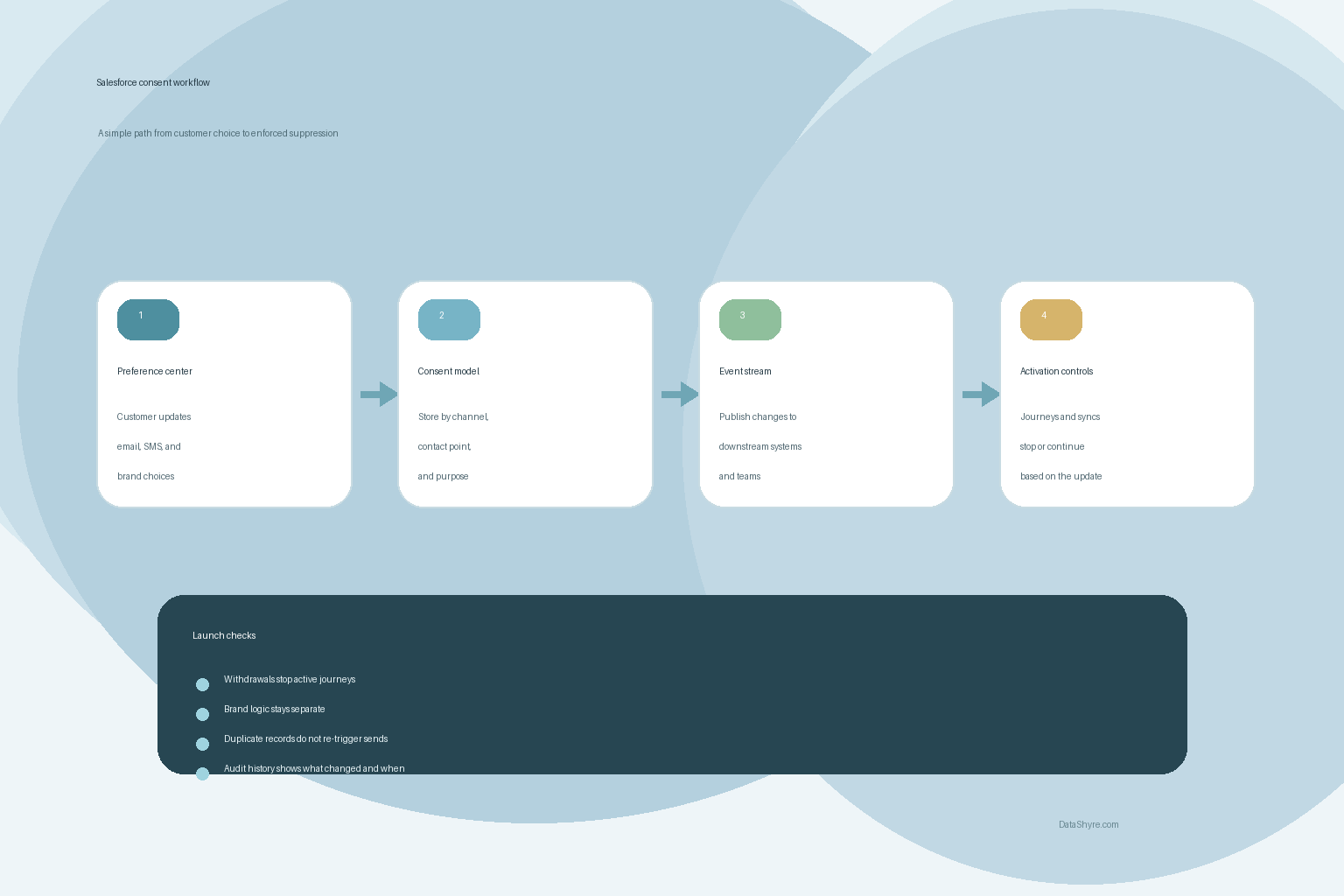
Salesforce gives teams more than a single opt-in flag. Current help documentation says Data 360 can ingest and store consent preferences, Marketing tools can apply global or granular preferences to communications, and Privacy Center can track customer consent and honor opt-out requests. Salesforce also documents a Consent Event Stream for record creations and updates so external platforms and internal systems can react to consent changes instead of waiting for manual exports.
That is the upside. The catch is design discipline.
Salesforce’s own design notes warn teams to align contact records to a single contact point, configure duplicate management, and think carefully about multi-brand consent. Those are not side issues. They are the places where a clean preference center turns into conflicting records, duplicate sends, or opt-outs that land in one cloud but not another.
If you are comparing process options first, our guides to consent management platform best practices, marketing consent, and GDPR consent management platform are useful companion reads.
Six checks before go-live
1. Pick one system of record for each kind of consent
Do not start with fields. Start with ownership.
Which system owns newsletter permission? Which one owns SMS? Which one owns website preference-center changes? Which one owns suppression status after a withdrawal request? If your answer is “Salesforce, broadly,” you are not done yet.
The safest setups define one source of truth for each consent type and document which systems subscribe to it. That keeps salesforce consent management from becoming a quiet conflict between forms, journeys, imports, and service updates.
2. Fix identity and duplicate handling before you sync anything
This is the unglamorous step that saves real pain later. Salesforce explicitly flags the need to align contact records to a single contact point and to configure duplicate management. That matters because consent is only useful if the right record is attached to the right person and the right channel.
If one customer has two email records, a merged lead, and a mobile number shared across systems, your preference history can become unreliable fast. The result is a bad mix: over-suppression for some people, under-suppression for others.
3. Separate brand, channel, and purpose
This is where the Salesforce model is genuinely helpful. It lets you move beyond a blunt yes-or-no field and handle consent more granularly.
Use that structure. A customer agreeing to product emails from Brand A is not automatically agreeing to event messages from Brand B. The same person might allow service SMS and reject promotional email. salesforce consent management works better when those choices stay narrow and readable instead of getting bundled into a single marketing status.
4. Make withdrawal as real as collection
Collection gets the attention. Withdrawal is where the program proves itself.
The ICO’s consent guidance says it must be as easy to withdraw consent as it was to give it, and GDPR Article 7 says the same thing. Maureen Mahoney of the CPPA made the practical point even more directly in October 2025: “privacy rights are meaningless if they’re too difficult to use.”
So test the ugly cases. Unsubscribe from email. Revoke SMS. Change a preference in a portal. Call support and ask for the same change. Then confirm the downstream journeys, segments, and service processes actually stop using the data for that purpose.
5. Treat California opt-out signals as operating inputs
If your web stack feeds Salesforce audiences or activation workflows, browser and site-level signals matter too.
In September 2025, the CPPA joined California, Colorado, and Connecticut in a sweep focused on businesses that may not have been honoring Global Privacy Control signals. A month later, Tom Kemp said privacy choices should be “as simple as clicking a button in your browser.” That is a warning against treating opt-out signals as a web-team issue only.
If Salesforce segments, journeys, or downstream activations use data affected by those signals, the opt-out has to reach the systems that act on it.
6. Keep evidence that somebody else can understand
Salesforce gives you tools for this. Current documentation points to the Consent Event Stream for change notifications, and Salesforce release notes say Field Audit Trail can retain and audit changes across five consent management objects.
That only helps if the records are usable. You want a trail that answers simple questions fast:
- What did the person agree to?
- Through which channel and for which purpose?
- Under which brand?
- When did it change?
- Which downstream systems were updated?
That is where salesforce consent management stops being a configuration project and starts becoming an operating control.
Bottom line
Salesforce can support a serious consent program, but it does not remove the hard part. You still have to decide record ownership, resolve identity, separate brand and purpose, honor withdrawals quickly, and keep evidence worth keeping.
If those pieces are in place, Salesforce becomes a useful backbone for consent operations. If they are not, the platform will only make the confusion move faster.
Sources
- Salesforce Help
- Salesforce Developer Documentation
- Information Commissioner’s Office
- EUR-Lex
- California Privacy Protection Agency