

Cookie Consent Message Examples in 2026: 7 Patterns That Still Work
If you are searching for cookie consent message examples on August 19, 2026, the useful question is not which banner sounds the most polite. It is which message still makes sense after you test the reject path, the settings layer, and the technologies the site actually uses.
That matters more now, not less. The European Commission still says valid consent must be freely given and that people must be able to refuse or withdraw it without disadvantage. The UK’s ICO published final storage-and-access-technologies guidance on April 29, 2026 and made clear the review is broader than classic browser cookies alone. In France, CNIL is still repeating the sharpest design test in one sentence: users should be able to reject as easily as they accept. And on July 14, 2026, the EDPB required the Belgian DPA to handle the merits of a cookie-banner complaint involving broadcaster VRT, which is a useful reminder that banner scrutiny is still active.
If you want the surrounding basics first, start with our guides to cookie consent message, cookie consent banner, and GDPR cookie consent examples. This article is narrower. It is a set of cookie consent message examples you can adapt without drifting away from the live compliance baseline.

What the best cookie consent message examples have in common
Before the examples, the shared pattern:
- they explain the main optional purposes in plain language;
- they show a real refusal path on the first layer where that structure is required;
- they avoid pretending every tool is “necessary”;
- they tell users they can return and change the choice later;
- they match the site’s actual runtime behavior.
The ICO’s April 2026 announcement put the broader goal in plain English when William Malcolm said people should have “meaningful control over how their data is used.” That is a better internal drafting test than whether the banner simply looks modern.
The European Commission gives the usability test in one sentence too:
“It should be as easy to withdraw as to give consent.”
If your message promises later control but the visitor cannot actually reopen settings or reverse the choice cleanly, the copy is overpromising.
7 cookie consent message examples you can adapt
1. The standard three-choice website banner
For many business sites, this is the safest default:
We use cookies and similar technologies to run the site, measure traffic, and support marketing. You can accept all, reject non-essential tracking, or manage preferences. You can change your choice any time in Cookie Settings.
Why it works:
- it names the main optional purposes;
- it gives an immediate reject path;
- it points to a later return path;
- it avoids implying consent is required to use the site.
2. The analytics-first banner
Some sites mainly need a message for optional analytics:
We use essential technologies to keep the site working and optional analytics tools to understand performance. You can accept analytics, reject optional tracking, or review settings first. Your choice can be updated later.
This version only works if the scope is honest. If advertising, session replay, or personalization is also active, do not understate the setup just to make the message shorter.
3. The ecommerce banner
Commerce teams usually need copy that separates checkout functions from optional marketing:
We use cookies and similar technologies to power checkout, remember your preferences, measure store performance, and support marketing. You can accept all, reject non-essential tracking, or manage preferences. Update your choice any time in Privacy Settings.
This is one of the more practical cookie consent message examples because it tells users why some technologies stay on while still making the optional layer clear.
4. The publisher or ad-supported banner
If advertising is part of the model, say so plainly:
We use cookies and similar technologies to operate the site, measure audiences, personalize content, and support advertising. You can accept all, reject non-essential uses, or manage choices by purpose. You can revisit these settings later.
Vague lines about “enhancing your experience” are much weaker here. If advertising or audience measurement matters, name it.
5. The embedded-content prompt
Not every message needs to be site-wide:
This video uses optional cookies and similar technologies from a third party. Choose
Allowto load the video now, orCancelto continue without it. You can revisit this choice in Cookie Settings.
This is one of the most useful cookie consent message examples for help centers, blogs, and knowledge bases that use video, maps, or chat widgets.
6. The mobile-first short banner
On smaller screens, the copy often needs to be tighter:
We use cookies and similar technologies for site performance, analytics, and marketing. Accept all, reject non-essential tracking, or open settings. Change your choice any time.
The main risk on mobile is not just wording. It is whether Reject becomes visually weaker, lower on the screen, or harder to reach than Accept.
7. The California privacy-choice message
California wording usually needs to reflect privacy-choice logic rather than EU-style prior consent alone:
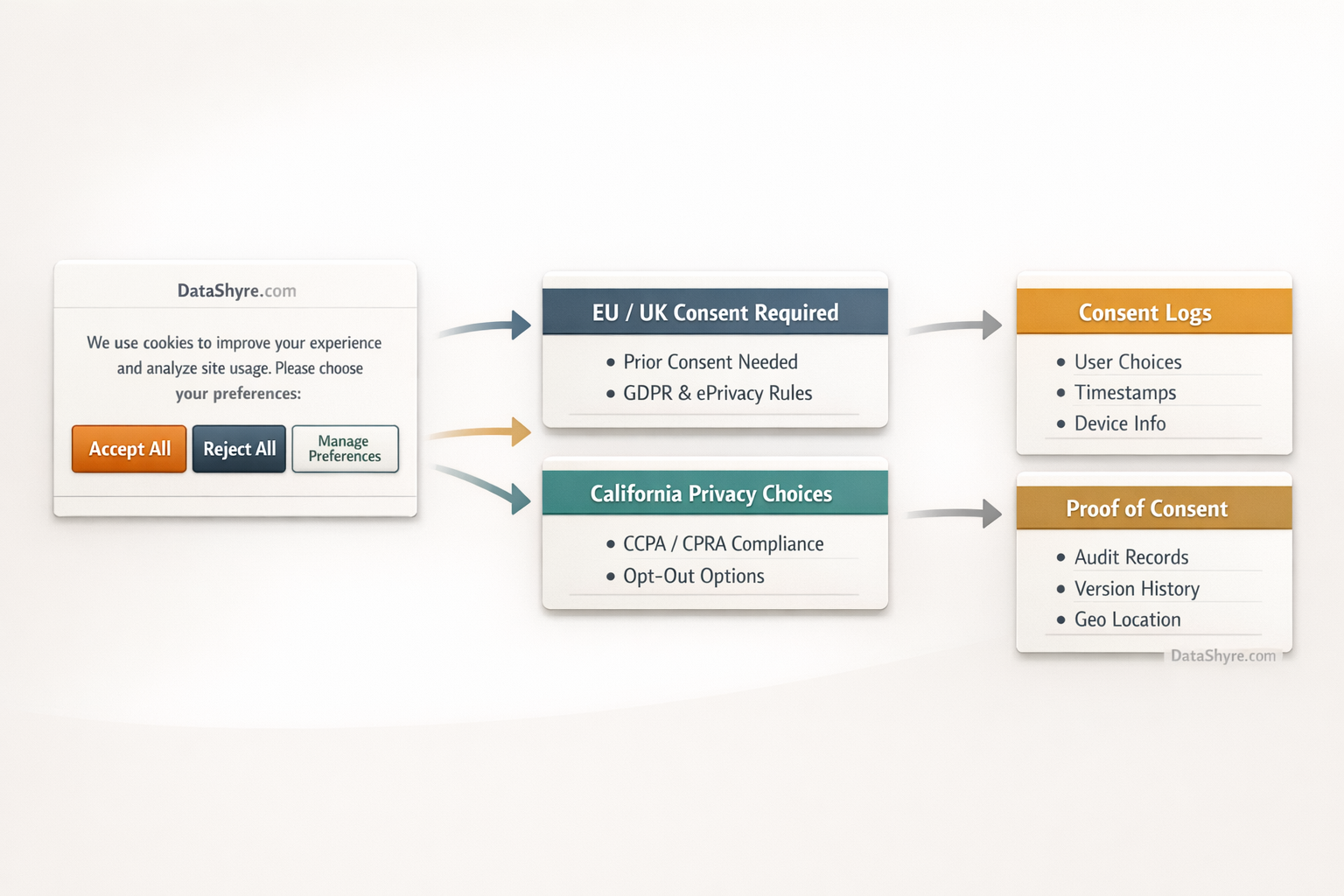
We use cookies and similar technologies for analytics and advertising. California visitors can use Privacy Choices to opt out of sale or sharing, and qualifying browser privacy signals are honored where required.
The California Department of Justice still describes Global Privacy Control as a user-enabled signal that covered businesses must honor as a valid request to stop the sale or sharing of personal information. If your site operates in that context, the message should line up with the actual rights path.
What weak cookie consent messages usually get wrong
The same copy problems keep showing up:
- they say “we value your privacy” but never identify the optional purposes;
- they offer
Acceptimmediately but hide rejection in a softer or slower path; - they mention only cookies when the site also uses pixels, scripts, fingerprinting, or similar tools;
- they promise later control without a usable way to reopen settings;
- they sound narrower than the real tracking stack.
That is why the words should be drafted after a quick implementation review, not before it. The message needs to describe the system you really have.
A quick review before you publish banner copy
Before you approve any of these cookie consent message examples, run this short sequence:
- Check which optional technologies the site actually uses.
- Confirm the first-layer text names the main purposes in plain language.
- Make sure the refusal path is as visible as the acceptance path where your structure requires that.
- Test whether optional tags, pixels, or scripts stay off after rejection.
- Reopen the settings later and confirm withdrawal still works cleanly.
- For California traffic, verify that any qualifying browser privacy signal and opt-out path match the words on the banner.
If the technical behavior fails those checks, revising the sentence alone will not fix much.
Bottom line
The strongest cookie consent message examples in 2026 are short, plain, and honest about purpose. They give a visible refusal path, avoid pretending everything is essential, and point users back to a real settings control later.
If you copy only the wording and not the choice design or technical behavior, the result will still be weak. If you match the copy to the actual consent flow, these examples become much more useful.
Sources
- European Commission: When is consent valid?
- European Commission: Legal grounds for processing data
- UK ICO: Final storage and access technologies guidance published
- UK ICO: Guidance on the use of storage and access technologies
- CNIL: Dark Patterns in Cookie Banners: CNIL issues formal notice to website publishers
- European Data Protection Board: Belgian DPA must handle the merits of a cookie-banner complaint
- California Department of Justice: Global Privacy Control
This post was updated on August 19, 2026 using current official regulator guidance available at publication time.