

GDPR Cookie Consent Google Tag Manager in 2026: 7 Checks Before Tags Fire
If you are searching for gdpr cookie consent google tag manager on August 12, 2026, the useful question is not whether the banner looks compliant. It is whether Google Tag Manager actually keeps non-essential analytics, advertising, personalization, and partner tags from firing until valid consent exists.
That is still the right frame in 2026. Google’s current consent documentation says you need to set the default consent state before any commands that send measurement data, and it says consent updates should be tracked on the page where they occur, before any page transition. The European Commission still says consent must be freely given, specific, informed and unambiguous, and that it should be “as easy to withdraw as to give consent.” The UK’s ICO says any consent mechanism must “function as intended” and makes it a practical checklist point that refusal should be as easy as acceptance. France’s CNIL still says “Rejecting cookies should be just as easy as accepting them.” And on July 14, 2026, the EDPB published a binding-decision outcome requiring the Belgian DPA to handle the merits of a NOYB cookie-banner complaint, which is another reminder that banner design and runtime behavior are still active enforcement terrain.
If you want the wider setup first, start with our guides to Google Tag Manager cookie consent, tag manager cookie consent, and GDPR cookie consent. This article is narrower. It is the GDPR-specific GTM review I would run before letting optional tags fire on a live site.

Why this keyword still matters
The common failure is not that a team forgot to add a banner. The failure is that the banner, the CMP, the GTM container, and the actual browser behavior are operating on different timelines.
One template sets consent late. One custom HTML tag bypasses the consent state. One video embed loads outside GTM. One reject button looks fair in the UI but still leaves optional storage or reads in place. That is exactly why gdpr cookie consent google tag manager is mostly a sequencing and evidence problem, not a copywriting problem.
1. Put the consent-writing logic at the earliest GTM point
Google’s Tag Manager help says the Consent Initialization trigger is there to make sure consent settings are honored “before any other triggers fire.”
That sentence is one of the most useful GTM rules in this whole topic. If your default consent logic or CMP bridge runs later on Initialization, Page View, or a custom event, the rest of the container may already have had a chance to evaluate tags first.
For a real audit, answer these questions in the live container:
- Which tag sets the default consent state?
- Which tag updates consent after user interaction?
- Which trigger does each one use?
- Which old tags or templates can still run outside that path?
If those answers are fuzzy, the setup is not finished.
2. Set denied defaults before any measurement code can react
Google’s current developer guide says the default consent state should be set before any commands that send measurement data. Its current Tag Assistant troubleshooting guide also warns that setting the default too late may not have the anticipated effect.
That matters because GTM can look correct in preview mode while still being wrong on a cold page load.
For most current Google implementations, the important consent types are:
ad_storageanalytics_storagead_user_dataad_personalization
Under a GDPR-focused implementation, the practical first-load question is simple: in a clean browser session, are those relevant defaults denied before optional measurement or advertising behavior gets a chance to act?
If the answer is no, the banner may be visible, but the GDPR control is already late.
3. Use GTM consent APIs or templates, not late patchwork
Google’s consent implementation guide for Tag Manager says to use the Tag Manager-specific APIs setDefaultConsentState and updateConsentState. It also warns not to substitute gtag('consent', 'update', ...) inside Tag Manager because queued gtag messages may not be processed before the next event begins.
That is an easy place for inherited GTM setups to drift.
A late patch in a custom HTML tag can seem fine during one clean acceptance demo and still lose the race on a slower page load, after a template change, or when a vendor script order changes. A stronger GDPR setup is boring in the best way: denied defaults, an early GTM-native consent path, and a clearly traceable update when the user acts.
4. Test reject, granular choice, and withdrawal on the same page
Google’s current consent guide says consent updates should be tracked on the page where they occur, before any page transition. The European Commission says withdrawal should be “as easy to withdraw as to give consent.”
Those two points belong together.
If your site sends users through a route change, a redirect, or a delayed modal close before the new consent state is fully applied, the interface may promise more than the runtime delivers.
For GDPR, the three journeys that matter most are:
- first visit plus
Reject all; - first visit plus a granular approval of only one category;
- later withdrawal through the persistent settings path.
If you only prove that Accept all starts analytics, you have not really tested the consent layer.
5. Make refusal genuinely as easy as acceptance
This is where design fairness and GTM behavior meet.
The ICO’s current storage-and-access-technologies guidance says consent mechanisms must “function as intended” and includes a practical checkpoint that the mechanism should make it as easy to refuse consent as it is to accept. The CNIL’s current dark-patterns notice says the same thing even more plainly:
“Rejecting cookies should be just as easy as accepting them.”
>
CNIL
That is not only a UX observation. It is a runtime requirement. If the first layer gives users a neat reject path but GTM still allows optional tags, pixels, or embedded trackers to run, the implementation is not merely inelegant. It is saying one thing and doing another.
6. Follow the consent state into real tags, embeds, and later reads
This is where many GTM reviews stop too early.
A container can be clean while the wider site is still messy. One vendor script may load outside GTM. One embedded player may drop identifiers before consent. One tag may respect the initial denied state but keep using previously stored identifiers after a user withdraws.
Official enforcement keeps pointing to that exact gap. In December 2025, the CNIL said AMERICAN EXPRESS was fined for several cookie-rule failures, including placing cookies without consent or despite refusal and continuing to read previously placed cookies despite withdrawal.
That is why I would test more than the GTM event timeline:
- inspect the browser after
Reject all; - inspect it again after a later withdrawal;
- verify whether non-Google scripts still load or read stored values;
- and verify whether the preference change affects the actual downstream behavior, not just the banner state.
If optional tracking is still active after refusal or withdrawal, the GTM implementation is not solving the whole GDPR problem.
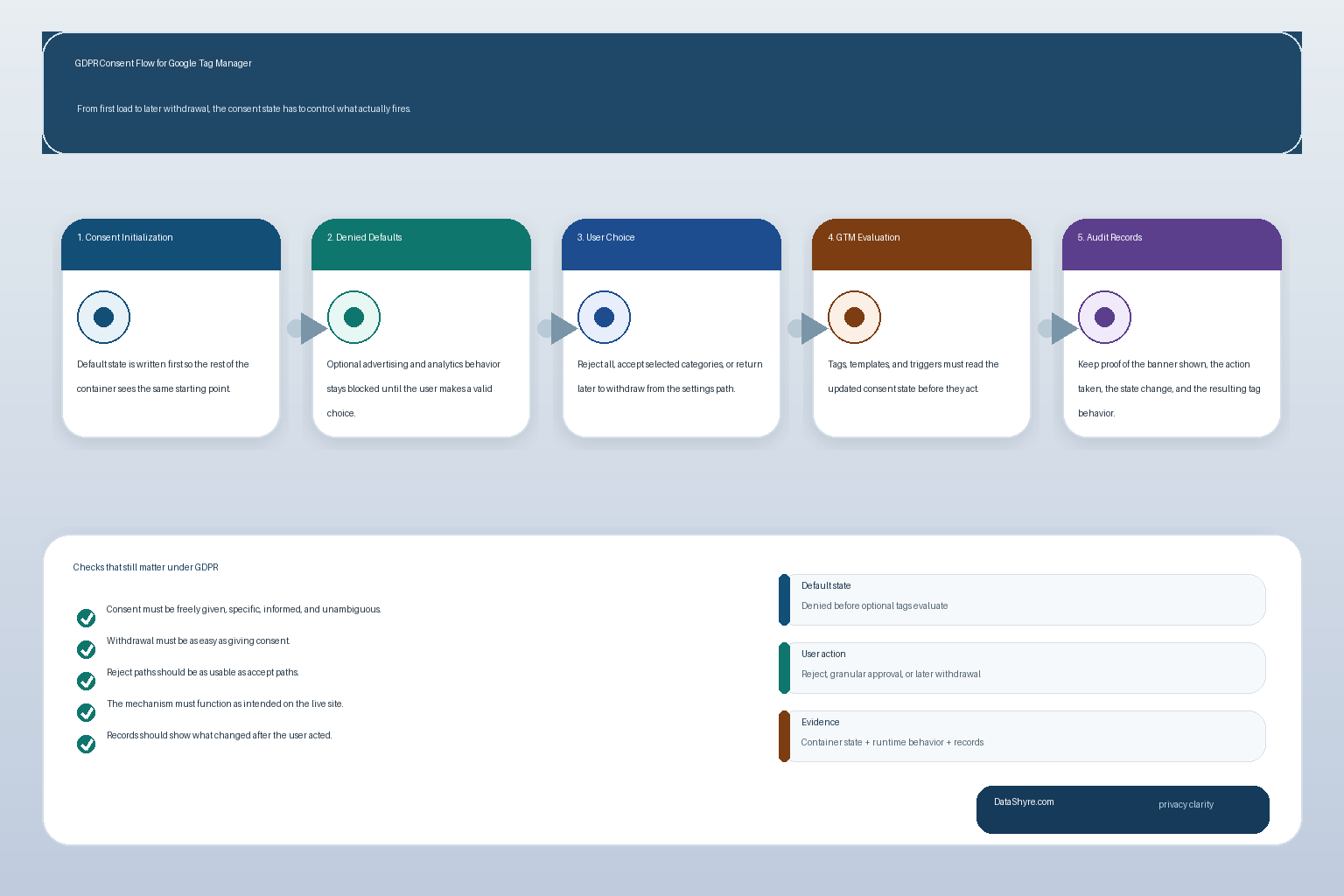
7. Re-test after every real change, not only the first launch
The EDPB’s July 14, 2026 cookie-banner decision is a useful reminder here. Cookie-banner complaints are still live, and regulators are still being asked to look past surface design and into how the mechanism actually works.
Operationally, drift is what breaks GDPR GTM setups:
- a CMP template is updated;
- a marketing team adds a new tag;
- a developer ships a new route or embedded widget;
- a regional rule changes;
- or a vendor starts reading state in a new way.
So the right standard is not did this work on launch day? It is can we still prove what happens now?
A short go-live checklist for this week
Before you trust a gdpr cookie consent google tag manager setup in production, run this sequence:
- Load the site in a clean browser session.
- Confirm the consent-writing logic runs on
Consent Initialization. - Verify denied defaults exist before optional measurement code reacts.
- Click
Reject alland confirm optional tags remain blocked. - Allow only one category and confirm only the expected behavior changes.
- Reopen preferences and test withdrawal from the persistent settings path.
- Check whether off-container scripts, embeds, or previously stored identifiers still undermine the choice.
- Keep enough records that engineering, privacy, and support can reconstruct what happened later.
That short review surfaces more truth than most banner screenshots ever will.
Bottom line
GDPR cookie consent Google Tag Manager in 2026 is not mainly a banner-design task. It is an execution-order and proof task.
If consent initializes first, defaults are denied where they should be, rejection is as real as acceptance, withdrawal changes the runtime behavior, and later evidence is usable, the setup is in much better shape.
If any of those pieces are vague, the banner may look compliant while GTM and the wider site still let optional tracking outrun the user’s choice.
Sources
- Google for Developers: Set up consent mode on websites
- Google for Developers: Troubleshoot consent mode with Tag Assistant
- Google Tag Manager Help: Tag Manager consent mode support
- UK ICO: How do we manage consent in practice?
- European Commission: When is consent valid?
- European Commission: What if somebody withdraws their consent?
- CNIL: Dark Patterns in Cookie Banners: CNIL issues formal notice to website publishers
- CNIL: Cookies: AMERICAN EXPRESS fined €1.5 million by the CNIL
- EDPB: EDPB requires Belgian DPA to handle the merits of NOYB cookie banner complaint
This post was updated on August 12, 2026 using current official regulator, government, and platform materials available at publication time.