Webflow Cookie Consent: Complete 2026 Compliance Guide
Published Keyword: webflow cookie consent
Executive Summary
Webflow websites face unique cookie consent challenges due to the platform’s lack of native consent management tools. With GDPR enforcement fines reaching €295 million in H1 2026 and regulators targeting consent violations specifically, Webflow site owners must implement compliant solutions to avoid significant penalties. This guide provides a step-by-step approach to achieving GDPR-compliant cookie consent on Webflow.
Why Webflow Cookie Consent Is Critical in 2026
- No Native Solution – Webflow lacks built-in cookie consent mechanisms, requiring third-party integrations
- Enforcement Surge – GDPR fines increased 230% in Q2 2026 vs Q1, with consent failures being a top violation
- Cross-Platform Scrutiny – Regulators are auditing EU visitor data handling with increased focus on consent legitimacy
- Technical Complexity – Webflow’s staging subdomains (.webflow.io) require special handling for accurate consent testing
Key Requirements for GDPR-Compliant Webflow Cookie Consent
| Requirement | GDPR Basis | Implementation Approach | |————-|————|————————-| | Prior Consent | Article 6(1)(a) – Freely given, specific, informed | Block all non-essential scripts until active consent | | Granular Control | Article 7(3) – Easy withdrawal | Separate toggles for analytics, marketing, functional cookies | | Equal Visibility | EDPB Guidelines 05/2020 | Accept and reject buttons must have equal prominence | | Purpose Limitation | Article 5(1)(b) – Specific purposes | Clear descriptions of what each cookie category does | | Audit Trail | Article 30 – Records of processing | Maintain logs of consent timestamps and choices |
Step-by-Step Implementation for Webflow
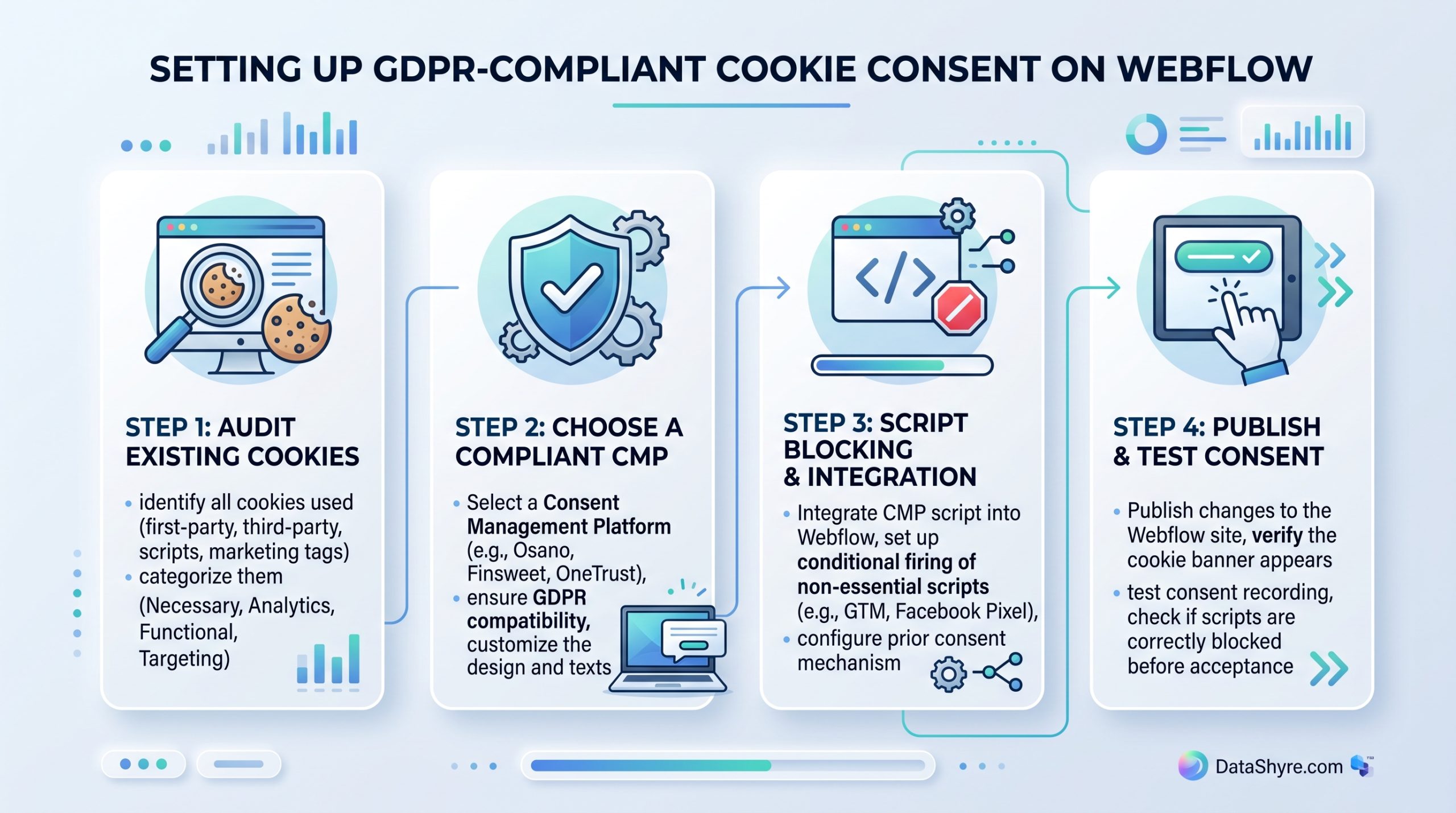
1. Audit Your Webflow Site’s Cookies
- Identify all trackers – Use browser dev tools to list cookies set on page load
- Categorize by purpose – Essential (session), Analytics, Marketing, Preferences
- Check script loading – Verify which scripts fire before user interaction
- Document findings – Create a cookie inventory table for transparency
“The foundation of compliant cookie consent is knowing exactly what your site sets and why.” – Data Protection Authority Guidance, 2026
2. Select a Compliant Consent Management Platform (CMP)
When choosing a CMP for Webflow, prioritize:
- Pre-consent script blocking – Essential for preventing premature tracker firing
- Google Consent Mode v2 support – Critical for GA4 and Ads compliance
- Audit-ready logging – Detailed records of consent decisions
- Easy Webflow integration – Simple script injection without custom code
- Regular updates – Must adapt to evolving GDPR interpretations
3. Implement the CMP Script Correctly
Proper implementation sequence is critical:
- Access Project Settings → Custom Code → Head Code
- Paste CMP script FIRST – Must load before any other scripts
- Verify load order – Use network tab to confirm CMP loads before GA4, Meta Pixel, etc.
- Test on production domain – .webflow.io subdomain may bypass consent requirements
- Publish and validate – Check that no non-essential cookies set pre-consent
4. Configure Script Blocking and Categories
Within your CMP dashboard:
- Create cookie categories – Essential (always on), Analytics, Marketing, Preferences
- Map scripts to categories – Assign each tracker to its appropriate purpose
- Set blocking rules – Block non-essential categories until explicit consent
- Enable Google Consent Mode v2 – If using GA4 or Google Ads
- Customize banner text – Use clear, plain language descriptions
5. Design Compliant Banner UI
Following EDPB guidelines on dark patterns:
- Equal button weight – Accept and Reject must be visually equivalent
- No pre-ticked boxes – All toggles must start in off position (except Essential)
- Easy access to settings – Link to preference center must be visible
- Clear purpose descriptions – Explain what data each category collects
- Withdrawal mechanism – Persistent link to modify consent at any time
Internal Resources for Webflow Site Owners
- Webflow Cookie Consent Examples – Real implementation patterns from compliant sites
- Google Consent Mode v2 Setup – Step-by-step guide for GA4 integration
- Cookie Banner Design Principles – Avoiding dark patterns while maintaining conversions
- Testing Your Webflow Consent Setup – Validation checklist before going live
Testing Your Implementation
Before considering your Webflow cookie consent compliant:
- Test in incognito mode – Ensures clean slate without existing cookies
- Verify pre-consent state – No analytics/marketing cookies should load initially
- Test rejection flow – Rejecting all non-essential should leave only essential cookies
- Check partial acceptance – Accepting only analytics should block marketing scripts
- Confirm withdrawal works – Users must easily revisit and change choices
- Validate on production – Test on your live domain, not just .webflow.io
- Check mobile responsiveness – Banner must be usable on all device sizes
Ongoing Maintenance Requirements
GDPR compliance is not a one-time setup:
- Quarterly audits – Re-scan for new trackers added via Webflow updates or integrations
- CMP updates – Ensure your provider adapts to new EDPB guidelines
- Legal review – Annual check-in with privacy counsel on evolving interpretations
- User feedback – Monitor bounce rates and consent rates for UX issues
- Breach preparedness – Have process ready if consent logs are questioned
Conclusion
Achieving GDPR-compliant cookie consent on Webflow requires technical precision and ongoing vigilance. By implementing a proper CMP with script blocking, granular controls, and transparent user interfaces, Webflow site owners can meet regulatory requirements while maintaining user trust. With enforcement actions increasing and fines reaching record levels in 2026, the investment in compliant consent implementation is essential for any Webflow site serving EU visitors.
Published: August 30, 2026