

Finsweet Cookie Consent in 2026: 7 Checks Before You Trust Consent Pro on Webflow
If you are searching for finsweet cookie consent on August 19, 2026, the first useful clarification is that the old Finsweet cookie-consent component has moved. Finsweet’s own documentation says the earlier Cookie Consent experience was migrated to Consent Pro, and Webflow’s current help center now points teams to the Consent Pro app for consent management on Webflow.
That matters because the real review is no longer, Did we add a banner? It is, Did Consent Pro, Webflow, Google tags, embeds, fonts, and regional privacy logic all stay aligned on the live site after the last publish?
The regulatory baseline is still active this week. The UK ICO finalized its storage-and-access technologies guidance on April 29, 2026, and the scope expressly reaches beyond classic cookies into scripts, tags, pixels, and similar technologies. The European Commission still says valid consent must be freely given, specific, informed, and unambiguous, and that withdrawal should be as easy as giving consent. In California, the Department of Justice still says Global Privacy Control is a valid browser-based request to stop the sale or sharing of personal information, and the CPPA’s current regulations page reflects multiple rules effective in 2026.
If you want the adjacent platform context first, start with our guides to Webflow cookie consent, Google Tag Manager cookie consent, and cookie consent manager. This article is narrower. It is the implementation review I would run before trusting finsweet cookie consent on a live Webflow site this week.

Why this keyword now really means Consent Pro
The old naming can hide the real implementation risk.
Finsweet’s legacy cookie-consent page now says:
“Cookie Consent in Components was migrated to a new experience called Consent Pro.”
>
Finsweet
So when someone says finsweet cookie consent in 2026, they usually mean one of four things:
- a legacy setup that may not be using the current Consent Pro flow;
- a Webflow site running the newer app but still carrying old scripts or old assumptions;
- a GTM and Google-consent setup that looks correct in the UI but fires too early in production;
- a California or multi-region flow that was never tested separately from the EU banner logic.
That is why this keyword deserves its own review instead of being folded into a generic banner article.
7 checks before you trust finsweet cookie consent on a live site
1. Confirm whether the site is still on legacy Finsweet cookie consent or has fully moved to Consent Pro
This is the first check because half the later problems start here.
Finsweet’s current migration guidance says v1 users can keep older behavior, but features such as logs, auto-categorized scripts, and newer geolocation behavior do not become available until the migration is completed. The docs also say the new script must be added to the Webflow , the legacy code block removed, and the site published again.
If a team says it is using finsweet cookie consent, ask:
- Are we on Consent Pro V2?
- Did we replace the legacy script, not just add another one?
- Did we remove old code added by the app or by custom code?
- Did we publish after the migration?
If those answers are fuzzy, the rest of the audit is premature.
2. Remove any Webflow or custom-code paths that bypass Consent Pro
This is the most common Webflow-specific failure.
Webflow’s own help article says Consent Pro supports strict opt-in consent and “blocks scripts before consent.” But Webflow’s integration guide also warns that Google Analytics and Meta Pixel added through Webflow’s native Apps & Integrations flow cannot be blocked by Consent Pro. Scripts placed directly in Site Settings custom code can also fire before Consent Pro intercepts them.
So for finsweet cookie consent, the practical review is not just inside the app. It is across:
- Site Settings custom code;
- Webflow’s native integrations;
- GTM containers;
- app-installed marketing tools;
- embeds and custom snippets added by other teammates.
If the same tracker exists both inside Consent Pro and elsewhere in Webflow, the banner can look right while the runtime behavior is still wrong.
3. Verify GTM timing before any tag gets to run
This is the technical control that most often drifts.
Consent Pro’s current GTM guide says to remove the GTM tag, use a Consent Initialization – All Pages trigger, and make sure Consent Pro loads before collection tags. The docs also say Consent Pro supports both Basic and Advanced Google Consent Mode, with Basic mode as the recommended default.
That timing matters because Google’s consent-mode logic is sequence-sensitive. If a measurement or marketing tag acts before the consent default and update are in place, your setup can claim consent governance while still leaking data too early.
On a live Webflow build, test:
- what loads before any banner interaction;
- whether the GTM container was updated after Consent Pro changes;
- whether marketing tags wait for the
consent-updatedpath when required; - whether GA4, ads, and non-Google tags all behave the same way you think they do.
If your finsweet cookie consent review never leaves the Designer and browser UI, this is the part you are probably missing.
4. Treat embeds, maps, videos, fonts, and image trackers as separate controls
This is where many teams overestimate what the scan catches automatically.
Webflow’s integration guide says iframes, videos, maps, and some other elements need consent-specific attributes so they can be gated. Consent Pro’s docs also note that a live image src cannot be blocked directly; the URL has to be held in fs-consent-src so it loads only after consent. Webflow’s guide separately warns about Google Fonts loaded through the default integration path.
That means finsweet cookie consent is not only about scripts. It is also about elements that can still contact third parties or expose visitor data through page structure that feels “visual” instead of “tracking-related.”
Review every:
- video embed;
- map;
- iframe;
- tracking pixel or third-party image;
- Google Font dependency;
- widget that arrives through a code embed.
If those elements are outside the consent logic, the setup is incomplete.
5. Publish after every tracker or preferences-panel change
This is an easy operational miss and a useful reason to treat Webflow separately from other CMP environments.
Consent Pro’s current docs say the Providers and Trackers visible in the preferences panel reflect what was included at the time the Webflow site was published. If you scan new trackers or update categories in the manager but do not publish the Webflow site again, the live site will not show the new tracker and provider details.
That creates a subtle failure mode:
- the manager looks current;
- the team assumes the preferences panel is current too;
- the published site is still serving older tracker information.
So for finsweet cookie consent, a scan is not the same thing as a live update. The publish step is part of the control.
6. Separate EU and UK opt-in logic from California opt-out and GPC logic
One Webflow banner can hide two different privacy paths.
The European Commission still says:
“It should be as easy to withdraw as to give consent.”
>
European Commission
That is the cleanest standard for the EU and UK side of the workflow when non-essential technologies should wait for consent. California is different. The California DOJ still describes GPC as a:
“stop selling or sharing my data switch.”
>
California Department of Justice
Consent Pro’s marketing and Webflow materials say the product supports GPC and region-based banners. That is helpful, but it does not eliminate the need to test the actual downstream behavior.
For finsweet cookie consent, make sure you separately test:
- EU or UK prior-consent behavior for optional technologies;
- California-facing notice and opt-out handling;
- whether GPC changes the downstream behavior you expect;
- whether later withdrawal is still easy and functional.
Do not let “one banner supports multiple laws” become “we tested one path and assumed the others.”
7. Re-test staging, production, and domain changes as separate risk points
This is the last check because it catches the quietest failures.
Consent Pro’s current license documentation says a production domain needs its own license, while *.webflow.io staging domains can be used for testing without consuming a production license. It also says domains and subdomains are treated separately, and that if the detected region changes, stored consent can be discarded so the correct regional banner is shown again.
That combination matters because finsweet cookie consent often breaks in transitions:
- a site works on staging and silently fails on the live custom domain;
- a cloned or transferred site points at the wrong licensed domain;
- a subdomain behaves differently from the main site;
- returning visitors receive different region logic than the team expected.
If you only test staging, or only test one domain, you are not really done.
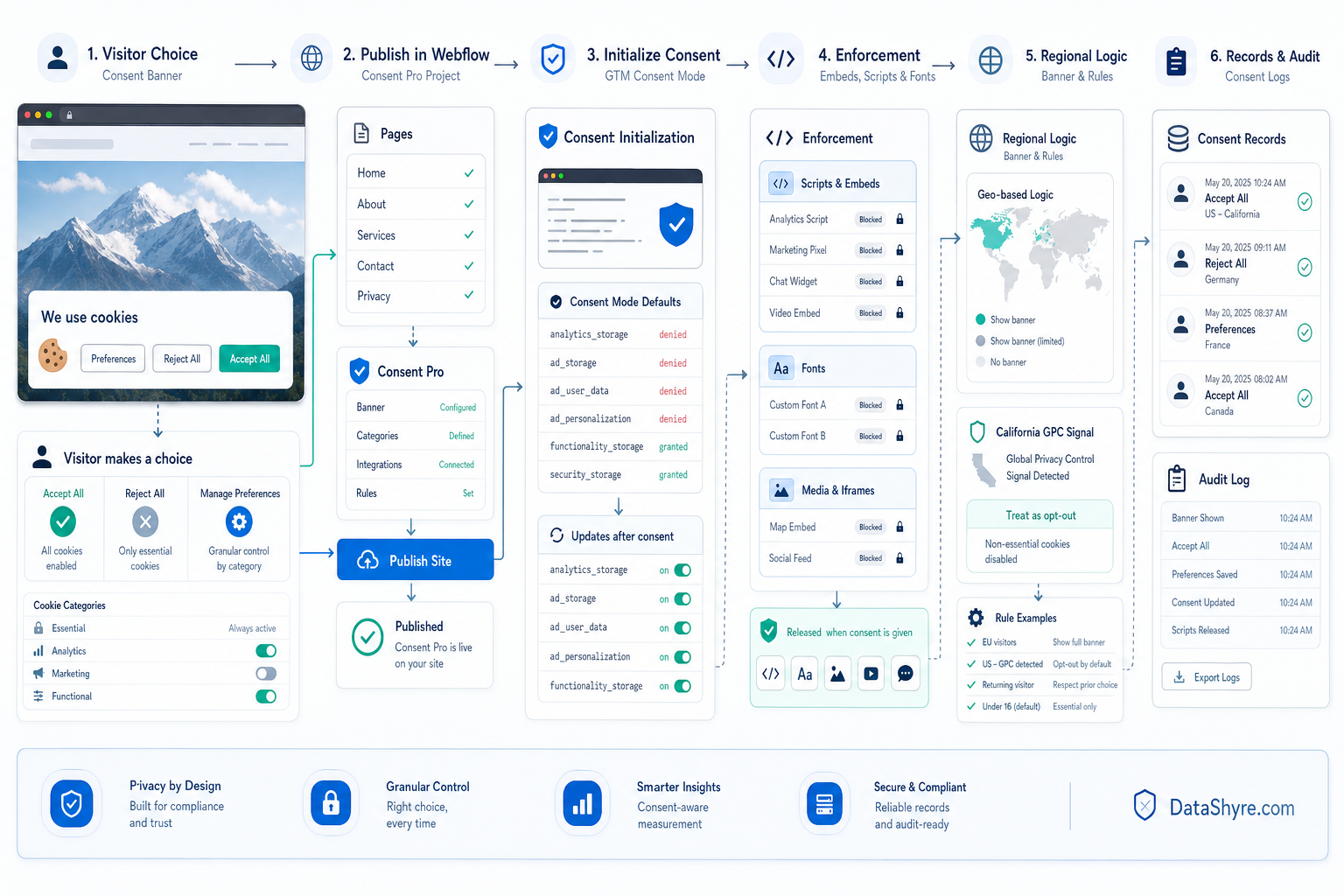
A short review I would run this week
If I had ten minutes to assess finsweet cookie consent before launch, I would do this in order:
- Confirm the site is fully on Consent Pro, not a mixed legacy setup.
- Inventory custom code, native Webflow integrations, GTM, and embeds.
- Test what fires before any choice on both staging and production.
- Verify GTM consent initialization and update timing.
- Check embeds, maps, images, and fonts separately from normal scripts.
- Re-publish after any scan or tracker change, then verify the live preferences panel.
- Run California and EU or UK flows separately, including GPC and later withdrawal.
That review usually reveals more real risk than a long banner-design discussion.
Bottom line
The practical way to think about finsweet cookie consent in 2026 is as a Webflow operating control built around Consent Pro, not as a one-time banner install.
If the site is fully migrated, all trackers actually route through the consent layer, GTM timing is correct, embeds and fonts are not bypassing the system, live publishes keep the tracker panel current, and California and EU or UK flows are tested separately, you are in much stronger shape.
If not, the Webflow canvas may look compliant while the live site is still doing more than the visitor agreed to.
Sources
- Finsweet: Cookie Consent built for Webflow
- Consent Pro: Cookie Consent built natively for Webflow
- Consent Pro Docs: Using Consent Pro
- Consent Pro Docs: Migrate from v1 to v2
- Consent Pro Docs: Google Tag Manager Setup
- Consent Pro Docs: Async Script Loading
- Consent Pro Docs: Licenses and Domains
- Consent Pro Docs: Providers and Trackers in Preferences Panel
- Consent Pro Docs: HTML Attributes Reference
- Webflow Help: Integrate Consent Pro for consent management
- Webflow Integration Guide: Consent Pro by Finsweet
- UK ICO: Final storage and access technologies guidance published
- UK ICO: Guidance on the use of storage and access technologies
- European Commission: Information for individuals – Consent
- European Commission: Legal grounds for processing data
- California Department of Justice: Global Privacy Control
- California Department of Justice: California Consumer Privacy Act
- California Privacy Protection Agency: Law & Regulations
This post was updated on August 19, 2026 using current official platform, regulator, government, and Webflow materials available at publication time.