

Cookie Consent Manager Language Switching: 7 Checks for Multilingual Banners
If your site runs in more than one language, cookie consent manager language switching is not a cosmetic detail. It affects whether people see the same choices, whether consent stays intelligible, and whether your team can still prove what happened after a visitor flips from English to French, German, Spanish, or another locale.
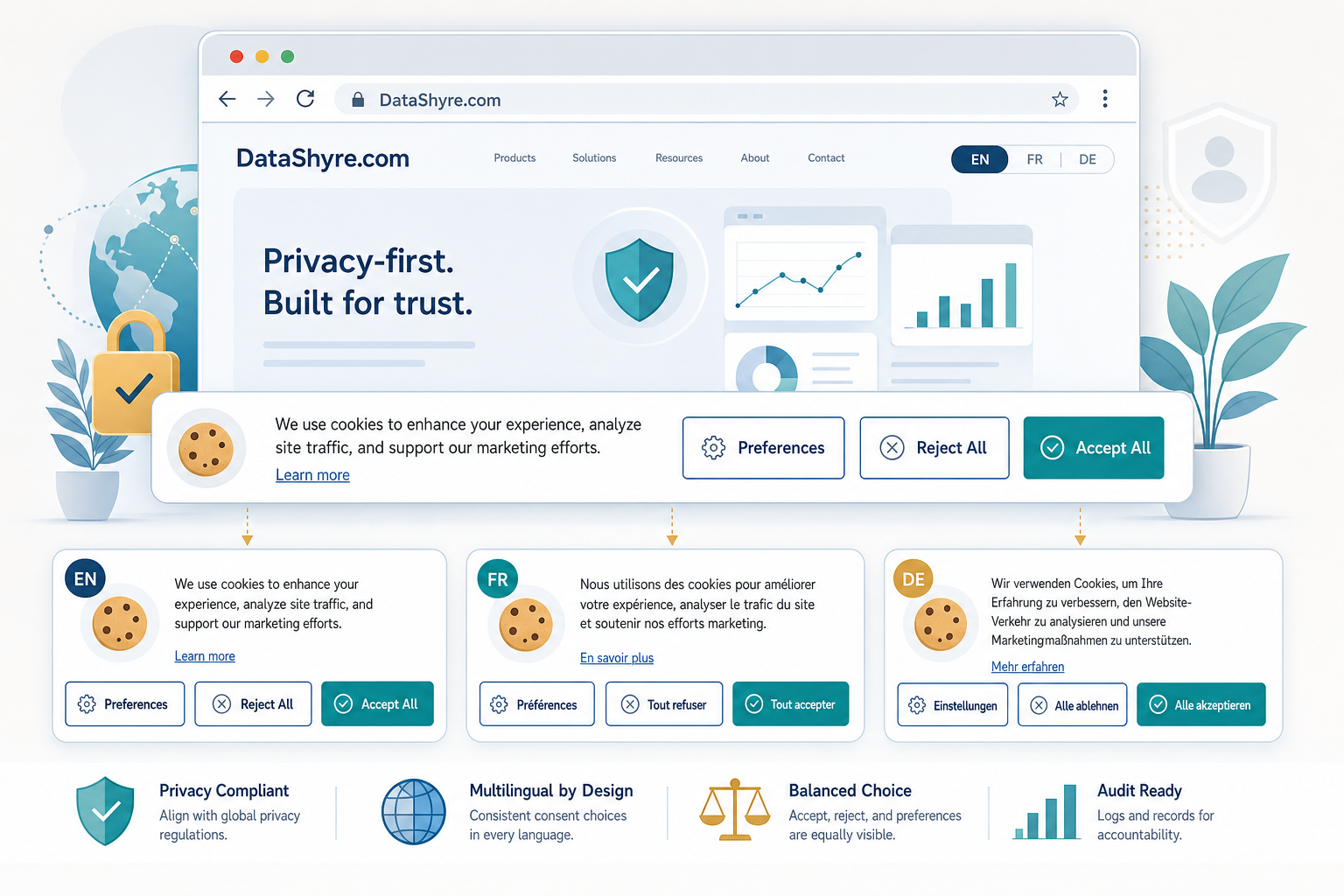
This is where multilingual banners often drift. The English banner gets the polished version. Another locale gets older copy, a missing reject button, or vendor text that never got translated. That is not just messy UX. In a 2022 decision, the EDPS found that the European Parliament’s cookie banners differed by language and concluded that the banners were not in line with valid consent requirements. That is the clearest warning business teams can use: inconsistent language handling can become a consent problem, not just a localization problem.
If you are auditing the wider setup too, our guides to cookie consent manager, cookie consent banner, and GDPR cookie consent requirements cover the broader control stack behind the banner.
Cookie consent manager language switching: what can go wrong
The legal baseline is straightforward even if the implementation is not. GDPR Article 12 says information for data subjects must be concise, transparent, intelligible, easily accessible, and written in clear and plain language. The ICO says consent requests should use clear language and consistent methods across multiple consent options. Put those together, and the practical rule is simple: a multilingual banner cannot offer one choice architecture in one language and a different one somewhere else.
That is why EDPB Chair Anu Talus said users should get “real choice.” It is also why the CNIL’s 2024 cookie-banner action focused on banners that made rejection harder than acceptance. If your translated banner quietly hides the reject path, shrinks it, or swaps it for softer wording, you have created a compliance gap with a localization label on it.
I would also keep one broader point in mind. Max Schrems recently argued that the industry fears easier ways for people to “say ‘no'” to tracking. Whether or not you agree with his framing, it is a useful test for product teams: does the translated version preserve a clear no, or does it make that path fuzzier?
7 checks before you approve a multilingual banner
1. Keep first-layer choices functionally identical
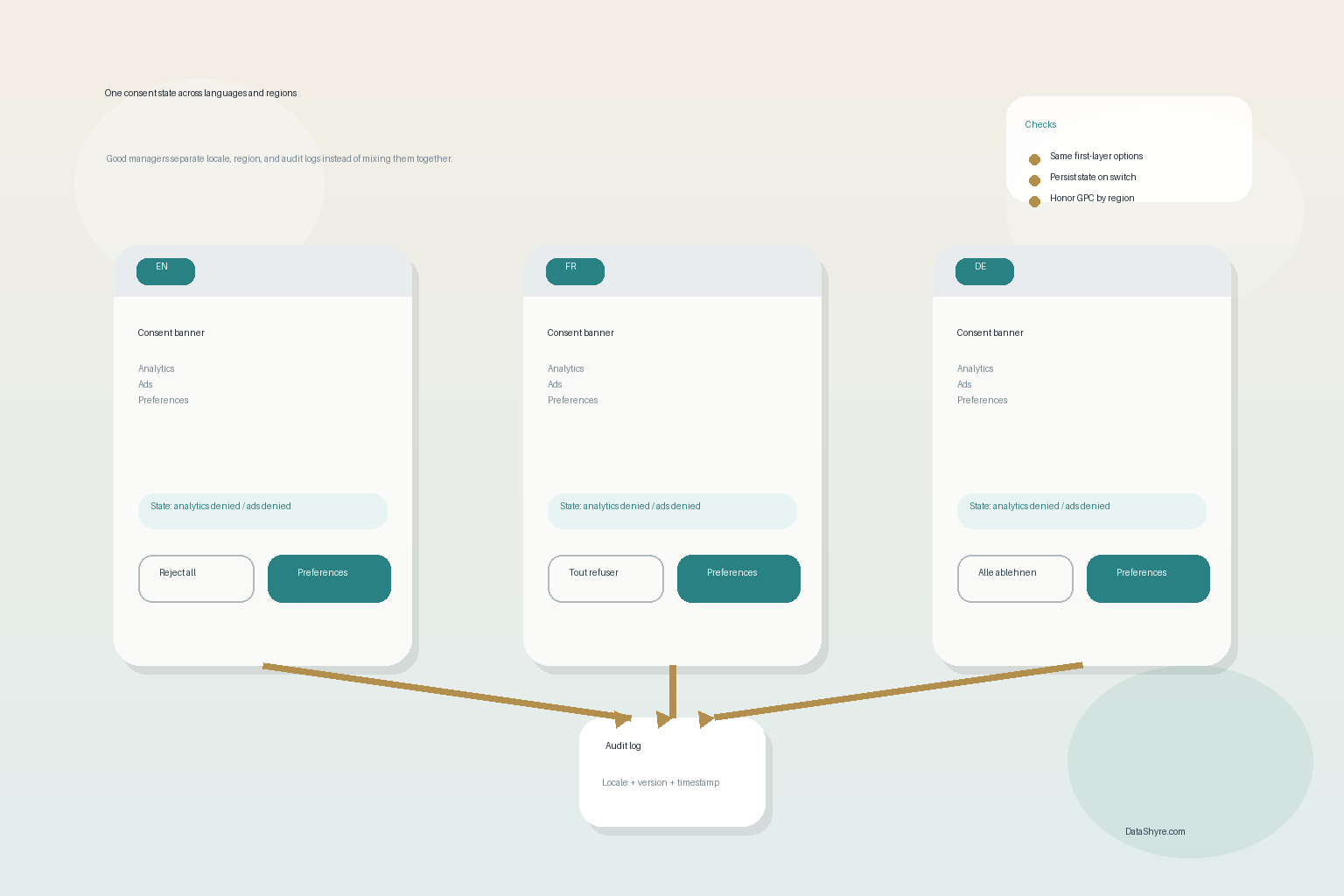
Every supported language should offer the same first-layer actions: accept, reject, and preferences when that is your design. Do not let one locale ship with “accept all” and “save” while another gets a real reject button. The EDPS decision on the Parliament banner is the cautionary example here.
2. Translate the meaning, not just the headline
Teams often translate the top line and forget the harder parts: category labels, vendor disclosures, retention notes, and withdrawal instructions. Recital 58 of the GDPR is useful on this point because it ties transparency to language that is easy to understand in complex online advertising settings. Literal translation is not enough if the result becomes vague or awkward.
3. Do not mix region logic with language logic
This one causes a lot of avoidable confusion. Language choice and legal region are not the same thing. A French-speaking visitor in California may need a French interface and a California opt-out flow, not a France-specific consent flow. The California Attorney General still treats Global Privacy Control as an acceptable method for online opt-out requests where sale or sharing rules apply, and the CPPA’s current CCPA updates have been effective since January 1, 2026. Your manager should separate locale, geography, and legal defaults instead of letting one setting impersonate the other.
4. Preserve consent state when the user changes language
If someone rejects analytics in English, then switches to German, the choice should persist unless you have a legitimate reason to ask again. Re-prompting because of a locale switch creates friction and weakens your audit story. A strong setup stores one preference state and re-renders the interface around it.
5. Version your banner copy across locales
This is the boring control that saves teams later. When banner copy changes, log the version by locale and keep the publication date. The ICO’s consent guidance is blunt about recordkeeping: you should be able to show what people were told, when they consented, and how they consented. For multilingual sites, that means storing the language version too.
6. Test the reject path on mobile and with assistive tech
CNIL’s recent enforcement focus was not theoretical. It called out reject options that were visually buried, styled weakly, or hidden inside surrounding text. Those problems get worse on mobile layouts and for screen-reader users. Test the translated reject path as seriously as the accept path.
7. Make withdrawal easy in every language
Consent is not finished when the banner disappears. The ICO says withdrawal must be as easy as giving consent. If your footer, privacy center, or account settings expose withdrawal in English but bury it elsewhere, the implementation is uneven. That is the sort of detail that turns a decent CMP rollout into a patchy one.
The business takeaway
Cookie consent manager language switching is really a governance issue hiding inside localization work. The question is not whether each locale uses exactly the same words. It is whether every locale offers the same real choices, the same clarity, and the same proof trail.
That matters more in 2026 because regulators keep tightening the practical bar. The ICO published final storage-and-access technologies guidance on April 29, 2026, and said 99% of the UK’s top 1,000 websites now meet its cookie-banner compliance standards after intervention work. ICO executive director William Malcolm said the goal is “meaningful control” over how data is used. cookie consent manager language switching should be judged by that standard: if a visitor changes language, do they still have meaningful control, or does the interface get weaker?
The fastest fix is usually operational, not legal. Put localization, consent ops, and front-end QA in the same review loop. Compare every locale side by side before you publish. Then test again after the next vendor, template, or CMS change. That is how multilingual consent stays boring, which is exactly what you want.
A light note: this is a practical implementation guide, not legal advice. But if your site serves multiple markets, auditing this multilingual consent setup now is a smart cleanup job, not a nice-to-have.
Sources
- European Data Protection Supervisor
- European Data Protection Board
- UK Information Commissioner’s Office
- CNIL
- California Department of Justice
- California Privacy Protection Agency
- GDPR text