

Consent Mode in 2026: 7 Live Checks Before You Trust the Setup
If you are evaluating consent mode on October 2, 2026, the useful question is not whether the setting is turned on in one dashboard.
It is whether the live page actually handles consent defaults, updates, rejection, withdrawal, and non-Google tags the way your team thinks it does.
That is still the right frame. Google’s current help still says consent mode “does not provide a consent banner or widget.” Google’s current developer documentation still distinguishes basic and advanced implementations and still expects sites to obtain consent, communicate the choice, and ensure tags respect it. The European Commission still describes valid consent as needing to be freely given, informed, specific, and based on clear affirmative action. The ICO’s finalized April 29, 2026 storage-and-access-technologies guidance also makes clear the review reaches beyond old cookie-only checklists. And CNIL still says “rejecting cookies should be just as easy as accepting them.”
If you want adjacent detail first, start with our guides to what Google consent mode is, GTM consent mode, and cookie consent Google Tag Manager. This article is broader. It is the live review I would run before trusting a consent mode setup this week.

1. Decide whether basic or advanced consent mode is intentional
Google still treats basic and advanced consent mode as different runtime strategies, not cosmetic labels.
In basic mode, Google tags are blocked until the user interacts with the consent banner. In advanced mode, tags can load before the user chooses, but they operate according to default consent states and limited signaling rules until the state changes.
That distinction matters because many teams say they “implemented consent mode” without being clear which behavior they actually deployed.
The first check is simple:
- does the page block Google tags entirely before choice;
- or does it allow them to load with denied defaults before choice;
- and does that match your team’s documentation.
If those answers are fuzzy, the setup is already harder to trust.
2. Set default consent before the rest of the page matters
The most common failure is still load order.
Google’s current setup guidance still says you should set the default consent state before a user grants consent. In Tag Manager implementations, that usually means putting consent logic early enough that analytics and advertising tags do not read the wrong state first.
On a live review, I want to know:
- whether denied defaults exist before measurement commands fire;
- whether those defaults match the regions where the banner applies;
- whether any optional script reaches the page before consent logic runs.
If a vendor script, conversion tag, or pixel beats consent to the page, the rest of the configuration may only be cleaning up after a mistake.
3. Verify all four current Consent Mode v2 signals
A modern consent mode review still needs to include four core signals:
ad_storageanalytics_storagead_user_dataad_personalization
That is the practical effect of the current v2 model. Teams that still test only analytics versus ads are using an outdated review pattern.
This is also where false confidence starts. One visible status change is not enough. You want to verify that the signals your team expects are the signals actually being sent on the live page.
4. Remember that consent mode is not the banner, CMP, or legal analysis
Google’s help is unusually clear here: consent mode does not provide the banner itself.
That means a site can have consent mode enabled and still fail somewhere else that matters:
- the banner can pressure users toward acceptance;
- refusal can be buried or visually weaker than acceptance;
- the notice can be incomplete;
- non-Google technologies can ignore the same choice.
This is where the regulator guidance still matters. The European Commission’s current consent guidance is about the quality of the consent itself, not just the technical flag. CNIL’s cookie-banner enforcement remains useful because it translates that principle into a very visible interface rule: “rejecting cookies should be just as easy as accepting them.”
5. Test updates, rejection, and withdrawal on the same page
A consent mode setup is not healthy because the accept path works once.
Google’s current setup guide still says the consent state should be updated when the user interacts and that the update should happen on the page where the interaction occurs, before any page transition. The European Commission’s current materials also still treat refusal and withdrawal as part of what valid consent requires.
So I would test at least these states separately:
- first load with no choice yet;
- explicit reject;
- explicit accept all;
- later withdrawal from settings.
If the state only becomes correct after a reload, after a route change, or after some hidden retry, the setup is weaker than it looks.
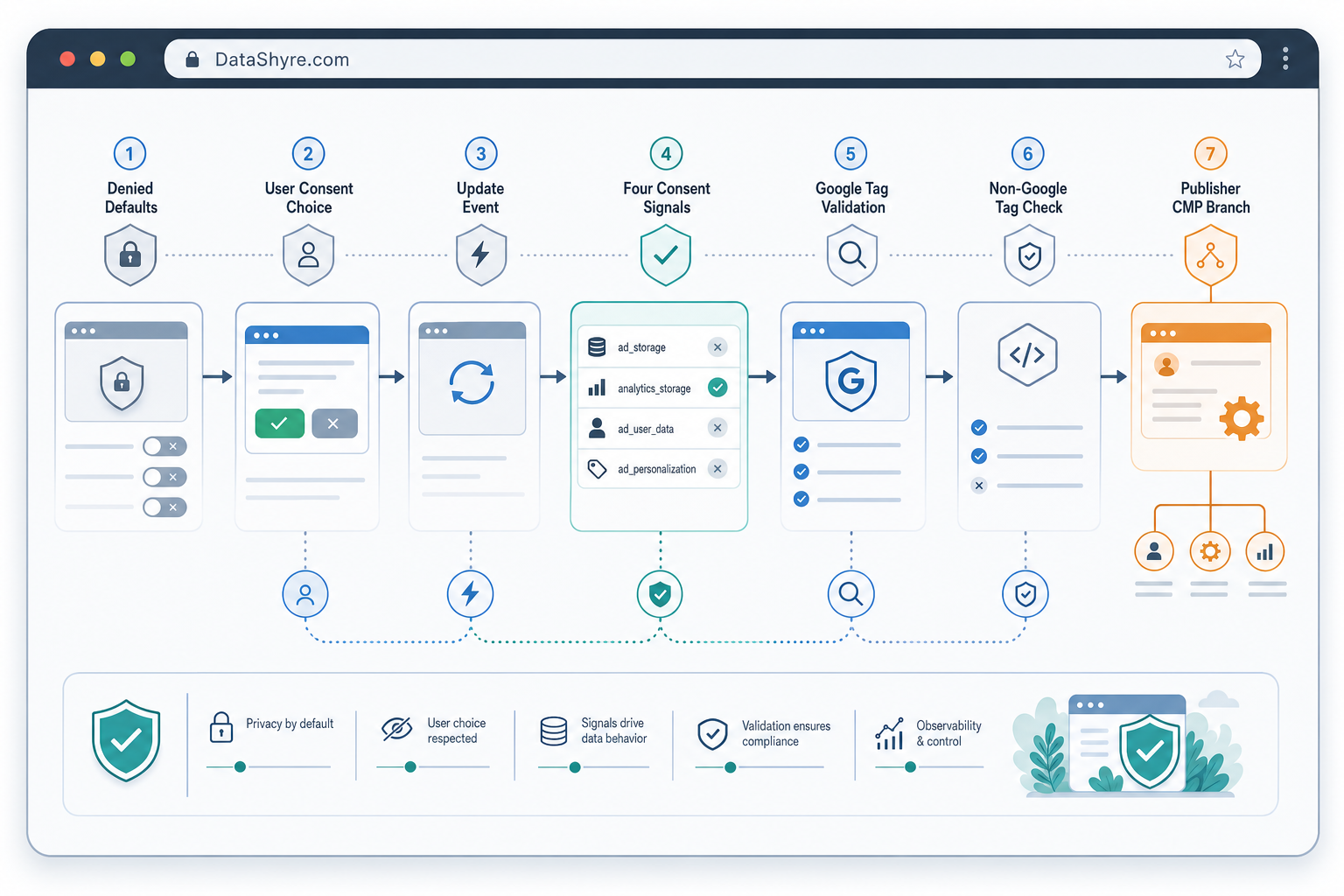
6. Review Google tags and non-Google tags as separate branches
Consent mode mainly tells Google tags how to behave.
That does not automatically mean your Meta pixel, LinkedIn Insight tag, Hotjar script, embedded video, chat widget, or custom vendor code is following the same choice correctly.
That is why I split the audit:
- review Google tag behavior with consent mode;
- review non-Google tags with their own gating logic;
- compare both branches under no choice, reject, accept, and withdrawal.
Many broken implementations pass the first branch and fail the second.
7. Run the publisher-specific CMP branch separately if ads matter
Some teams stop at “consent mode is working.” That is not always enough.
Google’s current publisher guidance still says partners using AdSense, Ad Manager, or AdMob must use a Google-certified CMP integrated with the IAB Transparency and Consent Framework when serving personalized ads in the EEA and UK and, separately, in Switzerland under Google’s published rollout dates.
That requirement is related to consent mode, but it is not the same check.
If your business depends on ad-supported traffic, review these separately:
- consent mode defaults and updates;
- banner fairness and withdrawal;
- certified CMP and TCF handling where publisher rules apply;
- downstream ad-tech behavior tied to the same user choice.
A site can look healthy in Tag Manager and still miss the publisher-specific branch.
Bottom line
The strongest consent mode setup in 2026 is not the one with the cleanest settings screen.
It is the one that deliberately chooses basic versus advanced behavior, sets denied defaults early, verifies all four current signals, treats rejection and withdrawal as first-class tests, audits non-Google tags separately, and runs the publisher branch on purpose where monetization matters.
If your team can still prove those seven checks on the live page today, you have something much closer to a trustworthy setup.
Sources
- Google for Developers: Consent mode overview
- Google for Developers: Set up consent mode on websites
- Google Tag Manager Help: About consent mode
- Google Tag Manager Help: Unblock Google tags when using consent mode
- Google Analytics Help: Troubleshoot consent mode
- European Commission: Legal grounds for processing data
- ICO: Final storage and access technologies guidance published
- ICO: Guidance on the use of storage and access technologies
- CNIL: Dark Patterns in Cookie Banners: CNIL issues formal notice to website publishers
- Google AdSense Help: Google consent management requirements for serving ads in the EEA, the UK, and Switzerland (for publishers)
—
Published: October 2, 2026. Updated using current official regulator, government, platform, and publisher materials available at publication time.