Consent Management Platform for Salesforce: What to Verify Before You Sync Consent in 2026
DataShyre StaffJul 29, 2026
7 min read
Consent Management Platform for Salesforce: What to Verify Before You Sync Consent in 2026
If you landed here searching for consent management platform, salesforce, the real question is not whether Salesforce has privacy objects. It does. The harder question is whether your consent stack can capture a valid choice on the site or app side, map that choice to the right person and purpose, and keep Salesforce from activating data after the user has said no.
That matters more in July 2026 because the consent baseline is clearer, not looser. The European Commission still frames valid consent as freely given, informed, specific, and clearly expressed through a positive act. The UK ICO’s final storage-and-access technologies guidance, published on April 29, 2026, also makes the scope broader than classic browser cookies alone, covering pixels, fingerprinting, and similar technologies. If your web or app layer feeds Salesforce audiences, journeys, or service workflows, the collection layer and the CRM layer have to stay in sync.
If you want the broader buying picture first, start with our guides to consent management platform and salesforce consent management. This article is narrower. It is the practical checklist I would use when evaluating a consent management platform for Salesforce in 2026.
Where Salesforce actually fits in the consent stack
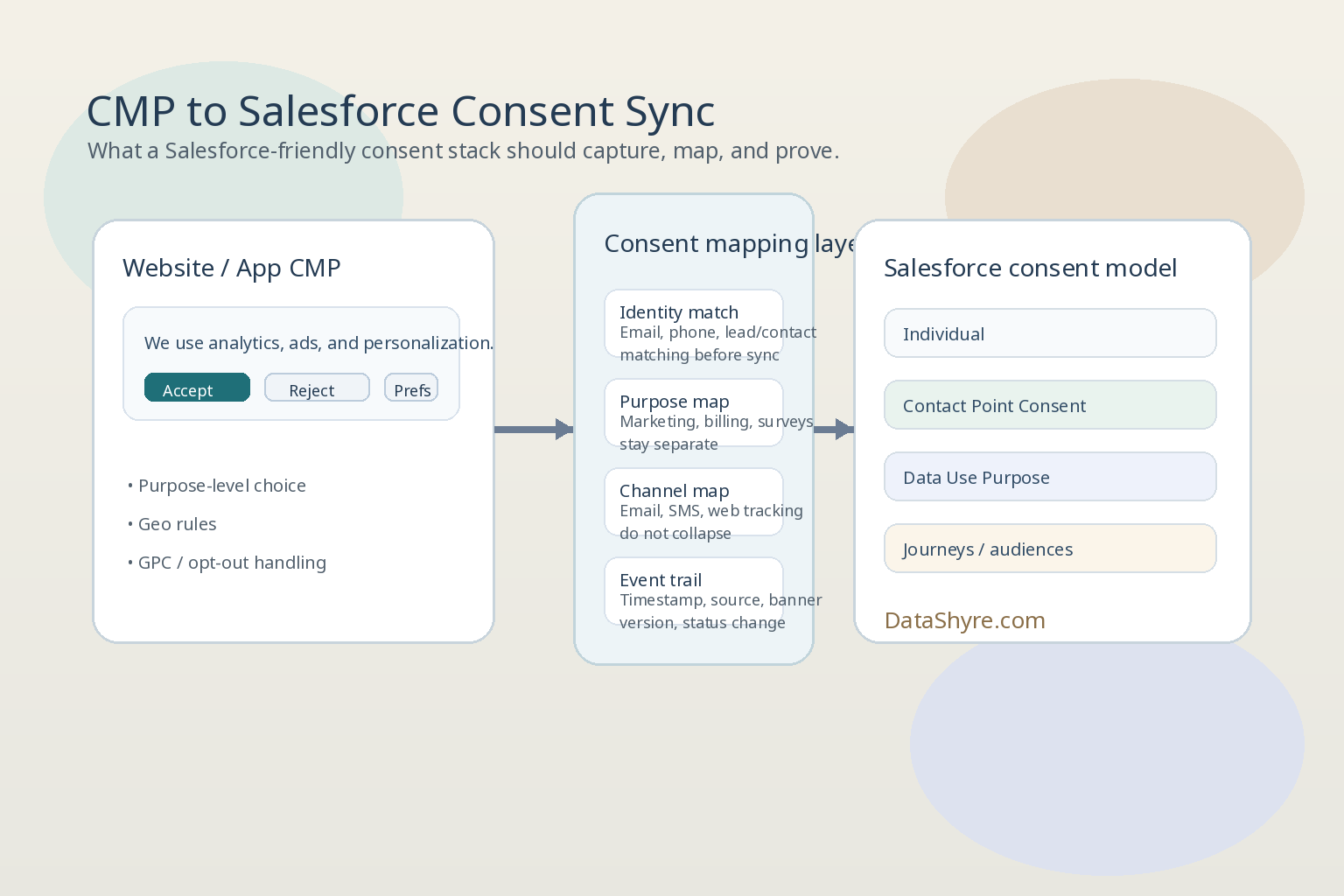
Salesforce’s current documentation is useful here because it shows that consent is not just one field. Its Privacy Consent Data Model includes objects such as Individual, Contact Point Consent, Contact Point Type Consent, Data Use Purpose, and Party Consent. The Individual object stores a customer’s data privacy and protection preferences. Contact Point Consent represents consent tied to a specific contact point, such as an email address or phone number. Data Use Purpose represents the reason for contacting an individual, such as billing, marketing, or surveys.
That is a strong downstream model. It gives you a place to store consent by person, by channel, and by purpose instead of flattening everything into one marketing flag.
Salesforce also documents Consent API endpoints that compile consent settings for actions such as email or track across related consent objects. And on the product side, Salesforce Privacy Center says Preference Manager can host no-code preference forms on your website or in Experience Cloud, feed responses into the Salesforce Consent Data Model, store consent in Data 360, and use that information to restrict processing.
The practical lesson is simple: Salesforce can be a serious record and orchestration layer, but many teams still need a dedicated CMP at the web or app edge. A CRM object model does not by itself block optional tags before consent, interpret browser-level opt-out signals, or control what third-party scripts do on first load.
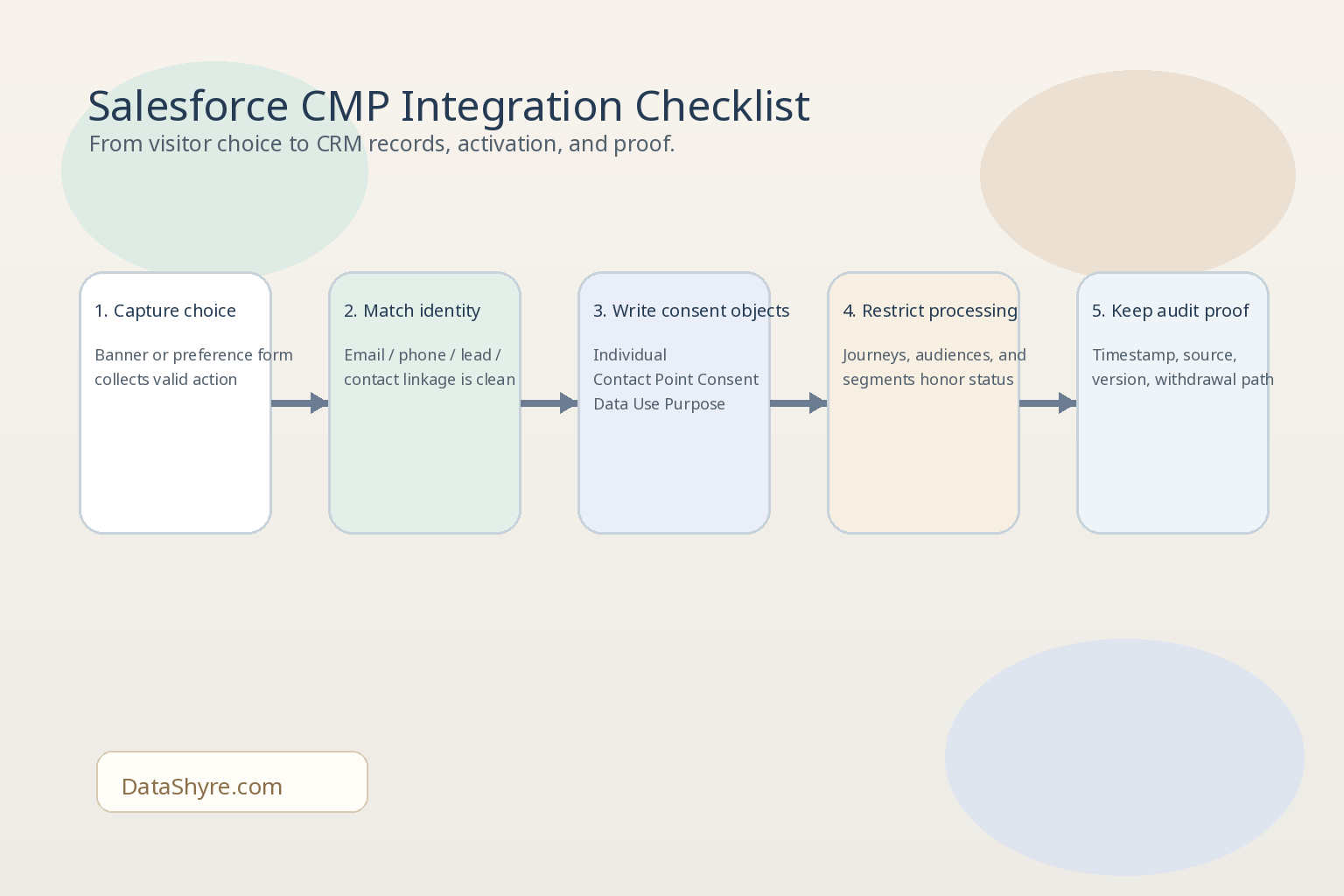
6 checks before you connect a CMP to Salesforce
1. Decide which system owns each consent state
Do not start with field mapping. Start with ownership.
Which system is the source of truth for:
website analytics consent;
ad-tech or tracking consent;
marketing email permission;
SMS or phone outreach;
later withdrawals or preference-center changes?
If the answer is vaguely “Salesforce” or vaguely “the CMP,” you are not ready yet. The safest setups define one owner for each consent type and make every other system subscribe to it.
This matters because Salesforce can store consent well, but duplicate ownership creates drift fast. One form says yes, one import says yes, one preference center says no, and nobody can explain which state should win.
2. Map identity before you map automation
Consent is only useful if the right choice lands on the right record.
This is where Salesforce implementations often get messy. A visitor may begin as an anonymous browser, then become a lead, then a contact, then a customer with multiple contact points. If your CMP syncs too early or too loosely, the consent record may attach to the wrong identity or fail to join later.
Before launching, verify:
how an anonymous web choice becomes a known Salesforce person;
how email, phone, or customer ID are matched;
how duplicate leads and contacts are handled;
what happens when one person has multiple contact points.
For a consent management platform for Salesforce, identity quality is not an implementation detail. It is the difference between a usable consent history and a fragmented one.
3. Keep channel and purpose separate inside Salesforce
Salesforce’s consent model is useful precisely because it lets you stay granular. Use that advantage.
An individual might allow:
service email but not promotional email;
billing messages but not surveys;
SMS for account security but not SMS marketing;
website analytics consent in one region but not another.
That is why the Contact Point Consent and Data Use Purpose layers matter. If a CMP pushes everything into one broad opt-in value, you lose the structure Salesforce gives you and make later compliance reviews harder than they need to be.
4. Make edge signals travel downstream
This is the part buyers underweight. A CMP can collect a neat preference on the website and still fail where it counts if the signal does not reach the systems that actually act on data.
In practice, that means checking whether a refusal or withdrawal changes:
tag-manager behavior;
analytics collection;
advertising or audience syncs;
Salesforce segments and journeys;
downstream service or marketing workflows.
California makes this even more important. The California Department of Justice says a valid Global Privacy Control signal must be honored by covered businesses as a request to stop the sale or sharing of personal information. If your site honors GPC at the banner layer but Salesforce-linked audiences or activations keep using the affected data, the stack is still misaligned.
5. Be explicit about what Salesforce Privacy Center does and does not replace
This is where many evaluations get blurry.
Salesforce Privacy Center and Preference Manager can absolutely help with consent capture, consent storage, downstream restriction, and broader privacy operations. The official product page is clear about that. But if your site needs first-load blocking of optional cookies, pixels, or similar technologies, you should confirm exactly where that control lives.
For many teams, the cleanest split looks like this:
the CMP handles first-layer choice, script control, geo logic, and browser-side signals;
Salesforce stores structured consent, applies it to CRM and marketing workflows, and supports later requests, exports, or privacy operations.
That is an architectural judgment, but it is the one I would test first when evaluating a consent management platform for Salesforce.
6. Demand audit proof that spans both systems
Sooner or later, someone asks a simple question that turns into a hard one: what exactly did this person agree to, when, and where did that state go afterward?
Your stack should be able to answer:
What was shown on the website or in the form?
Which person record did the choice map to?
Which contact point and purpose were updated?
What changed after rejection, withdrawal, or GPC?
Which downstream systems stopped or continued processing?
Salesforce’s consent objects and APIs can help here, but only if the upstream CMP data is clean, timestamped, and versioned. If audit proof lives half in the CMP and half in Salesforce with no clean bridge, the integration is not finished.
A short evaluation sequence I would use this week
If I were shortlisting a consent management platform for Salesforce right now, I would run this sequence:
Trigger a fresh website or app consent flow in a clean session.
Verify what optional technologies fire before any action.
Accept, reject, and change preferences, then inspect what reaches Salesforce.
Confirm the resulting records stay separated by person, contact point, and purpose.
Test a withdrawal and, where relevant, a GPC-driven opt-out.
Check whether audiences, journeys, or similar downstream actions actually stop.
Export the evidence and decide whether somebody outside engineering could follow it.
That usually tells you more than a long vendor comparison spreadsheet.
Bottom line
The right consent management platform for Salesforce is not just a banner tool with a connector. It is a control layer that captures valid choice at the edge, maps it cleanly into Salesforce consent objects, carries refusals and withdrawals into downstream processing, and leaves behind evidence your team can trust.
If it cannot do those things, Salesforce will still store data. It just will not solve the hard part of consent operations.